Part 4 - Create an n8n workflow for patching with Patchmon and Semaphore UI
Go to previous section Download Markdown
September 12, 2026
Table of Contents
- Introduction
- Step 1 - Deploy n8n
- Step 2 - Logic of the patching workflow
- Step 3: Import the Poll-Semaphore Task sub-workflow
- Step 4: Set up helpers for the main workflow
- Step 5: Import the main Patchmon Orchestrator Workflow
- Step 6: Finalize the connection with Patchmon
- Step 7 - Run, run, auto-patching workflow!
- Step 8 - Patch Security updates only
- Conclusion
Introduction
In the previous parts of this series, we did the following:
- In Part 1, we set up Semaphore with useful playbooks for snapshotting hosts on Proxmox before patching and playbooks that patch hosts differently based on their groups (such as web and DB servers).
- In Part 2, we set up Patchmon, explained why it is not yet ready for patching despite its recently added capabilities and connected it to our fleet of hosts, whether on Proxmox or other. We pushed a Semaphore job that deployed the Patchmon agent on all standalone hosts and VMs.
- In Part 3, we stood up Uptime Kuma and tagged every monitor with the hostname it belongs to, so we can put a host's monitors into a maintenance window for the duration of a patch run, no false "down" alert from a reboot, or from the brief pause a Proxmox snapshot causes.
Now we are getting into the interesting part by connecting them together with n8n! While some may argue that ‘n8n is dead’ due to recently identified security vulnerabilities back in early 2026 and before, I would argue that if we can work around the resulting limitations (such as jobs being launched in isolated containers), we actually have a more robust, time-proven workflow engine with an okay UI. So let’s dive in!
Step 1 - Deploy n8n
In case you do not have n8n installed already, here is a little guide on how to deploy it in a docker environment together with a containerized PostgreSQL instance to keep our data persistent and more production-ready than when using a simple SQLite (you can otherwise skip to Step 2).
- Create a folder on the VM for n8n and set up the docker-compose file:
# Create directory and a docker-compose file
sudo mkdir -p /opt/n8n
cd /opt/n8n
sudo nano docker-compose.yml
services:
postgres:
image: postgres:16.6-alpine
container_name: n8n-postgres
restart: unless-stopped
environment:
- POSTGRES_DB=n8n
- POSTGRES_USER=n8n
- POSTGRES_PASSWORD=${POSTGRES_PASSWORD}
volumes:
- n8n_postgres_data:/var/lib/postgresql/data
networks:
- n8n-network
healthcheck:
test: ["CMD-SHELL", "pg_isready -U n8n -d n8n"]
interval: 10s
timeout: 5s
retries: 5
start_period: 10s
# No ports published to the host on purpose - only n8n on this network needs it.
mem_limit: 512m
cpus: 1.0
n8n:
image: docker.n8n.io/n8nio/n8n:2.30.3
container_name: n8n
restart: unless-stopped
depends_on:
postgres:
condition: service_healthy
ports:
- "5678:5678"
environment:
# --- General ---
- GENERIC_TIMEZONE=Europe/Prague # Set up your timezone
- TZ=Europe/Prague # Set up your timezone
- NODE_ENV=production
# --- Database (Postgres, standalone, colocated with this container) ---
- DB_TYPE=postgresdb
- DB_POSTGRESDB_HOST=postgres
- DB_POSTGRESDB_PORT=5432
- DB_POSTGRESDB_DATABASE=n8n
- DB_POSTGRESDB_USER=n8n
- DB_POSTGRESDB_PASSWORD=${POSTGRES_PASSWORD}
# --- Credential encryption ---
# Set explicitly and back this up OUTSIDE the n8n_data volume.
# If this key is lost, every stored credential becomes unrecoverable.
- N8N_ENCRYPTION_KEY=${N8N_ENCRYPTION_KEY}
# --- Networking ---
# NOTE: We will set up TLS later
- N8N_HOST=n8n.bakalar.priv
- N8N_PORT=5678
- N8N_PROTOCOL=http
- WEBHOOK_URL=http://1.2.3.4:5678/
- N8N_SECURE_COOKIE=false
# --- Code node permissions ---
# Loosened from defaults - our workflow does not require fs
- NODE_FUNCTION_ALLOW_BUILTIN=fs,path
- N8N_COMMUNITY_PACKAGES_ALLOW_TOOL_USAGE=true
- N8N_RESTRICT_ENVIRONMENT_VARIABLES_ACCESS=true
# --- Task runners ---
- N8N_RUNNERS_ENABLED=true
- N8N_RUNNERS_MAX_OLD_SPACE_SIZE=1024
- N8N_RUNNERS_TASK_TIMEOUT=600
volumes:
- n8n_data:/home/node/.n8n
- ./local-files:/files
networks:
- n8n-network
healthcheck:
test: ["CMD-SHELL", "wget -q --spider http://localhost:5678/healthz || exit 1"]
interval: 30s
timeout: 10s
retries: 3
start_period: 30s
mem_limit: 1g
cpus: 1.5
volumes:
n8n_data:
name: n8n_data
n8n_postgres_data:
name: n8n_postgres_data
networks:
n8n-network:
name: n8n-network- Stand up a .env file - here is an example:
nano /opt/n8n/.env

# Copy this to .env (same directory as docker-compose.yml) and fill in real
# values. Do NOT commit .env to git - add it to .gitignore.

# Postgres password for the n8n database user.
POSTGRES_PASSWORD=change-me-to-a-strong-random-value

# n8n credential encryption key. Generate one with:
#   openssl rand -base64 32
# Back this value up somewhere OTHER than the n8n_data volume (password
# manager, vault, encrypted note). Losing it makes every stored credential
# permanently unreadable, even if the volume itself is intact.
N8N_ENCRYPTION_KEY=change-me-generate-with-openssl
💡 Note
If you are currently on an n8n set up with SQLite and want to upgrade it to PostgreSQL, you can export your current settings (workflows + credentials) to import them to the new DB (providing you have a path such as
./local-files/filesmounted):docker exec n8n n8n export:workflow --all --output=/files/workflows.json docker exec n8n n8n export:credentials --all --output=/files/credentials.json docker compose down # Extract the key from the SQLite instance and replace the 'N8N_ENCRYPTION_KEY' value with it in .env: docker run --rm -v n8n_data:/data alpine sh -c "apk add --no-cache jq >/dev/null 2>&1; jq -r .encryptionKey /data/config"
- Then, once you have launched the PostgreSQL + n8n instance, import them:
docker exec n8n n8n import:workflow --input=/files/workflows.json
docker exec n8n n8n import:credentials --input=/files/credentials.json
# Deploy
docker compose pull
docker compose up -d

# Check status
docker compose logs -f- Try accessing it on the website:

- Complete your registration to receive a free license key (indicate that you are not using n8n for work purposes).
Step 2 - Logic of the patching workflow
This is the most brainy part of the whole series - we will have two n8n workflows. The diagram below joins them together to showcase the entire workflow logic. The trigger is Patchmon, our source of truth regarding updates. If updates are found, an n8n workflow is triggered (see in Step 5), which resolves the host and acquires a per-group lock, optionally opens an Uptime Kuma maintenance window so the coming reboot or snapshot pause doesn't fire a false alert, then calls for a snapshot (if a Proxmox guest) by running a sub-workflow (Step 3 below).
Once a snapshot is taken, the main workflow kicks in by triggering the relevant Semaphore job template for the host's group. Yes, there is not just one template for patching; we need to take the nature of the host group into account (we configured them in Part 1 of this series). For example, with a web server running nginx, we will want to ensure that nginx is running after patching is complete.
Here is a diagram of the whole workflow logic (thanks, Claude, for putting my ideas together here):
┌────────────────────────────────────────────────┐
│ 0. TRIGGER                                     │
│ PatchMon webhook → n8n                         │
│ payload: { hostname, event_type, severity,     │
│            host_id, pending_count, threshold } │
└────────────────────────────────────────────────┘
                         │
                         ▼
                  ┌────────────────────┐
                  │ Hostname on the    │
                  │ EXCLUDED_HOSTNAMES │
                  │ list?              │
                  └────────────────────┘
                  yes                    │ no
                   ▼                      │
                  ┌──────────────────────┐│
                  │ SKIP - patch by hand ││
                  │ (e.g. Proxmox hosts) ││
                  └──────────────────────┘│
                                          ▼
┌──────────────────────────────────────────────────────────────┐
│ 1. RESOLVE HOST                                              │
│ Semaphore: run patchmon_lookup.yml, Limit=hostname           │
│ poll task → parse output                                     │
│ returns: groups[], is_proxmox_guest, proxmox node/type/vmid, │
│          in_alert_cooldown                                   │
└──────────────────────────────────────────────────────────────┘
                                │
                                ▼
                  ┌──────────────────┐
                  │ Already in a 24h │
                  │ alert cooldown?  │
                  └──────────────────┘
                  yes                   │ no
                   ▼                     │
                  ┌─────────────────────┐│
                  │ SKIP - already      ││
                  │ alerted, unresolved ││
                  └─────────────────────┘│
                                         ▼
┌─────────────────────────────────────────────────────────────┐
│ 2. DECIDE                                                   │
│ n8n: match groups[] against group→template rule table       │
│ → chosen Semaphore patch template                           │
│ → lock_key (shared by hosts in the same group, e.g. Galera) │
└─────────────────────────────────────────────────────────────┘
                               │
                               ▼
                  ┌──────────────────────────┐
                  │ Host is security-only    │
                  │ tier AND this alert is   │
                  │ a general (non-security) │
                  │ event?                   │
                  └──────────────────────────┘
                  yes                    │ no
                   ▼                      │
                  ┌──────────────────────┐│
                  │ SKIP - security-only ││
                  │ tier, patch by hand  ││
                  └──────────────────────┘│
                                          ▼
┌───────────────────────────────────────────────────────────────┐
│ 3. ACQUIRE LOCK  (no database, no Postgres)                   │
│ Semaphore: run patchmon_tag_host.yml, action=add              │
│ • Proxmox guest → tag "being_patched" on the Proxmox API,     │
│   check-then-set inside one Ansible task run                  │
│ • non-guest      → atomic "mkdir /run/patchmon-being-patched" │
└───────────────────────────────────────────────────────────────┘
                                │
                                ▼
                  ┌────────────────┐
                  │ Lock acquired? │
                  └────────────────┘
                  yes                     │ no
                   ▼                       │
                  ┌───────────────────────┐│
                  │ EXIT - another host   ││
                  │ in the lock group is  ││
                  │ already being patched ││
                  └───────────────────────┘│
                                           ▼
                      ┌────────────────────────┐
                      │ UptimeKuma maintenance │
                      │ enabled? (Part 3)      │
                      └────────────────────────┘
                      yes                     │ no
                       ▼                       │
                      ┌───────────────────────┐│
                      │ Open Kuma maintenance ││
                      │ window for this host  ││
                      └───────────────────────┘│
                                  └────────────┘
                                        │
                                        ▼
                              ┌─────────────────────┐
                              │ Is a Proxmox guest? │
                              └─────────────────────┘
                              yes                         │ no
                               ▼                           │
                              ┌───────────────────────────┐│
                              │ 4. SNAPSHOT (guests only) ││
                              │ Semaphore: snapshot       ││
                              │ template, poll to done    ││
                              └───────────────────────────┘│
                                            │              │
                                            ▼              │
                              ┌─────────────────────┐      │
                              │ Snapshot succeeded? │      │
                              └─────────────────────┘      │
                              no        │ yes              │
                               ▼         └─────────────────┐
                              ┌───────────────┐            │
                              │ ABORT: alert, │            │
                              │ release lock  │            │
                              └───────────────┘            ▼
                                                             ┌────────────────────────────────────────────┐
                                                             │ 5. PATCH                                   │
                                                             │ Semaphore: run chosen template, Limit=host │
                                                             │ poll (generous timeout, up to 45 min)      │
                                                             └────────────────────────────────────────────┘
                                                                                    │
                                                                                    ▼
┌──────────────────────────────────────┐
│ 6. VERIFY (via PatchMon's own count) │
│ ansible ok + 0 pending  → SUCCESS    │
│ ansible ok + still pending → PARTIAL │
│ ansible error / timeout → FAILURE    │
└──────────────────────────────────────┘
                    │
                    ▼
                      success │    partial │       failure │
                            ▼              ▼              ▼
                      ┌───────────┐  ┌──────────────┐  ┌────────────┐
                      │ ✅ success │  │ ⚠️ partial + │  │ 🔥 failure  │
                      │ alert     │  │ 24h cooldown │  │ alert w/   │
                      └───────────┘  │ tag + alert  │  │ log sample │
                                     └──────────────┘  └────────────┘
                            │              │              │
                            └──────────────┴──────────────┘
                                           ▼
┌──────────────────────────────────────┐
│ 7. CLEANUP (always runs once locked) │
│ Semaphore: patchmon_tag_host.yml,    │
│ action=remove - this IS the lock     │
│ release (tag removed / dir deleted)  │
│ + remove Uptime Kuma maintenance     │
│ window (optional)                    │
└──────────────────────────────────────┘
Step 3: Import the Poll-Semaphore Task sub-workflow
Since the workflow is quite large, it is best to split it into a parent-child relationship. If we take a step back and think about on which occasions Semaphore would be called, it's the following:
- Inventory lookup - confirm host details & tags
- Tagging - apply or remove a tag (Proxmox guests only) -
being_patched. - Snapshotting - create a snapshot before a patch is applied
- Patching - carry out a runbook relevant to that type of host after snapshot has completed
- Maintenance toggling (optional, Part 3) - open or close an Uptime Kuma maintenance window around the patch run
Import the .JSON workflow into n8n:
📎 PatchMon - Poll Semaphore Sub-Task.json
Sub-workflow explained
This sub-workflow exists so the ‘kick off a Semaphore task and wait for it’ logic is written once instead of four times. The parent hands it a taskId and a timeoutMinutes value that's different per call - lookups, tag add/remove, and maintenance start/stop all get 2 minutes (POLL_TIMEOUT_MINUTES_TAG), snapshots get 10, patches get 45 (they need the room for reboots) - and it hands back a status and the raw task output text once the Semaphore task is done or the clock runs out.
┌─────────────────────────────┐
│ On Execute (from parent)    │  ← Execute Workflow node
│ inputs: baseUrl, projectId, │  7 types: lookup, tag-add, snapshot,
│ taskId, timeoutMinutes,     │              patch, tag-remove,
│ pollIntervalSeconds         │              maintenance-start and stop
└─────────────────────────────┘
               │
               ▼
┌────────────────┐
│ Set Start Time │  startedAt = now()
└────────────────┘
         │
         ▼
┌─────────────────────────┐                          │
│ Wait Before Poll        │◄─────────────────────────┐
│ sleeps pollIntervalSecs │                          │
└─────────────────────────┘                          │
             │                                       │
             ▼                                       │
┌───────────────────────────┐                        │
│ GET Semaphore Task Status │  GET /tasks/{taskId}   │
└───────────────────────────┘                        │
              │                                      │
              ▼                                      │
┌─────────────────────┐                              │
│ Merge Timing Fields │                              │
└─────────────────────┘                              │
  elapsedMinutes = (now - startedAt) / 60s           │
           │                                         │
           ▼                                         │
┌────────────────────────────┐                       │
│ Finished or timed out?     │                       │
│ status in {success, error, │                       │
│ stopped} OR elapsed >=     │                       │
│ timeout                    │                       │
└────────────────────────────┘                       │
no                                              │ yes
└────────────────────────────────────────────────────┘
                          ▼
┌───────────────────────────┐
│ GET Semaphore Task Output │  GET /tasks/{taskId}/raw_output
└───────────────────────────┘
              │
              ▼
┌────────────────────┐
│ Set Final Result   │  Status: success/error/stopped/timeout
│ output: the task's │
│ raw log text       │
└────────────────────┘
           │
           ▼
Returns to the parent's
 Execute Workflow node
Create a Semaphore API token and add it into n8n
- On your Semaphore UI instance, click on your username at the bottom left and go to API Tokens → click on the ‘New token’ button.
- Value:
PatchMon - Poll Semaphore Task - Expires: Never
- Value:
- Save it in your password manager (1password / Bitwarden / Vaultwarden, etc.), as you will not be able to see that token secret anymore.
Set up a Bearer token in n8n
- Go into the imported workflow, find the tile called ‘GET Semaphore Task Status’.
- Generic Auth Type: Bearer Auth
- Bearer Auth - click on the ‘Set up credential’ button
- In the new window, set up the authentication variable:
- Value: paste the token value from Semaphore
- Also set the name in the top left corner to ensure that it is not just called ‘Bearer Auth’.

- Re-open the same tile and choose the new bearer token from the drop-down list.
- Find the other tile called ‘GET Semaphore Task Output’ and apply the same header as well.
Step 4: Set up helpers for the main workflow
For the main workflow to work, we will need to launch two playbooks - one that gets the groups, the other that deals with adding a tag when a host is being patched.
Patchmon lookup playbook
In order to detect what are the groups that the host to be patched is a member of, we need to call a little harmless playbook in order to get the basics - no changes are made, no SSH connection is needed. Add this to your Gitea or other source version control system.
- The expected location and file name is
helpers/patchmon_lookup.yml
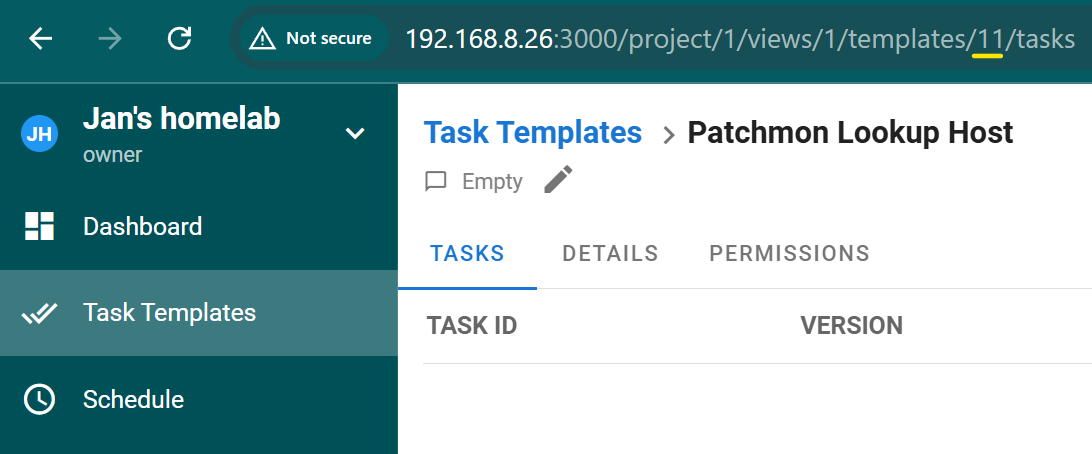
- In Semaphore, add a new template. Remember to add the Proxmox vault information to be able to reach each cluster/standalone host. Task Templates → New template.
- Name:
Patchmon Lookup Host(or similar) - Path to playbook file:
helpers/patchmon_lookup.yml - Inventory: All Sites
- Repo: your repo
- Vaults: Proxmox Vault
- Tick the box for limit, which will be supplied in the HTTP request from n8n
- Name:

- Note down the task ID once you open the template.
Patchmon Tag Playbook
The second playbook is concerned with adding and removing a tag called being_patched (change it to something else if you prefer). It is done in such a way (using ansible.builtin.uri) that will work around the situation of us having more than one set of Proxmox credentials.
- Create a file under
helpers/patchmon_tag_host.yml.
- Add it in Semaphore in the same way as we did it with the previous playbook.
- Remember to tick the ‘Limit’ box.
Step 5: Import the main Patchmon Orchestrator Workflow
Now when we have the ID of the sub-workflow, we can proceed with importing the main one.
📎 [PatchMon Auto-Patch Orchestrator.json](attachments/PatchMon Auto-Patch Orchestrator.json)
Semaphore connection & task templates
| Variable | Description |
|---|---|
SEMAPHORE_BASE_URL |
Base URL of your Semaphore instance, e.g. http://192.168.8.26:3000. |
SEMAPHORE_PROJECT_ID |
Semaphore project ID all templates below belong to. |
SEMAPHORE_LOOKUP_TEMPLATE_ID |
Template ID for the Lookup task (patchmon_lookup.yml). Resolves group membership, Proxmox identity, and alert-cooldown status. |
SEMAPHORE_TEMPLATE_SNAPSHOT |
Template ID for the Proxmox snapshot task (proxmox_snapshot_host.yml). |
SEMAPHORE_TEMPLATE_TAG_HOST |
Template ID for the lock acquire/release task (patchmon_tag_host.yml). |
SEMAPHORE_TEMPLATE_GALERA |
Template ID for the Galera patch playbook (patch_debian_galera.yml). |
SEMAPHORE_TEMPLATE_NGINX |
Template ID for the Nginx patch playbook (patch_debian_nginx.yml). |
SEMAPHORE_TEMPLATE_DEBIAN |
Template ID for the general Debian/Ubuntu patch playbook (patch_debian_single_hosts.yml). Fallback template for unmatched hosts. |
SEMAPHORE_TEMPLATE_UPTIMEKUMA_MAINTENANCE |
Template ID for starting/stopping an Uptime Kuma maintenance window (if you followed Part 3 of this series). |
Alerting
| Variable | Description |
|---|---|
ALERT_WEBHOOK_URL |
Discord/Telegram webhook for success, partial, and failure alerts. Treat as a secret. |
Polling behavior
| Variable | Description |
|---|---|
POLL_TIMEOUT_MINUTES_LOOKUP |
Minutes n8n polls a running Lookup task before timing out. |
POLL_TIMEOUT_MINUTES_TAG |
Same, for the tag add/remove (lock) task. |
POLL_TIMEOUT_MINUTES_SNAPSHOT |
Same, for the snapshot task. |
POLL_TIMEOUT_MINUTES_PATCH |
Same, for the patch task. Needs the most headroom: dist-upgrade plus reboot takes longest. |
POLL_INTERVAL_SECONDS |
How often n8n checks task status while polling. |
Host filtering & patch scope
| Variable | Description |
|---|---|
EXCLUDED_HOSTNAMES |
Comma-separated hostnames that never trigger a patch run. |
SECURITY_ONLY_GROUPS |
Comma-separated inventory groups limited to security updates only. Empty: full updates everywhere. |
Uptime Kuma integration
| Variable | Description |
|---|---|
UPTIMEKUMA_MAINTENANCE_ENABLED |
On/off switch for Uptime Kuma maintenance windows. Must be a String field ("true"/"false"), not Boolean. |
UPTIMEKUMA_DURATION_BUFFER_MINUTES |
Extra buffer minutes added to the estimated patch duration for the maintenance window. |
UPTIMEKUMA_INSTANCES |
JSON array of Uptime Kuma instances: name and url per entry. |
Workflow explained in short
Normalize Trigger Payload+Global Configare the setup stage. Fill in manually as explained above.Is Host Excluded?/Skip - Host Excludedis the hard exclude gate.Start Semaphore Lookup TaskthroughParse Group Namesis host resolution. Ensure the sub-workflow is mapped there.In Alert Cooldown?is the repeat-alert guard.Decide Template + Lock Keyis the one Code node you will actually maintain as your fleet grows. It's a small priority-ordered rule table mapping Ansible groups to Semaphore template IDs and lock keys.Standard Update on Security-Only Host?is the security-tier gate.Start Tag-Add Task(ensure the sub-workflow is mapped there) throughLock Acquired?is the locking step (Proxmox tag or localmkdir, decided automatically inside the playbook by whetherproxmox_vmidis defined).- UptimeKuma Maintenance Enabled? (Start) opens a maintenance window on every configured Kuma instance for this host before it's touched. Off by default; when off (or misconfigured) it routes straight through to
Is Proxmox Guest?untouched. Is Proxmox Guest?onward splits into snapshot-then-patch for guests, or patch-only for everything else.Patch Outcomeis the three-way verification switch.- Everything funnels into
Start Tag-Remove Task(ensure the sub-workflow is mapped there) /Poll Tag-Remove Task(again, check the mapping), which is both the alerting cleanup and the actual lock release. - UptimeKuma Maintenance Enabled? (Stop) sits right before
Start Tag-Remove Task- every alert path (success, partial, failure, even a failed snapshot) passes through it, so the window is always closed the same way it was opened, and a host is never left stuck "in maintenance."
Patchmon Auto-Patch Orchestrator in an ASCII flowchart:
Incoming PatchMon Webhook [Trigger]
      │
      ▼
Normalize Trigger Payload (hostname, eventType, severity, hostId, pendingCount, pendingThreshold)
      │
      ▼
Global Config (every non-secret setting lives here, CE has no Variables/Environments panel)
      │
      ▼
Is Host Excluded? ──yes──► Skip - Host Excluded (exit)
      │no
      ▼
Start Semaphore Lookup Task [sub-workflow] ──► Poll Lookup Task ──► Parse Group Names
      │
      ▼
In Alert Cooldown? ──yes──► Skip - In Alert Cooldown   (exit)
      │no
      ▼
Decide Template + Lock Key
      │
      ▼
Standard Update on Security-Only Host? ──yes──► Skip - Standard Update on Restricted Host   (exit)
      │no
      ▼
Start Tag-Add Task [sub-workflow]  ──► Poll Tag-Add Task ──► Parse Tag-Add Result
      │
      ▼
Lock Acquired? ──no──► Lock Busy - Exit   (exit)
      │yes
      ▼
UptimeKuma Maintenance Enabled? (Start) ──no─────────────────────────┐
      │yes                                                           │
      ▼                                                              │
Start Maintenance-Start Task [sub-workflow]                          │
      ──► Poll Maintenance-Start Task                                │
      ──► Parse Maintenance-Start Result                             │
      │                                                              │
      ▼                                                              │
Is Proxmox Guest? ◄──────────────────────────────────────────────────┘
      │no────────────────────────────────────────────────────────────┐
      │yes                                                           │
      ▼                                                              │
Start Snapshot Task [sub-workflow] ──► Poll Task ──► Snapshot Ok?    │
        │                                                              │
      │no                                                      yes│  │
      ▼                                                           ▼  │
Snapshot Failed Alert Context                  Start Patch Task◄─────┘
      │                                          [sub-workflow]
      │                                               │
      │                                               ▼
      │      Poll Patch Task ──► Parse Patch Verify Result
      │                                               │
      │                                  ┌────────────┘
      │                                  ▼
      │                         Patch Outcome (3-way)
      │                   ┌────────────────┬─────────────────┐
      │            success│         partial│          failure│
      │                   ▼                ▼                 ▼
      │     Send Discord/Telegram    Build Partial      Build Failure
      │        Success Message       Alert Context      Alert Context
      │                   │                │                 │
      │                   │                ▼                 ▼
      │                   │             Send Discord/Telegram Alert
      │                   │                │                 │
      │                   ▼                ▼                 ▼
      └───────────────────►────────────────►─────────────────►────┐
                       ┌──◄────────────────◄─────────────────◄────┘
                       │
                       ▼
      UptimeKuma Maintenance Enabled? (Stop) ──no──────────────────┐
                       │yes                                        │
                       ▼                                           │
      Start Maintenance-Stop Task [sub-workflow]                   │
                       ──► Poll Maintenance-Stop Task              │
                       ──► Parse Maintenance-Stop Result           │
                       │                                           │
                       ▼                                           │
                Start Tag-Remove Task ◄────────────────────────────┘
                 [sub-workflow] ──► Poll Tag-Remove Task
                                               │
                                               ▼
                                (Exit - releases the lock either way)
Before we can really run this workflow, we will need to configure Patchmon to send out webhooks when new updates are available. So run the test trigger for the workflow and head to Patchmon.
Step 6: Finalize the connection with Patchmon
The whole workflow starts with Patchmon. It is this very system that serves as a source of truth in terms of what updates are pending, whether standard or security updates. We will need to configure it to send notifications to n8n, which will then trigger patching jobs with Semaphore UI. Then, we will trigger a re-check by a Patchmon agent and send alerts via Discord, if required.
Create an Alert Channel
Since we now have a webhook created in n8n, we can link it in Patchmon.
- Go to Reporting → Click on the ‘Add Destination’ button and select ‘Webhook’.
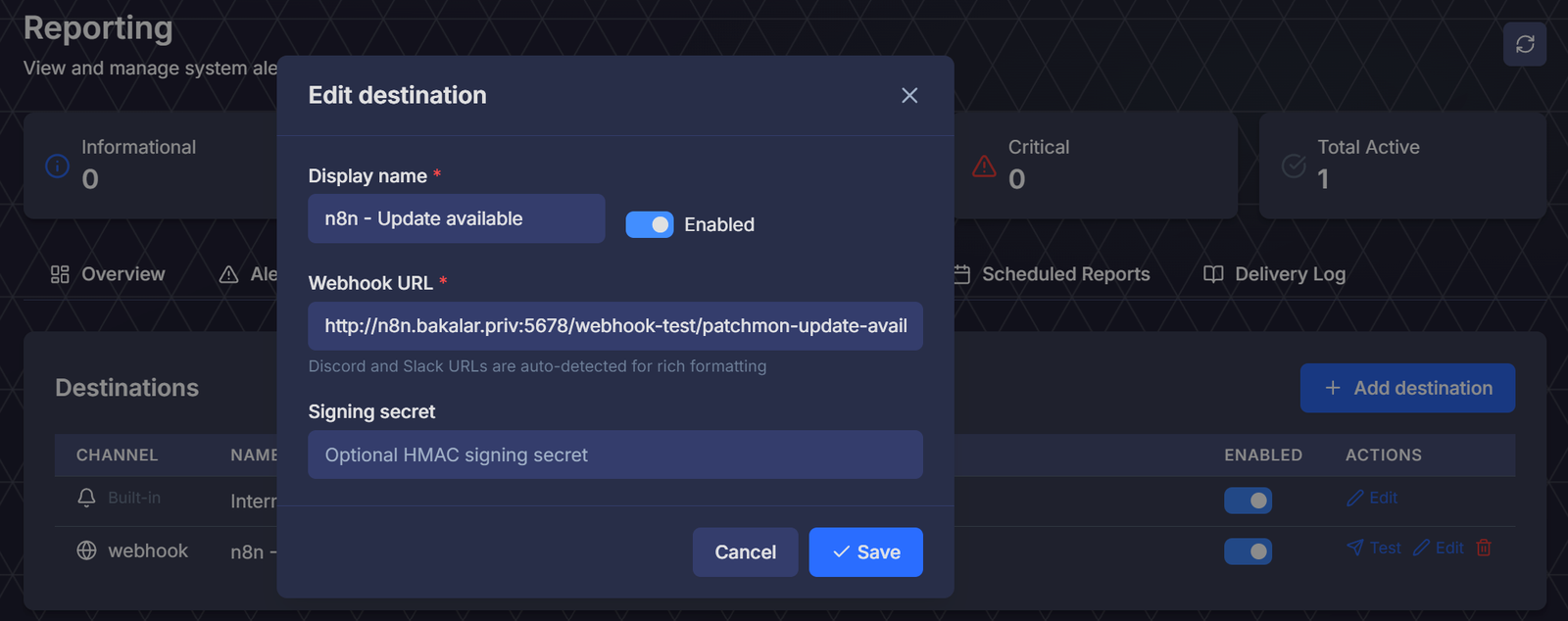
- Test the webhook:
- Go to n8n and click on ‘Execute Workflow’
- Click on the ‘Test’ button in Patchmon to fire a ‘Test’ button while still in the Destinations section.
💡 Note
Note: n8n’s test webhook differs from the production one - the test one is executed once when being actively triggered (waiting for a webhook to come), whereas the production webhook will trigger even when you do not actively press the ‘Execute’ button. For the production trigger to work properly, always publish your workflow to ensure you are not triggering on an older version of your workflow.
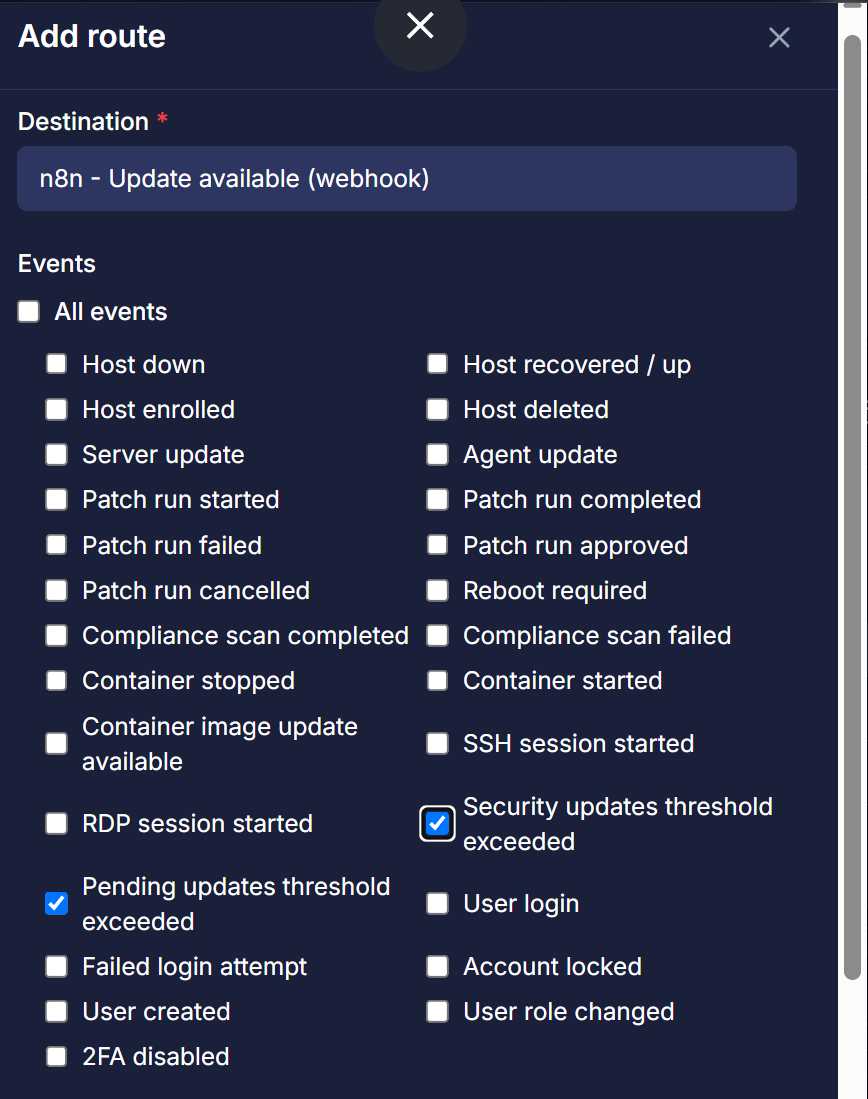
Configure a route for the webhook
With the webhook created, go to ‘Event Rules’ sub-section (within Reporting) and click on ‘Add event rule’. Select these two events:
- Pending updates threshold exceeded
- Security updates threshold exceeded
- Minimum severity:
Informational
Configure thresholds
I recommend taking a quick look at the manual related to Patchmon’s thresholds. Patchmon needs to know on a per-host basis what is the acceptable threshold of accumulated updates before it fires the n8n workflow to apply a patch.
- Firstly, go to Reporting → Alert Lifecycle → scroll down to ‘Alerts system’. Make sure that the toggle for master switch is on.

- Once on, scroll down and toggle the following two to enable them:
- Host Security Updates Exceeded
- Host Pending Updates Exceeded (consider covering these later once you run a few tests with the security updates)
- Severity: Warning
- Regarding the threshold, I recommend finding a host with that is the most out of date and setting the threshold one below that, so that during testing, you will not have too many webhooks coming into n8n.
- Later on once tested, the recommended value of 1 for security updates and 10 for standard updates is fine.

💡 Note
Just be careful about not setting the limit for updates too low, or you may a large number of hosts to update, which may clog up your IO resources.

Step 7 - Run, run, auto-patching workflow!
Getting it work initially will likely require a number of attempts. In my experience, it was best to configure updates coming out for just one host. Taking a manual snapshot of it is advisable before you verify that the workflow-driven one works.
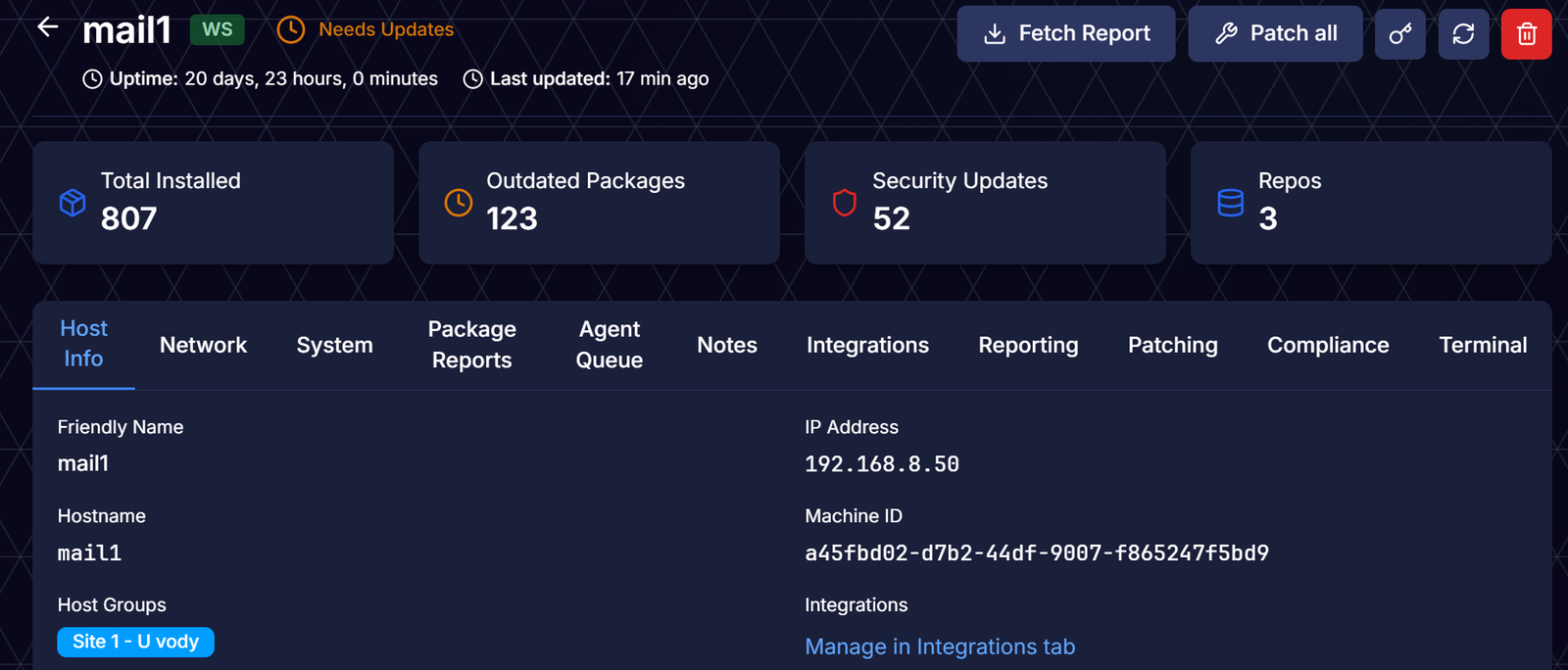
- My most out of date host was
mail1- look at how badly outdated this iRedMail host was, it is almost embarrassing to share!
- Once the workflow kicks in (ensure you clicked through every tile and provided the required variables in the Config tile), the first job that will be triggered in Semaphore is the lookup task.
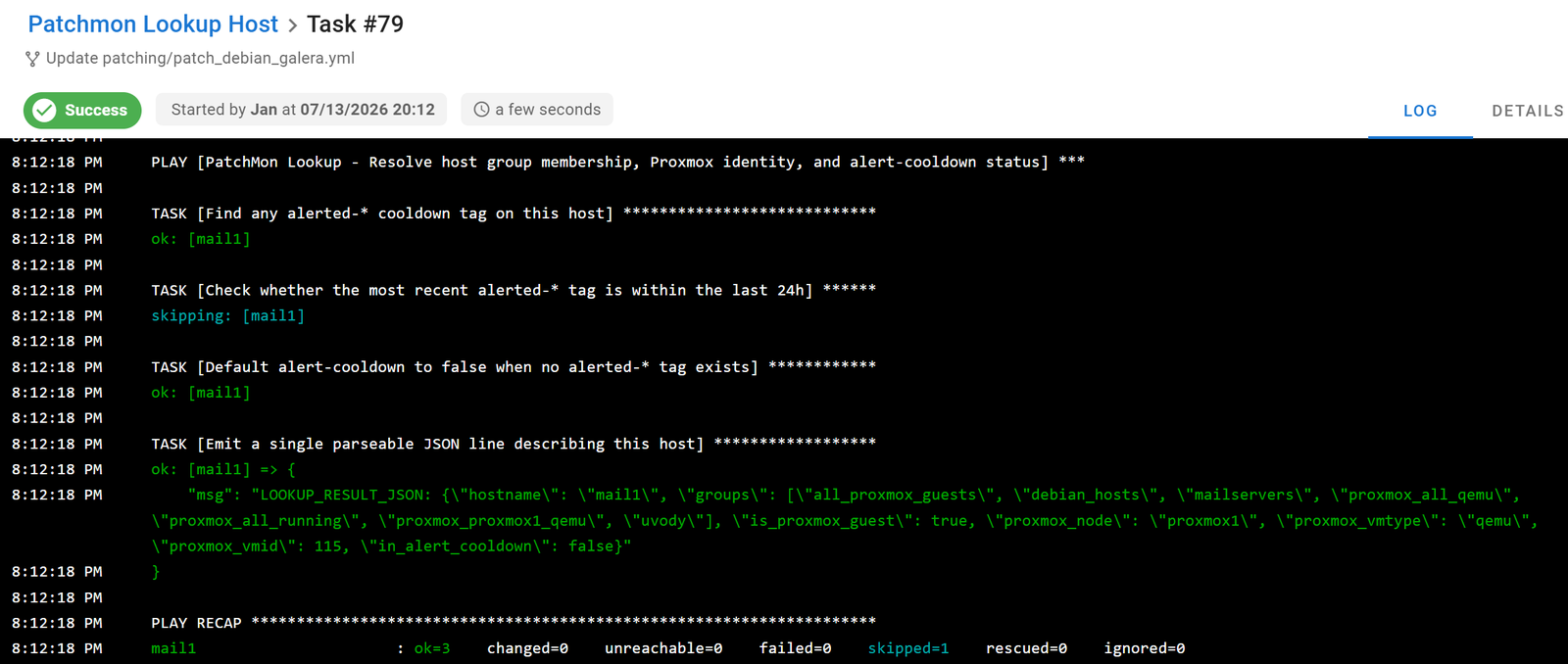
- If all good and it is a Proxmox guest (VM or an LXC), a snapshot is taken. In your Proxmox UI, observe that a snapshot was, in fact, taken, by the tag being added:
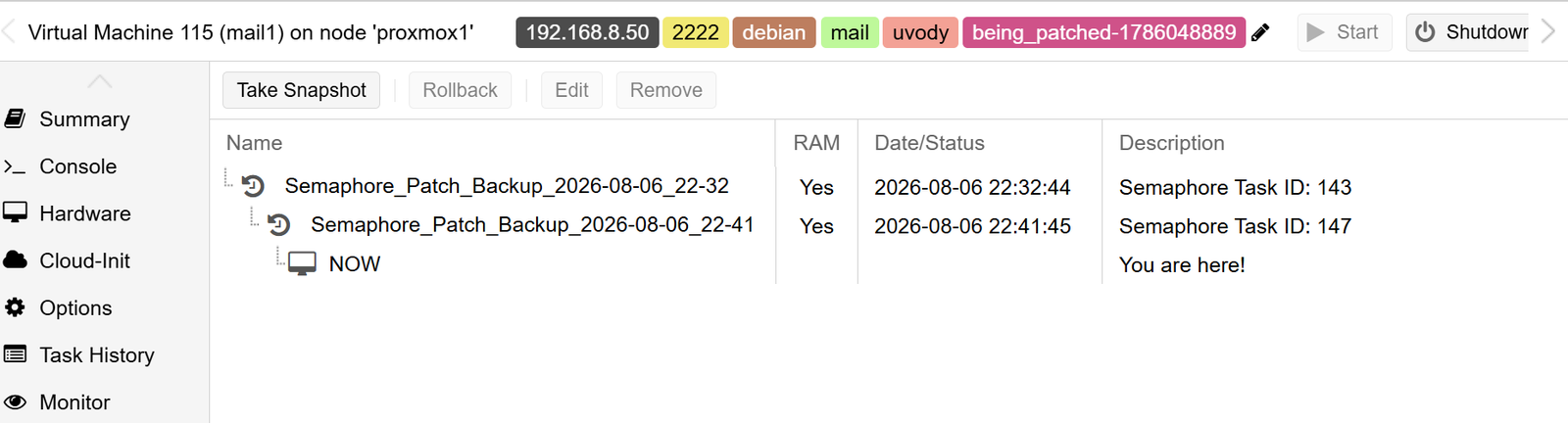
- Then the
Decide Template + Lock Keyis loaded - you may need to configure playbooks as per your type of servers - This is then followed by the actual patching job being called in Semaphore, as per your configured playbooks and then polled for the result. The playbook forces a re-check via the Patchmon agent at the end.
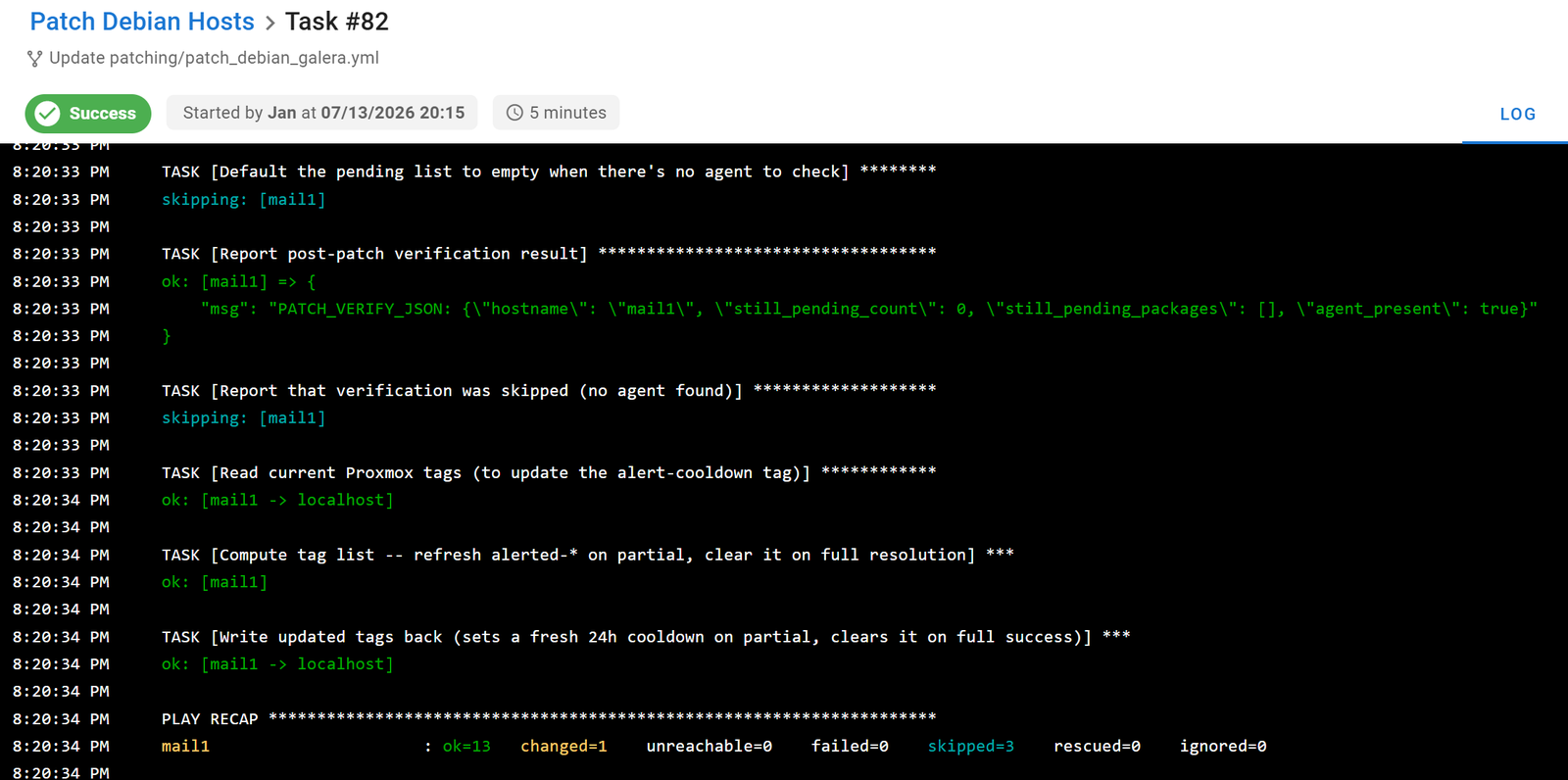
- And lastly, a nice Discord or Telegram message 🙂 What more can you want?
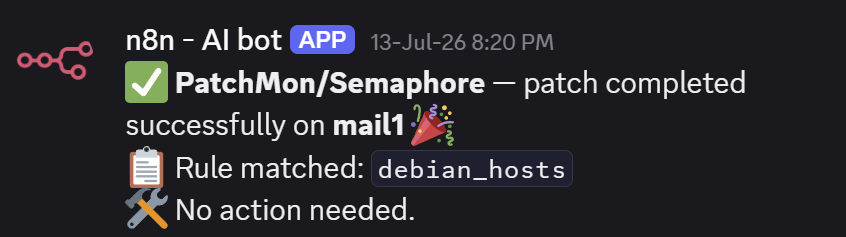
- Now let’s check the status in Patchmon!

Troubleshooting your patching job executions
Lots of things can and will go wrong, so let’s look into a few:
- No workflows coming to n8n - check the Delivery log section (
your_serever:port/reporting?tab=alerts) to see if a webhook even went out. If yes and it errored out, check what the error is. Error 404 indicates the webhook address is incorrect or there was nothing listening on that (when using the test hook, you need to click on the ‘Execute’ button).

- Error when taking a snapshot related to Proxmox - ensure that the credentials saved in Semaphore (such as via Ansible Vault) are correct. If needed, update them in Semaphore or re-create the Ansible Vault and then reflect it in the
group_vars/folder.

Once you are confident with the process, you can decrease the threshold for updates in Patchmon to ensure that your fleet gets patched.
Since this is quite a complex workflow, do let me know if you identify any bugs or make improvements that would be worth sharing with others.
Step 8 - Patch Security updates only
Let's say that you have a group of hosts called webservers and you want them to receive security updates only. This group was already created in Part 1 of this series - the web1 and web2 VMs are tagged as ‘web’.
- Let's add ‘web1’ and ‘web2’ into a group called ‘webservers’ in terms of their Proxmox tags.
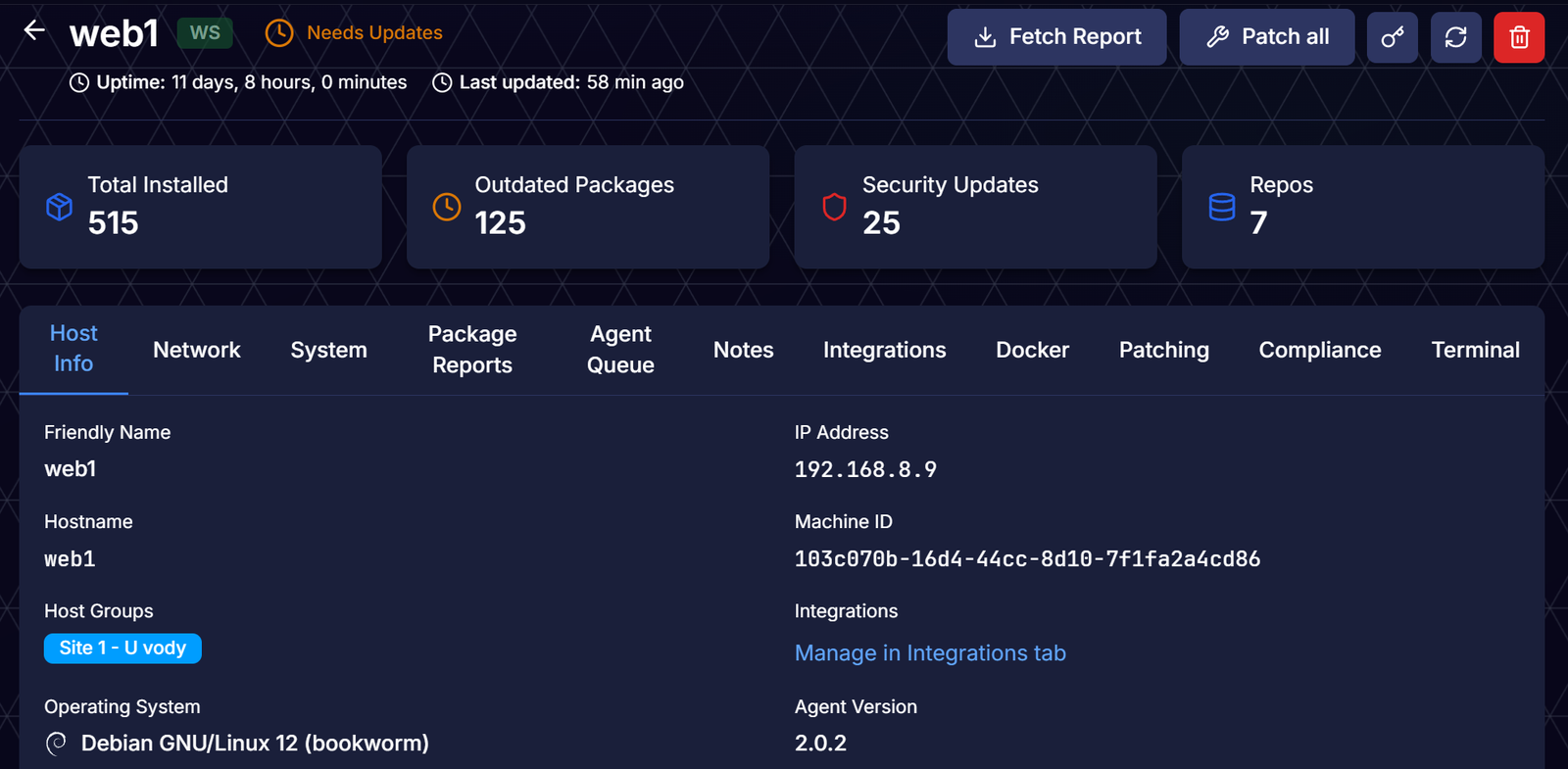
- At the start, ‘web1’ had a number of pending updates waiting, both security and standard, as shown below:

- The result was that only the security updates got applied!

- Verify the finding in Patchmon:
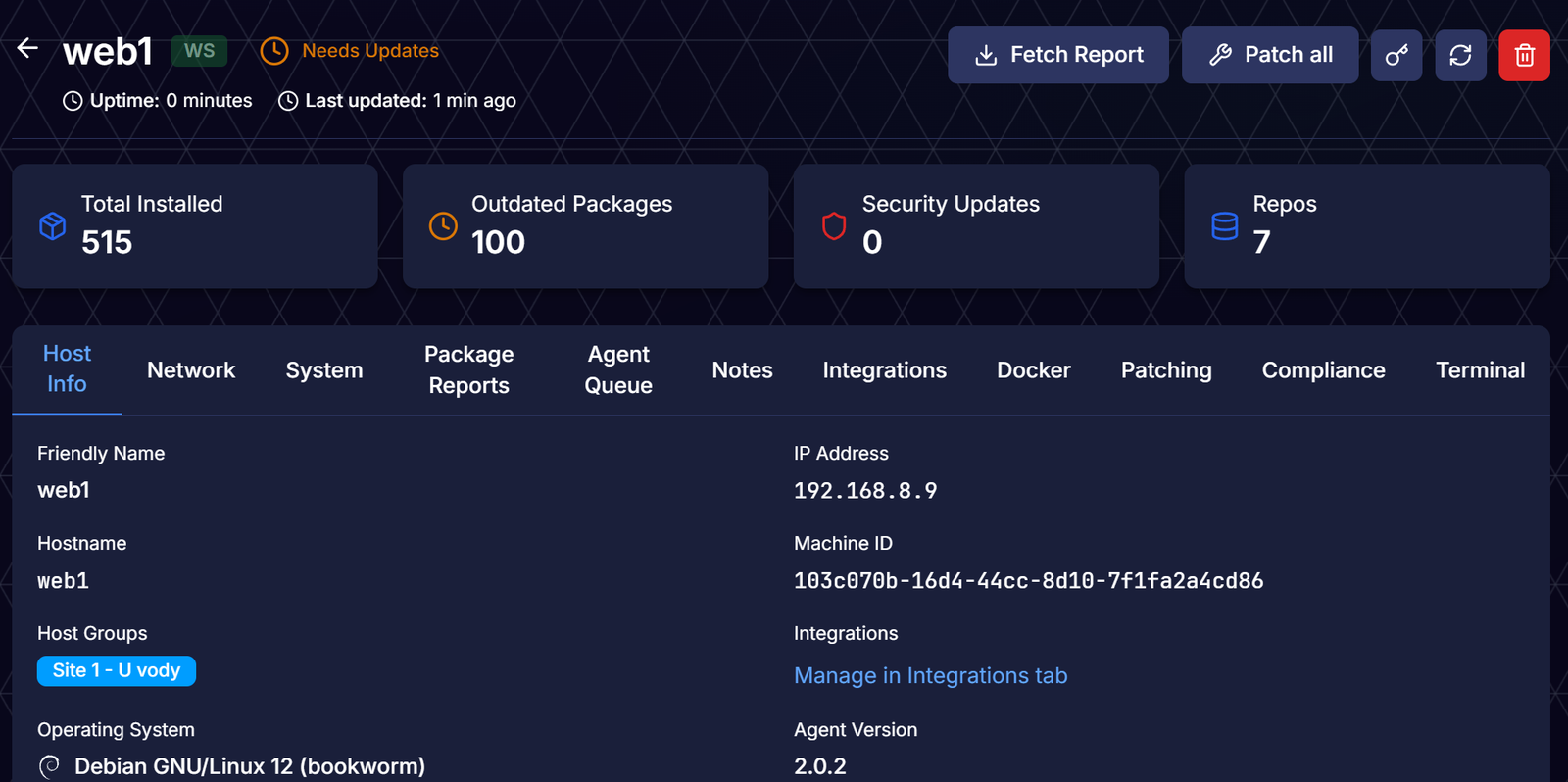
This is pretty awesome! You can consider applying this for your Proxmox hosts and other critical services that you want to keep up to date in terms of security, but would otherwise prefer to update manually.
Conclusion
The Part 4 of this series closes the loop: PatchMon spots the drift, n8n decides whether and how to act on it, Semaphore does the actual work, and Uptime Kuma keeps your alerting quiet while it happens and the monitors the hosts afterwards, in case something happens post-patching.
We have got a fleet that patches itself, snapshots itself first, verifies its own work, and tells us about it on Discord or Telegram - no database of its own anywhere in the loop, just Proxmox tags and a marker file standing in for locks.
A few things worth doing before you point this at production:
- Put these instances (n8n, Semaphore, Patchmon, Kuma) behind a reverse proxy running on HTTPS only.
- Implement firewall rules on these hosts (
iptables,nftables,ufwor similar) that allows connection only from your server subnet. - Add fail2ban on each of these hosts, allowing only certain endpoints for SSH access.
- The workflow is deliberately stateless, no lock table, no external queue. That may work well in a home environment. Originally, I prepared this tutorial by saving all information in a
postgresqldatabase, which helps with retrieval and locks. However, I wanted to simplify the process and not add another system to manage as part of the process. On a larger scale, however, it would likely be the right approach. - It may be good to include AI in the log analysis step when logs from Semaphore are being processed to advise you on next steps.
Did you find a bug, or improve on something here? Let me know in the comments! I would rather fix it for everyone than to have five people independently trip over the same edge case. Knowledge is to share - primarily with other humans, then our fellow AI friends :)
Enjoying this tutorial?
This site is a non-profit project. If it saved you some time, you can support it by getting Jan some coffee.
☕ Buy me a coffee
Comments