Part 3 - Set up UptimeKuma for monitoring & for maintenance windows during patching
Go to previous section Download Markdown Go to next section
September 12, 2026
Table of Contents
Introduction
In case you use Uptime Kuma for uptime monitoring, here is how to set it up so that we can reach it from an Ansible playbook, such as one called by the Semaphore instance we set up in Part 1 of this series, to schedule a maintenance window.
You might ask: "How will the workflow we build in Part 4 know which monitors in Kuma to put into maintenance, when one host can have multiple monitors that are all named differently?" That is a good question. The answer is simple. We tag each monitor with its host's hostname, so that when a request arrives carrying that hostname, Kuma applies the maintenance window to every monitor carrying that tag, regardless of what the monitor itself is called.
Now what if you have multiple sites and thus more than one instance of Uptime Kuma? Don't worry, I've got you covered. The workflow we build in Part 4 will simply have a field where you define as many instances as you need. Then, when a request for "hostX" comes in, it gets sent to every configured instance, and whichever ones find a tag match apply a maintenance window for however many minutes you define.
If you are already running Uptime Kuma (whether as a Docker container, in an LXC, or bare metal), skip Steps 1 and 2.
Step 1 - Installation on LXC & Monitors
You might ask why install Uptime Kuma in an LXC container rather than in Docker? A few reasons, drawn straight from lessons in this guide:
- No nested container runtime. Running Kuma in Docker means running an entire Docker engine just to host one app. An LXC with Node.js installed directly is lighter, has fewer moving parts, and does not need a privileged container or overlay filesystem workarounds to nest Docker inside Proxmox's own container layer.
- Room to add local tooling later. Uptime Kuma supports monitor types that shell out to local commands or scripts (for example checking a Docker socket, running a custom health check, or watching disk SMART data). In a full LXC you can just
apt installwhatever tool you need and add a cron job. In a Docker deployment, any extra tool has to be baked into a custom image ahead of time, which is exactly the kind of friction we hit with Semaphore's own Docker install later in this guide.
None of this means Docker is a bad choice for Kuma. If you already run it that way, it works fine for everything in this guide; the API calls we make later do not care how Kuma itself is hosted.
Install Uptime Kuma in LXC:
- Create a lightweight LXC the same way you created the Semaphore one in Part 1 of this series. Uptime Kuma is light on resources; 1 vCPU, 512MB to 1GB of RAM, and 4 to 8GB of disk is comfortable for a homelab.
- Inside the LXC, install Node.js (20.4 or newer is required) and git:
apt update && apt upgrade -y
curl -fsSL https://deb.nodesource.com/setup_lts.x | bash -
apt install -y nodejs git- Clone Uptime Kuma and run its setup:
git clone https://github.com/louislam/uptime-kuma.git
cd uptime-kuma
npm run setup- Run it persistently with PM2, so it survives reboots and restarts on crash:
npm install pm2 -g
pm2 install pm2-logrotate
pm2 start server/server.js --name uptime-kuma
pm2 save
pm2 startup- Visit
http://<lxc-ip>:3001in your browser and create the initial account.- Uptime Kuma does not support multiple user accounts (there is no way to add a second, lower-privilege login), so whatever credentials you set here are also what the Ansible automation later in this guide will use to log in.
- Treat this password the same way you would treat any other credential you are about to store in Ansible Vault, later in Step 3.
- While in the Uptime Kuma web interface, confirm your version. At the time of writing this article, I opted for the newest-at-the-time beta, version 2.5.0:

Set up monitors on Kuma
Add monitors as you normally would for each service running on a host: HTTP checks, TCP port checks, ping monitors, Docker container monitors, whatever applies. Nothing about how you build a monitor changes for this guide.
The one thing that matters for the automation in Part 3 is tagging. On every monitor you want protected during a patch run, add a tag whose name is the exact hostname that Ansible / PatchMon uses for that host (its inventory_hostname). Case matters, since the tag match later in this guide is case sensitive.
A single host is very likely to have several monitors, and they do not all have to carry the same name as the host itself. Take web1 as an example: it might have a ping monitor, two separate Docker container monitors, and a Syncthing monitor, four different monitor names in total, all tagged web1. Tag every one of them; the automation matches on the tag, not on the monitor's own name.
If you run more than one Uptime Kuma instance, this also does not have to line up 1:1. A single host's monitors can be spread across several instances (for example, its ping monitor lives on one instance and its Docker monitors on another), all tagged web1. Each instance is queried independently in Part 4, and a host with nothing tagged on a given instance is simply skipped there, not treated as an error.

Step 2 - Test API-like comms with UptimeKuma via SSH
To be able to send API-like commands to our UptimeKuma instance, we will need to utilize some middleware. While older (last update was three years ago), I have verified that lucasheld’s collection using a Python library still works even on the newest 2.5.0 for basic commands like setting or removing a maintenance window, which is all we need. Let’s use it till something more modern is available (alternatives include Keithah’s REST API and Zerka’s KumaCompanion, both unmaintained for over a year).
- Add this playbook into your source version control (e.g. Gitea):
Running Semaphore in Docker?
- Two packages will need to be installed, best specified as part of the dockerfile. As a quick test, you can run this:
docker exec -it <semaphore-container-name> pip3 install uptime-kuma-api jmespath- Try it without
--break-system-packagesfirst; many Docker base images are not built on a distro Python that enforces PEP 668, so it may just install cleanly. Only add the flag if you hit anexternally-managed-environmenterror. - This exec-based install is not durable. It disappears the next time the container is recreated (an image update,
docker compose pull && up -d), so treat it as a one-off test, not a fix. - Semaphore's own Docker install does support auto-installing from a
requirements.txt, but it is mounted at$SEMAPHORE_CONFIG_PATH(commonly/etc/semaphore) and only runs once, at container startup, not per task:
volumes:
- ./requirements.txt:/etc/semaphore/requirements.txt- I would not trust this blindly. Semaphore's documented startup command (
pip3 install --upgrade -r ${SEMAPHORE_CONFIG_PATH}/requirements.txt) does not itself pass--break-system-packages, so depending on the base image it may hit the same PEP 668 wall silently. Verify it actually landed after a restart:
docker exec <semaphore-container-name> python3 -c "import uptime_kuma_api; print('ok')"- The most durable option, and the one I'd actually lead with, is baking the packages into the image (using
dockerfile) instead of depending on any runtime install:
# dockerfile
FROM semaphoreui/semaphore:latest
RUN pip3 install --break-system-packages uptime-kuma-api jmespath- Build it and point your
docker-compose.ymlat that tag instead of the stock image. This survives every restart and pull without depending on whether the config-path install actually fires.
Running Semaphore in LXC (not Docker)
- SSH into your Semaphore host and install the following:
# For Semaphore to work with it, sudo and break-system-packages is necessary
sudo pip3 install --break-system-packages uptime-kuma-api jmespath

ansible-galaxy collection install lucasheld.uptime_kuma- The
sudomatters. Without it, this installs into your own login,~/.local/lib/..., invisible to the Semaphore user that runs web-triggered tasks (see also PR #2083).
Defensive systemd override (LXC + bare metal installations)
- This step does not apply to a Dockerized Semaphore; there is no systemd unit to edit inside the container. If you are on Docker, the Dockerfile approach above already bakes the flag in, so skip this.
- For a bare metal or LXC install, set this up so future updates and Semaphore's own
requirements.txtauto-install do not hit the same PEP 668 wall:
sudo systemctl edit semaphore

# Add these two rows, save and exit:
[Service]
Environment=PIP_BREAK_SYSTEM_PACKAGES=1

sudo systemctl daemon-reload
sudo systemctl restart semaphore

# Confirm that you can see it (should get: Environment=PIP_BREAK_SYSTEM_PACKAGES=1).
sudo systemctl show semaphore -p Environment- Treat this as a defensive measure, not a substitute for the
sudo pip3 installabove. In my own testing, this override alone did not fix the missing-module error; the direct system-wide install did.
For all types of installations - Requirements.txt
- Update your git and run the Ansible playbook (this time without Semaphore):
cd semaphore-playbooks/
git pull- For later on when we run it in Semaphore UI, create a requirements.txt file that will load when needed:
nano ~/semaphore-playbooks/collections/requirements.txt

# Paste this into it, save and exit
uptime-kuma-api
jmespath

# Remember to commit it if you are editing it directly on the server:
git add .
git commit -am "Added the requirements.txt file needed for Uptimekuma maintenance controls."
git push- Run a local Ansible test via SSH from the Semaphore instance (not the UI):
ansible-playbook monitoring/uptimekuma/maintenance/uptimekuma_login_test.yml \
  -e "uptimekuma_test_url=http://1.2.3.4:3001" \
  -e "uptimekuma_test_username=YOUR_USERNAME" \
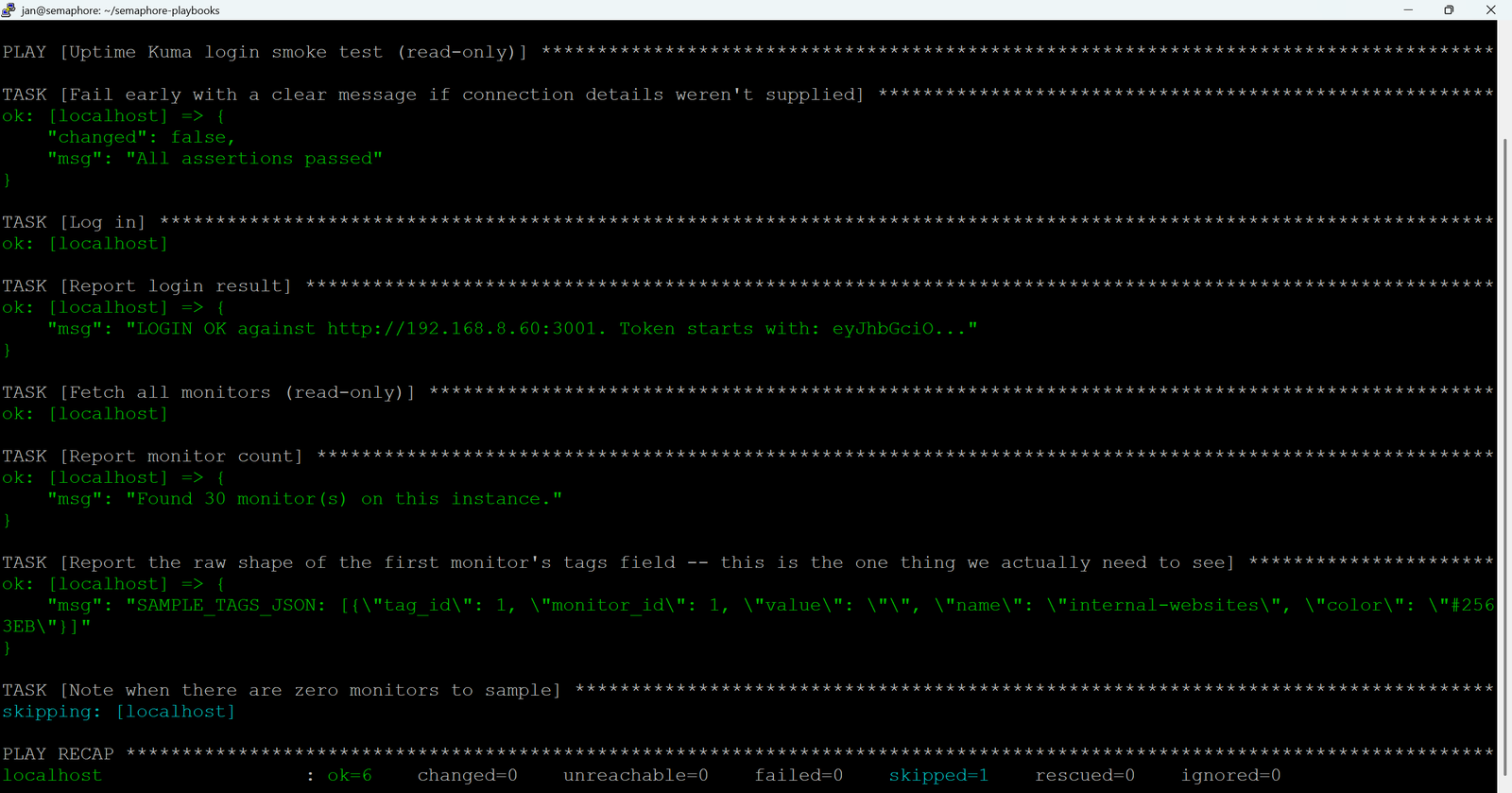
-e 'uptimekuma_test_password=YOUR_PASSWORD'- Ideally, the response would be something like this:
Verify you can place a host (or hosts) into maintenance
So far we did a read-only test. Let’s do a write test where we set a host or more into a maintenance group using tags.
- Tag one or more hosts such as
proxmox-nodes - Create an .ini file that would wrap it for later use:
echo "[all]
proxmox-nodes" > /tmp/uptimekuma-test-inventory.ini- Start a 5 minute maintenance window against that one Uptime kuma instance:
ansible-playbook -i /tmp/uptimekuma-test-inventory.ini \
  monitoring/uptimekuma/maintenance/uptimekuma_maintenance.yml \
  -e 'uptimekuma_action=start' \
  -e 'uptimekuma_duration_minutes=5' \
  -e '{"uptimekuma_instances": [{"name": "uptimekuma1", "url": "http://1.2.3.4:3001"}]}' \
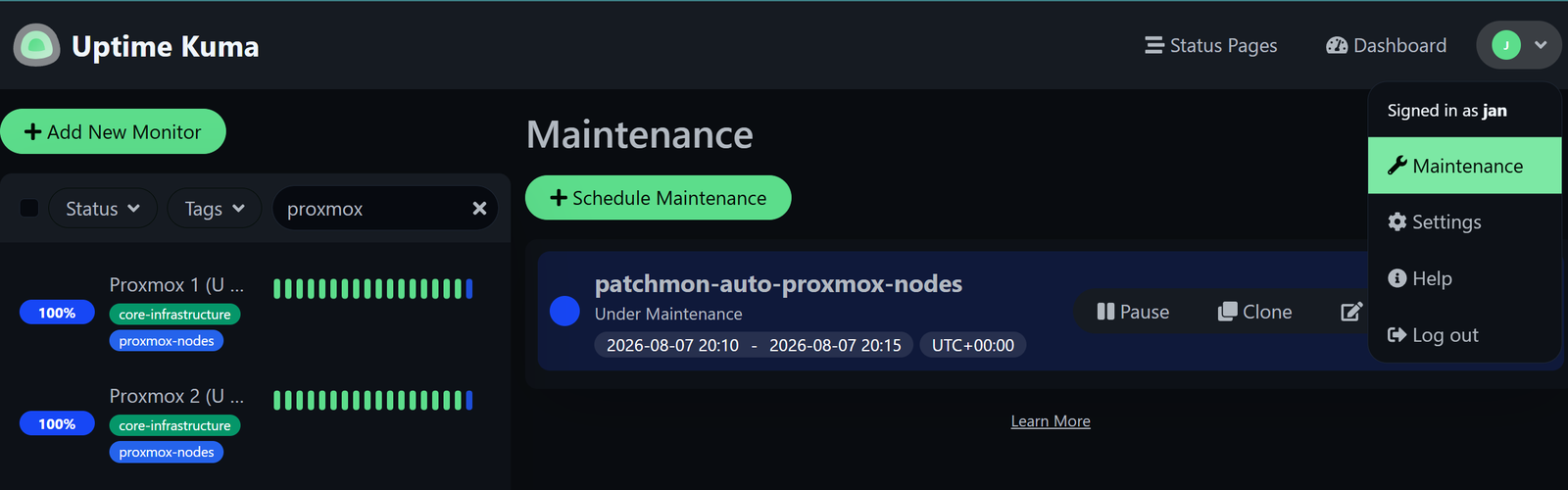
-e '{"uptimekuma_credentials": {"uptimekuma1": {"username": "YOUR_USERNAME", "password": "YOUR_PASSWORD"}}}'- Check that you can see it under your profile → Maintenance. Checks during that time will appear in blue.
Step 3 - Encrypt Uptime Kuma credentials using Ansible Vault
The terminal connection was great to verify that we can talk to Uptime Kuma and send commands using the lucasheld.uptime_kuma collection.
- Find your existing vaults:
grep -rl "ANSIBLE_VAULT" . --include="*.yml"- Create a vault file to-be in the folder where uptimekuma maintenance playbooks are, as only these jobs will need to access that vault:
# Navigate to your Semaphore playbooks folder (we created this one in Part 1).
cd ~/semaphore-playbooks/monitoring/uptimekuma/maintenance
nano uptimekuma_vault.yml- Copy the content of the file and change the username and password to actual values. Don’t worry, we will encrypt them at the next step.
---
uptimekuma_credentials:
  uptimekuma1:
    username: YOUR_USERNAME
    password: "REAL_PASSWORD_HERE"
  uptimekuma2:
    username: YOUR_USERNAME
    password: "REAL_PASSWORD_HERE"
  uptimekuma3:
    username: YOUR_USERNAME
password: "REAL_PASSWORD_HERE"- Encrypt the file using the same password used in the Vault cases in Part 1 (or create a new password).
# Modify the path if you are using your own folder structure
ansible-vault encrypt ~/semaphore-playbooks/monitoring/uptimekuma/maintenance/uptimekuma_vault.yml- Now when you open the
uptimekuma_vault.yml, it will be full of numbers (not really proper encryption but works well). - For the purpose of testing, we will need to move the inventory for Uptimekuma to a folder that can be reached, ideally into the group_vars:
cd ~/semaphore-playbooks
mv /tmp/uptimekuma-test-inventory.ini inventory/uptimekuma-test-inventory.ini
Test the communication with Ansible Vaults enabled
- Let’s add another playbook that would actually be used by Semaphore in the next Step. In my case, it resides under
semaphore-playbooks/monitoring/uptimekuma/maintenance/uptimekuma_maintenance.yml.
- And then also
uptimekuma_maintenance_one_instance.ymlin the same folder:
- In case you created it directly in your source version control software, when you move back to SSH, remember to run
git pullto fetch it. - Now go back to the root of your repository and try running it still from SSH but this time without credentials:
ansible-playbook -i /inventory/uptimekuma-test-inventory.ini ~/semaphore-playbooks/monitoring/uptimekuma/maintenance/uptimekuma_maintenance.yml -e 'uptimekuma_action=start' -e 'uptimekuma_duration_minutes=5' -e '{"uptimekuma_instances": [{"name": "uptimekuma1", "url": "http://1.2.3.4:3001"}]}' --ask-vault-pass- Enter the Vault password that you put in earlier.
- In case you get an error that read “Error loading plugin 'lucasheld.uptime_kuma.login': No module named 'ansible_collections.lucasheld’’, it means that you are not in the folder where the Python library is accessible. You can verify that by running
ansible-galaxy collection list | grep -i uptime. - Another option is if there was a typo in the now-encrypted file, in which case you can no longer edit it directly but need to use ansible-edit:
ansible-vault edit inventory/group_vars/all/uptimekuma_vault.yml- The result of a successful execution should be the same as before - the same host group gets a 5 minute maintenance window in Uptime kuma - this time, it is achieved via an Ansible playbook + by using Ansible Vault.
- Let’s also run the ‘stop’ command to close the loop:
ansible-playbook \
  -i inventory/uptimekuma-test-inventory.ini \
  monitoring/uptimekuma/maintenance/uptimekuma_maintenance.yml \
  -e 'uptimekuma_action=stop' \
  -e '{"uptimekuma_instances": [{"name": "uptimekuma1", "url": "http://1.2.3.4:3001"}]}' \
  --ask-vault-pass
If all is good to this point on your side, then we are finally ready to configure it in Semaphore UI!
💡 Note
Note: If you have previously uploaded templates via a text editor, remember to
git pushthem to your source version control server, so that Semaphore UI can see them!
Step 4 - Set up playbooks in Semaphore UI
Since we confirmed that the playbooks work with pure Ansible using SSH from our Semaphore instance, we can proceed with adding a task template.
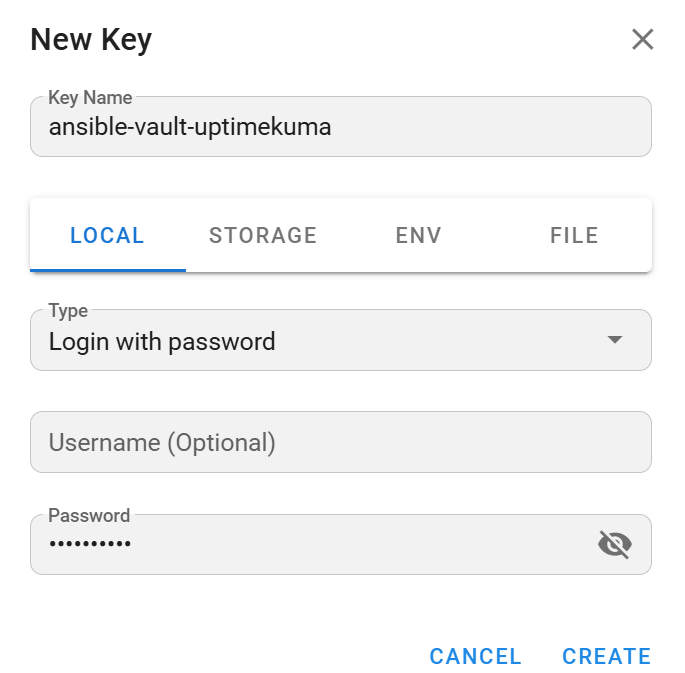
In Semaphore, go to Key Store → click on the ‘New key’ button.
- Key name: as you like, I chose
ansible-vault-uptimekuma - Stay in local → Password → add your Vault password that you used to encrypt the whole file.
Then create a new Task Template:
- Playbook:
monitoring/uptimekuma/maintenance/uptimekuma_maintenance.yml - Inventory: pick your production inventory, as created in Part 1 on this series. In our tests we used an .ini file, which was just for the proof of concept purposes.
- Advanced options - add three variables:
- Variable 1 Name + Title:
uptimekuma_action - Variable 1 Type:
string - Variable 1’s Default value:
start - Variable 2 Name + Title:
uptimekuma_duration_minutes - Variable 2 Type:
integer - Variable 2’s Default value:
7 - Variable 3 Name + Title:
uptimekuma_instances - Variable 3 Type:
integer - Variable 3’s Default value:
[{"name":"uptimekuma1","url":"http://1.2.3.4:3001"},{"name":"uptimekuma2","url":"http://1.2.3.4:3001"}
- Variable 1 Name + Title:
- Vault password: attach 2 things - the same Key Store vault entry that we created + the one for your Proxmox hosts (created in Part 1 of this series).
- Ansible prompts: check the Limit box.
- Save, then run it once manually, specifying one of your hosts that you have tagged in Uptime Kuma.

- Here is how it could look when you launch the job:
- Action:
start(apply a maintenance window) - Duration: a number, e.g.
7(minutes) - Instances: A list of your uptimekuma instances, I used
web1 - Limit: The tag that you want to run it against (could apply to multiple monitors)
- Action:

That run is the one that actually matters - it proves Semaphore's own execution path (including requirements.yml/requirements.txt auto-install, its own service user) can do everything our shell just did. Once that passes, run the stop variant the same way, note the template's numeric ID, and we will be able to use it in Part 4 for n8n orchestrator's SEMAPHORE_TEMPLATE_UPTIMEKUMA_MAINTENANCE field.
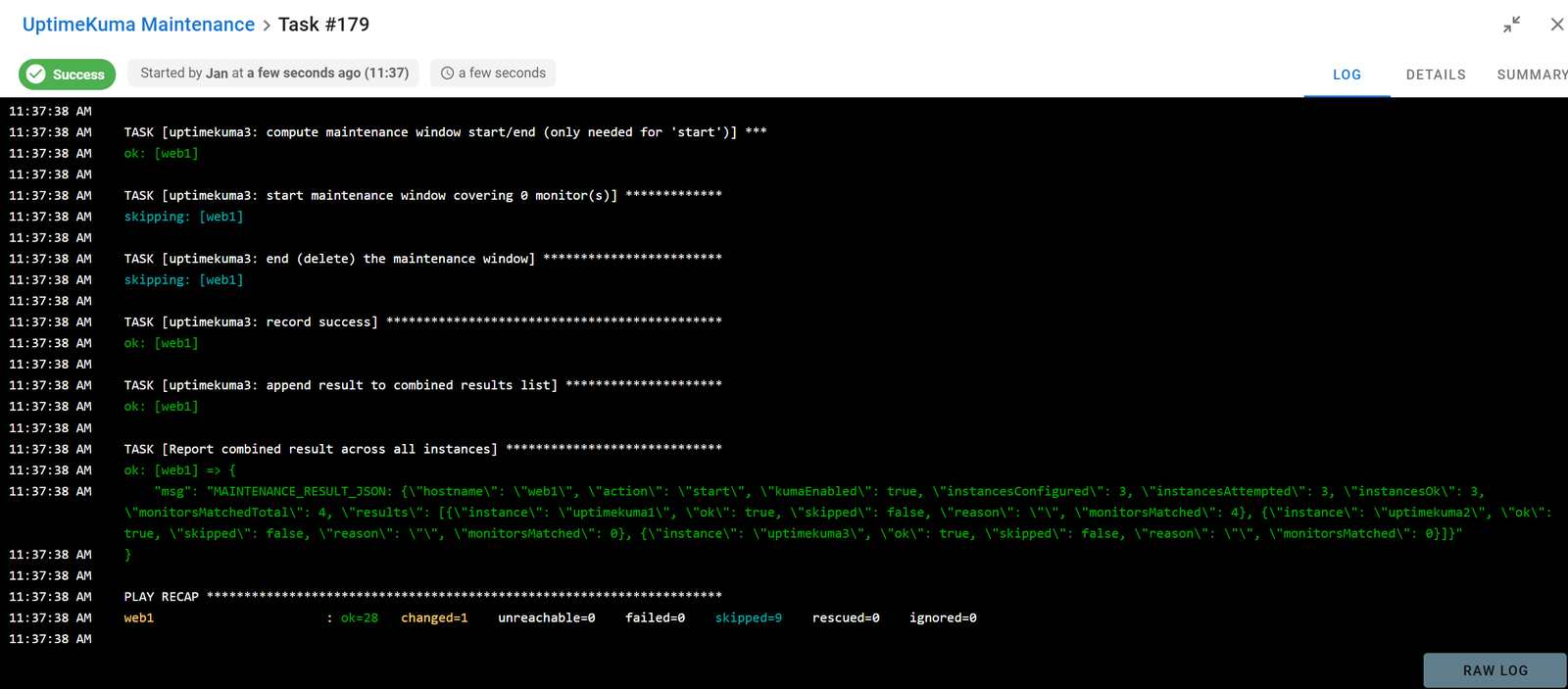
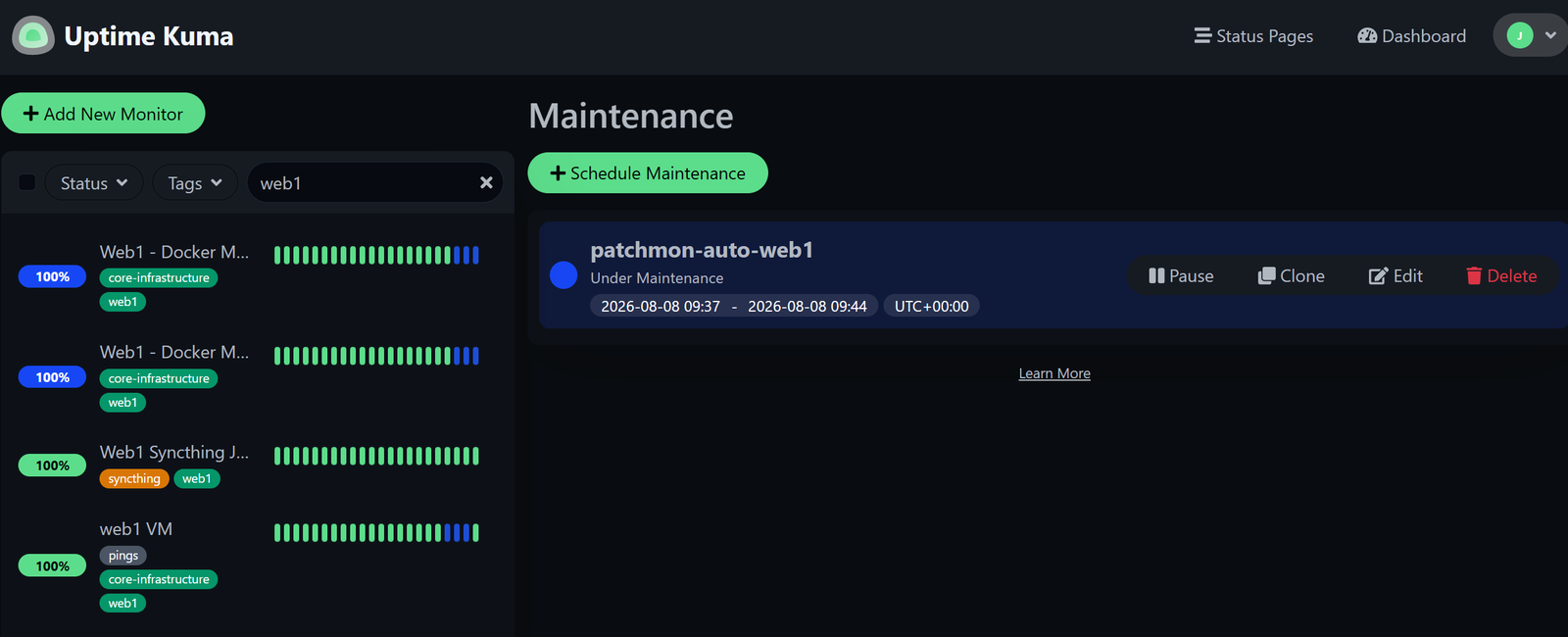
- The way it looks in UptimeKuma:
- Note that one monitor tagged with web1 does not show as being in maintenance mode. This is because it runs only every hour, so there was no health check while the maintenance window was active.
Enjoying this tutorial?
This site is a non-profit project. If it saved you some time, you can support it by getting Jan some coffee.
☕ Buy me a coffee
Comments