In order to add AI into the picture and entrust it with some degree of autonomy, we will need to leverage what we already built in this tutorial + utilize an automation platform that will execute pre-defined jobs in a controlled fashion.
This is a ‘middle-ground’ approach where we do not give AI full autonomy over the infrastructure but keep some level of control. Let me expand on that.
Automation Platform – AWX or Semaphore UI
The following workflow is built with two automation platforms in mind – AWX and Semaphore. If you use another one that supports Ansible (such as Spacelift or Rundeck), you will need to revise the URLs for launching and polling jobs and set up separate credentials, but most of the steps will still apply.
- Do you not have an automated platform deployment app built on Ansible set up yet? Catch up by following this tutorial on how to Deploy Ansible AWX to automate OS patching.
Risk Register For AI-driven workflows
To put it simply, we need to decide what activity constitutes a low, medium and high risk operation and to what degree we allow AI to handle it. Find some examples below:
- Low risk – operations that when executed, would be unlikely to lead to service outage. Metrics may indicate that if nothing is done, an outage would eventually occur, such as disk running out or RAM / CPU usage is > 90% for more than 5 minutes. Alternatively, when a service is stopped (such as the example with fail2ban). In this case, a Discord query is sent with a request to approve an action. Timeout 5 minutes. If no response the workflow will proceed.
- Medium risk – operations that may lead to a short but controlled outage. Example includes a reboot of a VM or an LXC container and restarting processes. A Discord approval request is sent with a timeout of 15 minutes. If no response is provided, implement it anyway.
- High risk – operations that, when implemented, could lead to unexpected outcomes. For example, when suggesting infrastructure changes such as moving a VM/container from one Proxmox host to another due to more storage/RAM/CPU availability. In addition, reboots of Type 1 hypervisors would fall under this category (this is defined in the AI prompt). This could be problematic when HA is implemented (such as on a Galera cluster). In this case, an alert can be sent to Discord with a timeout of 1 hour and if no response is given (or a rejection), then do NOT proceed.
An Approval Cycle With Discord
Previously we utilized Discord to send us notifications on what needs fixing with recommended steps to do so. Now, we will utilize Discord as a means of two-way communication to approve or reject a change. And for some items, we can define that they will be implemented anyway if there is no response. This brings us to a ‘risk register’.
| Feature | Low Risk | Medium Risk | High Risk |
|---|---|---|---|
| Examples | Restart service, Clear disk | Reboot host, Kill process | VM migration, Type-1 hypervisor reboots |
| Timeout | 5 minutes | 15 minutes | 60 minutes |
| On Timeout | ✅ APPROVE | ✅ APPROVE | ❌ DENY |
| Cancel with | ❌ Reply | ❌ Reply | ❌ Reply |
| Approve with | ✅ Reply | ✅ Reply | ✅ Reply |
Five Stage Approach (Diagrams)
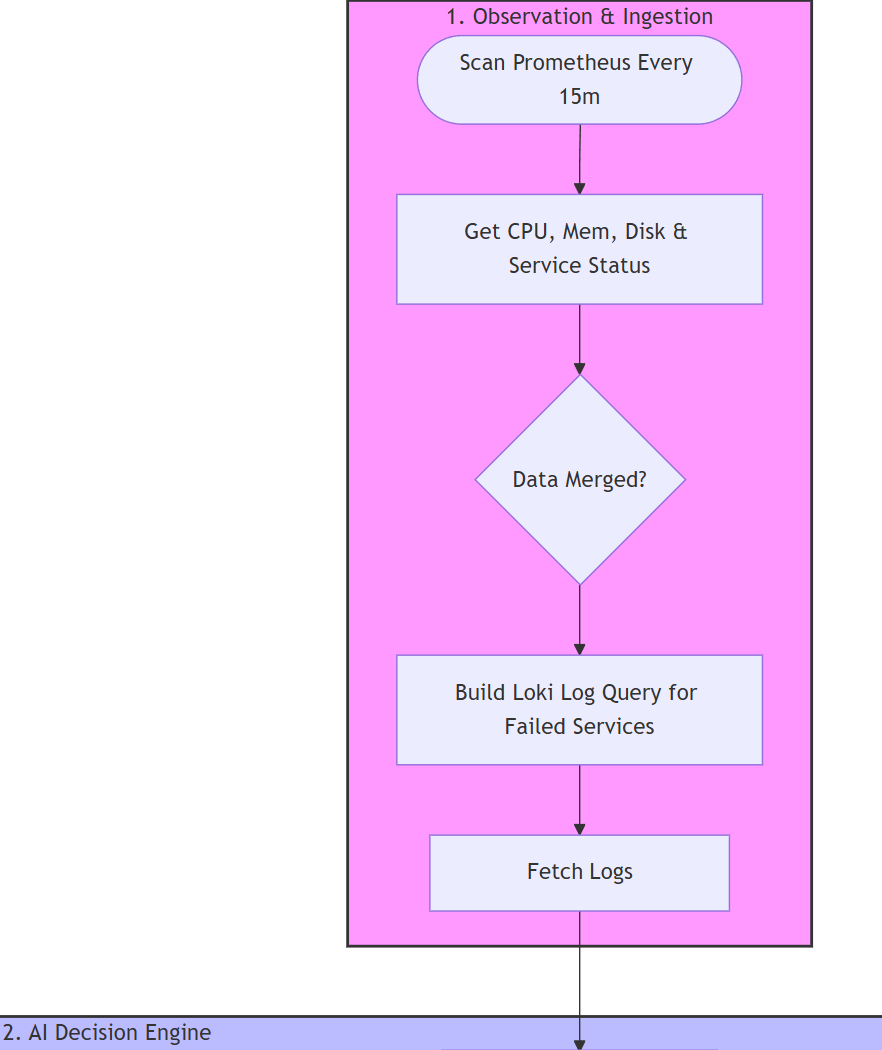
Do you like Mermaid diagrams? You can download the full version below (the Stages described below are redacted for easier readibility):
- Stage 1: Gather metrics from each host
- Get CPU logs (available and top consumers)
- Get RAM logs (available and top consumers)
- Get Disk usage logs
- Get Disk I/O pressure logs
- Get inactive / deactivating for critical services (pre-defined in our variables)
- Get failed services
- Fetch relevant logs from Loki for systemd services that are not working
- Stage 2: AI-decision engine
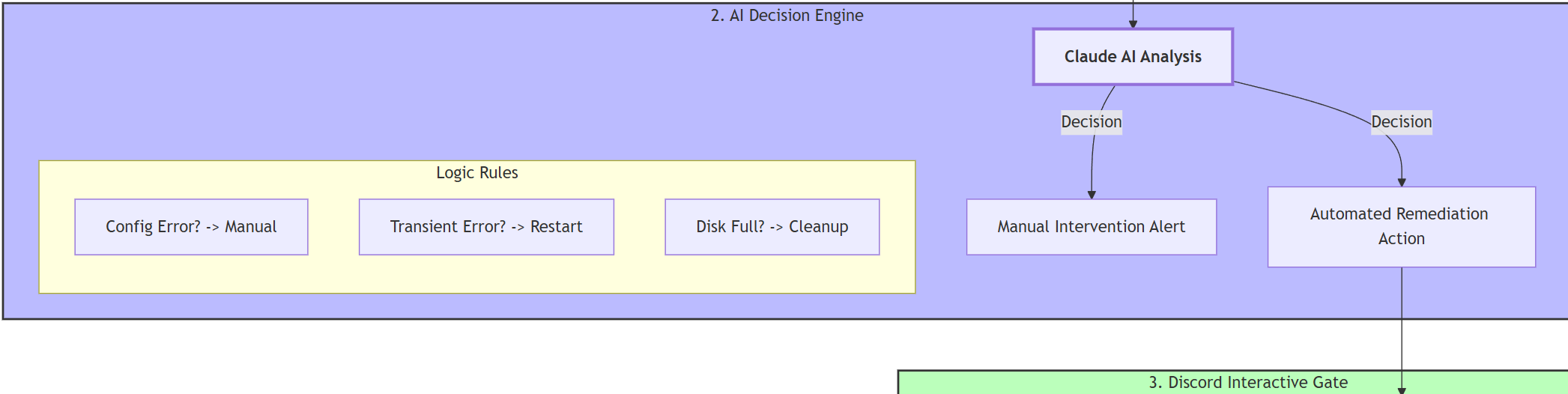
- AI analysis of the logs:
- No issues – workflow finishes
- Issues without pre-defined templates – manual intervention required
- Issues with pre-defined templates – a template ID is matched
- Templates available – you can add your own. At the time of deployment, AI can assign one of the following:
- Systemd is inactive / stopped → restart a service
- Disk utilization is over a threshold (or close to it) → run a disk space clean up job
- System issues (not responsive) → trigger a reboot job
- A process is not responding or faces RAM leak → call kill a process job
- AI analysis of the logs:
- Stage 3: Discord Interaction
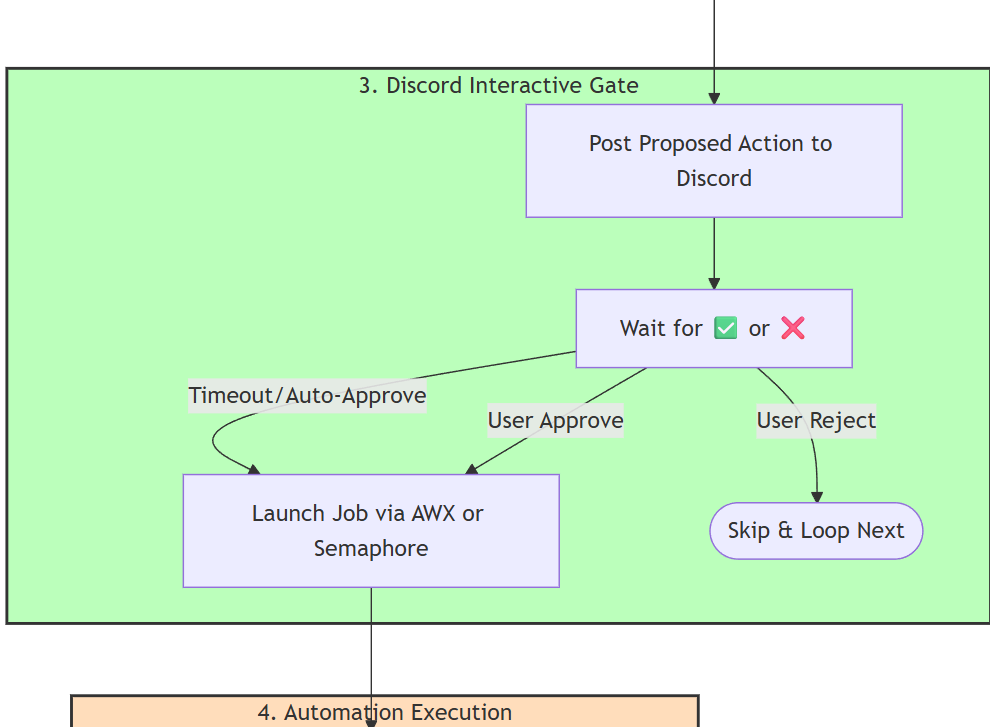
- Categorize the failures based on a risk register (low, medium, high) – more about that below.
- Utilize a Discord bot to post a summary of issues (if more than 2 issues) and the proposed solution for the Sysadmin to approve or reject with pre-defined timeout periods.
- Low and medium level risk jobs get auto-approved on timeout.
- Findings get saved in a file to ensure that subsequent runs do not flag the same issue for a pre-defined amount of hours (default is 8). This value can be changed in the ‘Config’ node.
- A request is sent to the respective automation platform (AWX / Semaphore) to trigger the job selected by AI.
- Stage 4 – Automation Execution
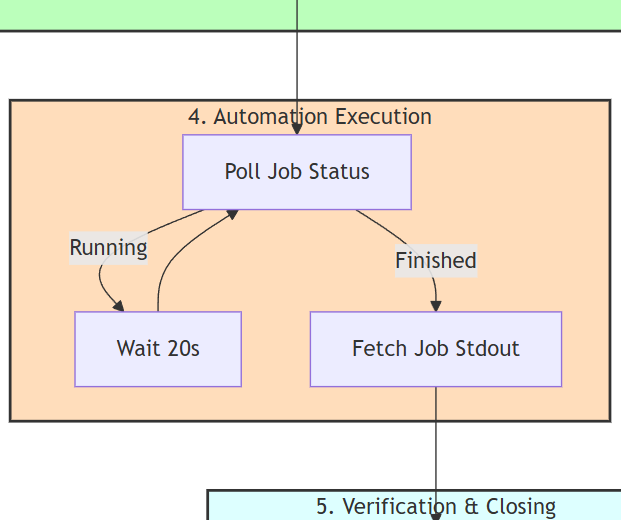
- Monitor the AWX or Semaphore job on a regular basis (every 20 seconds)
- Get results for further processing by AI in the next stage
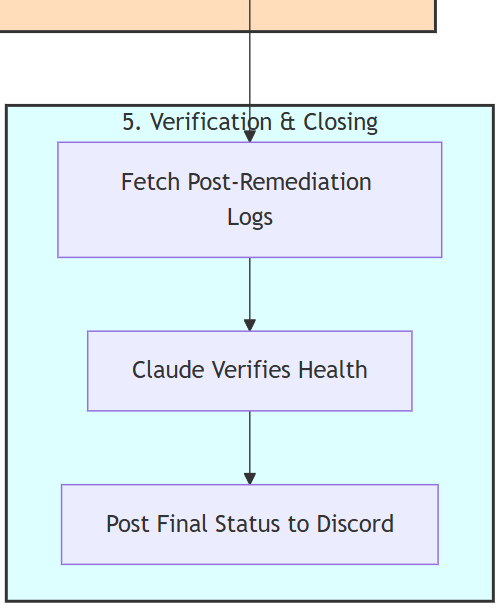
- Stage 5 – Verification & Closing
- Get logs from the automation platform
- Get additional logs via Loki to confirm the result
- Process the logs from both sources by AI
- Post on Discord a structured feedback
- If more additional issues were flagged earlier, loop back to stage 2 for additional requests to be approved.
Now when the structure is explained, we will need to set up those templates.