This is a passive (analysis-only) workflow where we let Claude (or another LLM) process the results of the metrics and recommend next steps. It’s a good starter, esp. if you are new to n8n and find the more advanced workflow in the next Step overwhelming.
- In this workflow, we fetch data from Prometheus in terms of (a) CPU / RAM / Disk usage and (b) service outages (inactive for critical ones and failed for any). Firstly, the metrics are all merged together and then processed together in one JSON.
- Then, the ‘brain’ of the workflow kicks in with custom JS code that processes the metrics to see if an alert needs to be sent.
- We pull out relevant logs from Loki in relation to failed or inactive
systemdservices that can be used to make a better judgement on why the failure occurred. - In addition, it checks a file saved in
/home/node/.n8n/alert-cache-advisory.jsonto see what alerts were sent previously (default is for up to the last 8 hours). This is to avoid a situation when you get repeatedly spammed with the same issue if you let this workflow run every 15-30 mins. - If an alert needs to be sent, the metrics are forwarded to Claude (or your preferred vendor) to make sense of it and recommend a solution. A message on Discord is then sent out.
Import The ‘Infrastructure AI Advisory’ Workflow
Good news, the hard work of putting it together has already been done for you! Simply import the workflow into your n8n instance.
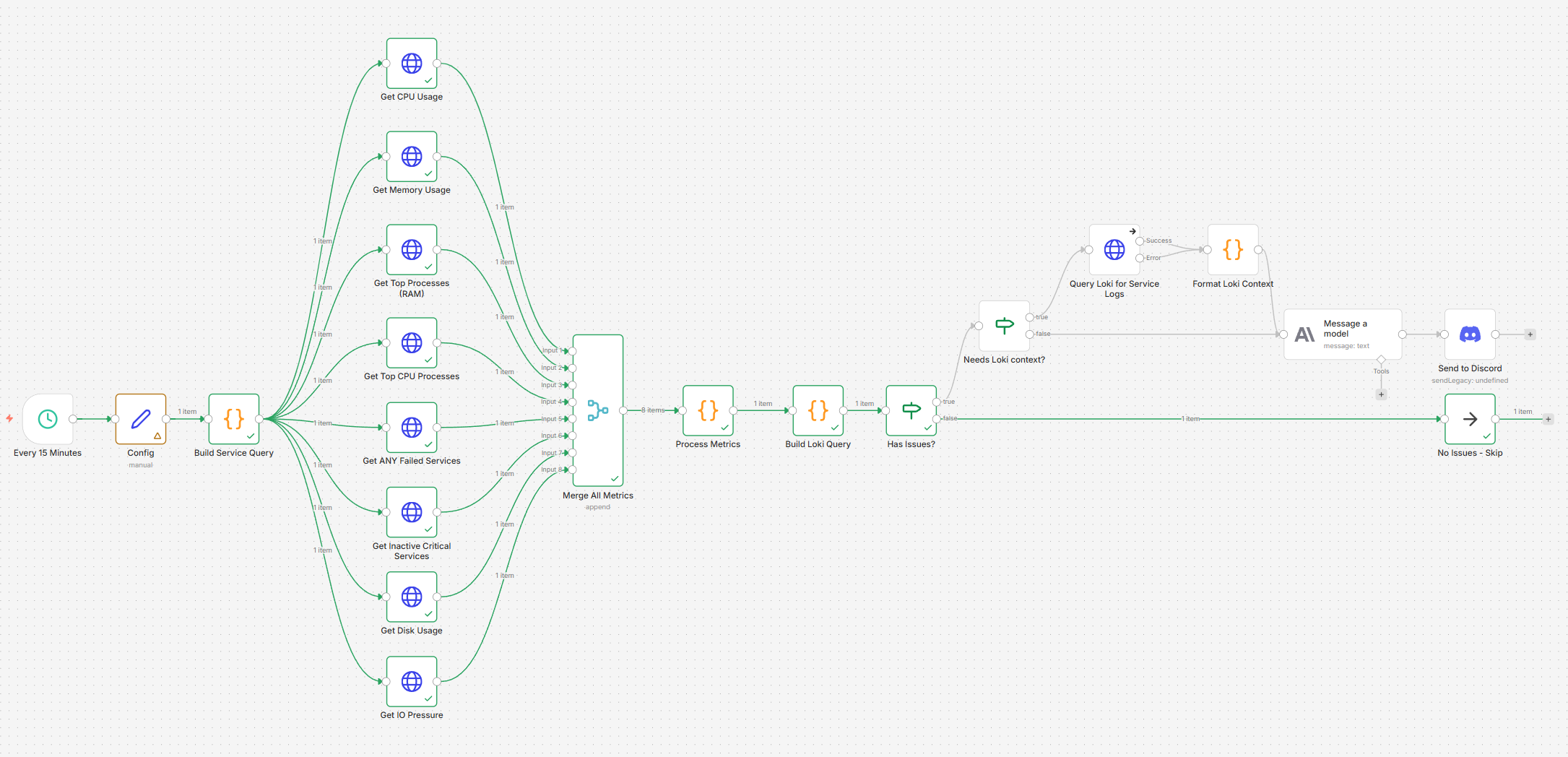
What to do after the import
- Read the sticky notes on what needs to be set up in terms of the ‘Config’ node.
- Add credentials for the relevant services, such as:
- Discord Webhook API
- Claude API
- Prometheus/Loki if you use any authentication (off by default)
- Review the Config node – read the sticky notes 😇
- Give it a test run! Fix any errors related to variables/credentials that you may find.
Specifics for detections
- The Get Disk Usage node looks only at the
/mountpoint, not others – you may wish to modify it as per your requirements. This applies to both workflows in this tutorial. - For all hosts in both workflows, it is assumed that they have a hostname-based label, not just an IP address. Check out the Process Metrics node around row no.30 with the
stripDomain()helper function to get to the hostname from FQDN. I included an exception if an IP address is found to not strip to down to the first octet. - Exceptions in the Build Service node – while most services run as ‘
systemd.service’, in my case, I run some services suc hasphp-fpm.service,syncthing.serviceandpostfix.serviceunder different users (such as[email protected]). For this reason, I included a regex pattern in this node (row no.9 – search for ‘// Build regex patterns for each service’). Feel free to adjust it per your needs.
Output On Discord
- In my case, a few things got flagged:
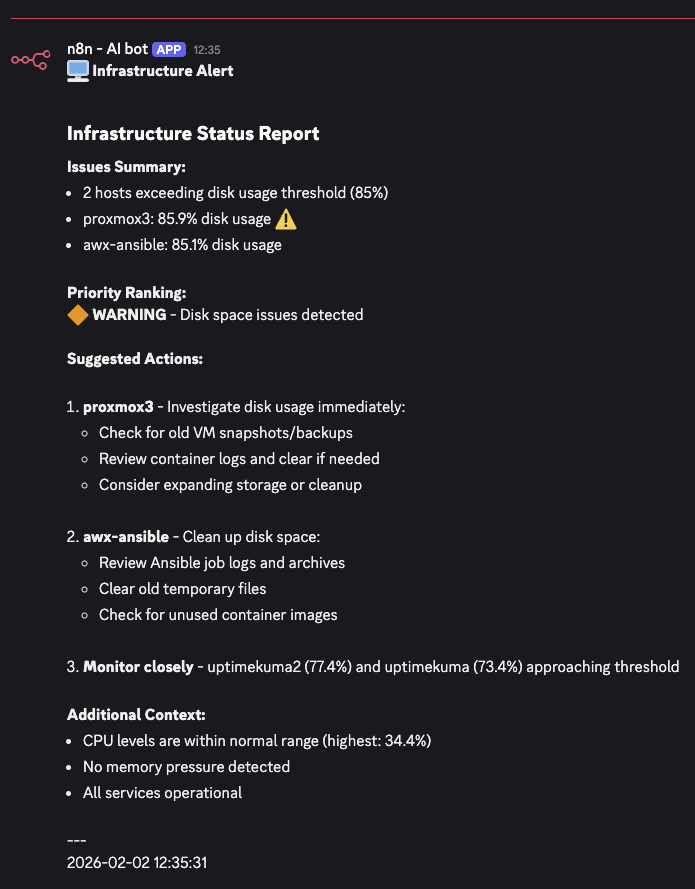
- No alterations are made, AI is used purely in an advisory role.
We demonstrated a simple workflow that processes recent metrics, fetches logs when appropriate and alerts you via Discord. The previous cache on repeated alerts is useful to avoid the situation of getting spammed.
But how about we increase the ‘fun’ and allow AI to handle some of the remediation tasks (that we pre-define) over our infrastructure? So that we move from just recommending the corrective action into also implementing it? Dive with me into part 2 of this tutorial if you feel brave enough 😎