Launch Galera Cluster from Site 1 to Site 2
March 3, 2026
Table of Contents
Pre-requisites
- Each site has an Uptime Kuma instance locally available
- Execution environments on AWX/Ansible:
xolorg.opnsense- used to make API calls to OPNSense to register new host overrides. This is because with Kea DHCP, the automatic registration of static reservations into Unbound DNS is currently missing in OPNSense 25.7+ and so it does not work reliably as in ISC DHCP, from which OPNSense is moving away.awx.awx- in order to interact with the inventory in AWXcommunity.mysql- to set up new Galera nodes (to modify config files).community.proxmox- to spin up new LXCs.
- Each site needs a unique (sub)-domain with pre-defined host overrides (if using Unbound DNS), so that the AWX server on Site 1 can reach a hostname such as
galera5.site2.mydomain.com. In my case, the sites are as follows:- Site 1:
uvody.bakalar.priv- an example host:galera-A1.uvody.bakalar.priv - Site 2:
tusarka.bakalar.priv- an example host:web3.tusarka.bakalar.priv - Site 3: hetzner-witness.bachelor-tech.com - no nodes are installed there, acts as an Arbitrator
- Site 1:
Workflow Explained
- This will be triggered on demand when needed by an admin.
- A survey will pop up asking for a predefined lists of items, such as:
- IP (drop-down)
- hostname (drop-down)
- segment ID (which site) - this will determine on which Proxmox server is the LXC spun up.
- quorum weight - default 1, smaller sites may have lower weight to keep a balance
- hostname (drop-down) - used in the inventory to run jobs against
Modify galera-template’s firewall rule + script
- Ensure that ufw rules are set up as follows:
root@galera--template:/opt/scripts# ufw status numbered
Status: active

 To                         Action      From
 --                         ------      ----
[ 1] 80/tcp                     DENY IN     Anywhere
[ 2] 443                        DENY IN     Anywhere
[ 3] 21/tcp                     DENY IN     Anywhere
[ 4] 4567/tcp                   ALLOW IN    10.10.10.0/24              # Cluster Replication / Multicast (heartbeat, actual writes)
[ 5] 4567/udp                   ALLOW IN    10.10.10.0/24              # Cluster Replication / Multicast (heartbeat, actual writes)
[ 6] 3306/tcp                   ALLOW IN    10.10.10.0/24              # MariaDB SQL client connection
[ 7] 3306/tcp                   ALLOW IN    192.168.0.0/16             # MariaDB SQL client connection
[ 8] 4567/tcp                   ALLOW IN    192.168.0.0/16             # Cluster Replication / Multicast (heartbeat, actual writes)
[ 9] 4567/udp                   ALLOW IN    192.168.0.0/16             # Cluster Replication / Multicast (heartbeat, actual writes)
[10] 2222/tcp                   ALLOW IN    192.168.0.0/16             # SSH in
[11] 4444/tcp                   ALLOW IN    192.168.0.0/16             # Galera full data copy from donor
[12] 4568/tcp                   ALLOW IN    192.168.0.0/16             # IST - Incremental State Transfer - last 10s
[13] 4444/tcp                   ALLOW IN    10.10.10.0/24              # Galera full data copy from donor
[14] 4568/tcp                   ALLOW IN    10.10.10.0/24              # IST - Incremental State Transfer - last 10s
[15] 80/tcp (v6)                DENY IN     Anywhere (v6)
[16] 443 (v6)                   DENY IN     Anywhere (v6)
[17] 21/tcp (v6) DENY IN Anywhere (v6)- You can run the following commands:
sudo ufw allow from 192.168.0.0/16 to any port 4444 proto tcp comment "Galera full data copy from donor"
sudo ufw allow from 10.10.10.0/24 to any port 4444 proto tcp comment "Galera full data copy from donor"
sudo ufw allow from 10.10.10.0/24 to any port 3306 proto tcp comment "MariaDB SQL client connection"
sudo ufw allow from 192.168.0.0/16 to any port 3306 proto tcp comment "MariaDB SQL client connection"
sudo ufw allow from 10.10.10.0/24 to any port 4568 proto tcp comment "IST - Incremental State Transfer - last 10s"
sudo ufw allow from 192.168.0.0/16 to any port 4568 proto tcp comment "IST - Incremental State Transfer - last 10s"- Or to simplify it in a table:
| Port | Protocol | Status | Scope | Comment |
|---|---|---|---|---|
| 2222 | TCP | ALLOW | LAN (192.168.0.0/16) | SSH Management |
| 3306 | TCP | ALLOW | LAN + VPN | Client Connections (Apps + Uptime Kuma) |
| 4567 | TCP/UDP | ALLOW | LAN + VPN | Replication Traffic (Heartbeats & Write Sets) |
| 4568 | TCP | ALLOW | LAN + VPN | IST (Incremental State Transfer - "The catch-up") |
| 4444 | TCP | ALLOW | LAN + VPN | SST (Snapshot Transfer - "The full backup") |
| 80/443 | TCP | DENY | Anywhere | Explicitly block Web traffic (Good practice) |
-
To explain in terms of bandwidth/latency terms:
- Port 4567 (Live Traffic): This is sensitive to Latency. If your VPN latency spikes, this port causes the cluster to pause writes (Flow Control).
- Port 4444 (SST): This is sensitive to Bandwidth. If a new node joins, it will max out your VPN upload speed on the donor side, potentially choking the VPN for other services (like your web traffic).
- Tip: If you ever find a node restore kills your VPN, you can limit the bandwidth in the
mariadb-backupoptions in the config file later.
-
Before converting the LXC into a template again, ensure that by default, incoming traffic is blocked and outgoing is allowed:
root@galera--template:/opt/scripts# ufw status verbose

Status: active
Logging: on (low)
Default: deny (**incoming**), allow (**outgoing**), disabled (routed)- Add a script for Uptime Kuma:
root@galera--template:/# cat /opt/scripts/check_galera.sh
#!/bin/bash

# --- CONFIGURATION ---
# Argument 1: The Kuma Push URL (including the unique code)
PUSH_URL="$1"

# Credentials (Local check doesn't necessarily need network IP, can use localhost)
# Recommendation: Use a .my.cnf file for the user running the script to avoid passwords in plain text in this file.
# If hardcoding is necessary:
DB_USER="uptimekuma"
DB_PASS="YourStrongPasswordHere"

if [ -z "$PUSH_URL" ]; then
    echo "Usage: $0 <uptime_kuma_push_full_url>"
    exit 1
fi

# --- CHECK 1: Is Process Running? ---
if ! systemctl is-active --quiet mariadb; then
     curl -fsS --retry 3 "${PUSH_URL}?status=down&msg=Service_Stopped&ping=" > /dev/null
     exit 0
fi

# --- CHECK 2: Galera Status ---
# We check 'wsrep_local_state_comment'.
# Valid states for serving traffic: 'Synced'.
# 'Donor/Desynced' means it's up but taking a backup or catching up (technically up, but maybe not ready for writes).

STATUS=$(mysql -u"$DB_USER" -p"$DB_PASS" -N -B -e "SHOW STATUS LIKE 'wsrep_local_state_comment';" 2>/dev/null | awk '{print $2}')

if [ "$STATUS" == "Synced" ]; then
    curl -fsS --retry 3 "${PUSH_URL}?status=up&msg=Synced&ping=" > /dev/null
elif [ "$STATUS" == "Donor/Desynced" ]; then
    # Optional: Mark as UP but with a warning message, or DOWN depending on your preference.
    curl -fsS --retry 3 "${PUSH_URL}?status=up&msg=Donor_Mode&ping=" > /dev/null
else
    # Joined, Connected, etc., but not Synced usually means issues.
    curl -fsS --retry 3 "${PUSH_URL}?status=down&msg=State_${STATUS}&ping=" > /dev/null
fi
- Once done, shut down the LXC and turn it into a template. Then back it up to your PBS to make it reachable from other Proxmox hosts that are not on the same cluster. As you make the backup, tick the ‘Protect’ box to ensure the template’s backup is protected, as we will rely on it.
Add a Credential Type in AWX for SST replication
- In AWX, go to Administration -> Credential Types -> Add.
- Name:
Galera Credentials - Enter the following for the input & injector configuration:
- Name:
**# Input configuration (YAML):**

fields:
  - id: wsrep_sst_password
    label: Galera SST Password
    type: string
    secret: true
required:
  - wsrep_sst_password

**# Injector configuration (YAML)**

extra_vars:
  galera_sst_pass: '{{ wsrep_sst_password }}'
- Then add your Credential into it called
galera_sst_passwith the replication password.
Create the Galera config to deploy
- In your Gitea repository, create a
60-galera.cnffile that will be saved on the node once deployed from the template.
# 60-galera.cnf.j2

[mysqld]
# MySQL-related settings
bind-address = 0.0.0.0
binlog_format = ROW
default_storage_engine = InnoDB
innodb_autoinc_lock_mode = 2

# Durability vs Performance
innodb_flush_log_at_trx_commit = 2
innodb_log_file_size = 256M
innodb_log_buffer_size = 64M
innodb_lock_wait_timeout = 60
innodb_buffer_pool_size = 800M

# Network & Safety
skip-name-resolve
max_connect_errors = 1000
log_warnings = 1
wait_timeout = 1800
interactive_timeout = 1800
max_allowed_packet = 1G

[galera]
# Galera Provider Configuration
wsrep_on=ON
wsrep_provider=/usr/lib/galera/libgalera_smm.so

# Provider Options
# gmcast.segment is injected via Ansible Inventory/Group Vars
wsrep_provider_options="gcache.size=512M;gcs.fc_limit=128;gcs.fc_factor=0.8;gmcast.segment={{ galera_segment }};pc.weight={{ galera_weight }}"

# Cluster Configuration - clusterA, clusterB, etc.
wsrep_cluster_name="{{ galera_cluster_name }}"
# This variable should be defined in your Inventory "all" group vars
wsrep_cluster_address="{{ galera_cluster_address_string }}"

# SST Configuration
wsrep_sst_method = mariabackup
# The user is hardcoded (usually safe), the password comes from AWX Secret
wsrep_sst_auth = sst_user:{{ galera_sst_pass }}

wsrep_node_address = "{{ ansible_ip | default(ansible_host) }}"
wsrep_sst_receive_address = "{{ ansible_ip | default(ansible_host) }}"
wsrep_node_name = "{{ inventory_hostname }}"
- Create a single node deployment script. What does this script do?
- On the destination Proxmox host (or cluster), we find the next available VM ID.
- Restore the latest template copy from Proxmox Backup Server (PBS), which is physically located on Site 1 but reachable by Site 2 via an existing S2S VPN tunnel. The naming by which it is mapped is a bit different, so the variables differ.
- Create a full (not linked!) copy of the template on the same Proxmox host after identifying the next available VM ID and then the template gets removed. The final container gets turned on.
- A DNS override is created in OPNSense to ensure it is reachable between the networks.
# 1-provision_one_galera_node.yml

---
- name: Provision Galera Container (Clone Method)
  hosts: localhost
  gather_facts: no
  connection: local

  vars:
    template_id: 150
    target_disk_storage: "local-lvm"
    storage_id_site1: "pbs-rpi"
    storage_id_site2: "rpi_backups"

  tasks:
    # ---------------------------------------------------------
    # 1. DYNAMIC INVENTORY LOOKUP
    # ---------------------------------------------------------
    - name: Identify Site Group Name
      set_fact:
        target_site_group: "{{ 'uvody' if galera_segment|int == 1 else 'tusarka' }}"

    - name: Find Target Proxmox Host in Inventory
      set_fact:
        pve_inventory_name: >-
          {{
            groups.get(target_site_group, [])
            | intersect(groups.get('proxmox_nodes', []))
            | first
            | default('')
          }}

    - name: Find Target OPNsense Host in Inventory
      set_fact:
        # Use .get() to return empty list [] if group is missing, preventing crash
        opnsense_inventory_name: >-
          {{
            groups.get(target_site_group, [])
            | intersect(groups.get('opnsense_hosts', []))
            | first
            | default('')
          }}

    - name: Validate Inventory Lookups
      fail:
        msg: >
          Could not find required infrastructure hosts in the selected inventory.
          Target Site: {{ target_site_group }}
          Found Hypervisor: '{{ pve_inventory_name }}' (Expected a host in 'proxmox_nodes')
          Found Firewall:   '{{ opnsense_inventory_name }}' (Expected a host in 'opnsense_hosts')
      when: pve_inventory_name == '' or opnsense_inventory_name == ''

    - name: Extract Variables
      set_fact:
        opnsense_ip: "{{ hostvars[opnsense_inventory_name]['ansible_ip'] | default(hostvars[opnsense_inventory_name]['ansible_host']) }}"
        pbs_storage_id: "{{ storage_id_site1 if galera_segment|int == 1 else storage_id_site2 }}"
        short_hostname: "{{ target_host.split('.')[0] }}"
        dns_domain: "{{ target_host.split('.')[1:] | join('.') }}"

    - name: DEBUG - Verify Target
      debug:
        msg: "Delegating to Inventory Host: {{ pve_inventory_name }}"

    # ---------------------------------------------------------
    # 1.5 PRE-FLIGHT CHECK (Prevent Clashes)
    # ---------------------------------------------------------
    - name: "Check if host '{{ short_hostname }}' already exists"
      command: "/usr/bin/pvesh get /cluster/resources --type vm --output-format json"
      register: cluster_resources
      delegate_to: "{{ pve_inventory_name }}"
      become: true
      vars:
        ansible_connection: ssh

    - name: Parse Existing Hosts
      set_fact:
        existing_host_conflict: >-
          {{
            cluster_resources.stdout
            | from_json
            | selectattr('name', 'equalto', short_hostname)
            | list
          }}

    - name: "FAIL: Host '{{ short_hostname }}' already exists!"
      fail:
        msg: >
          A container with the name '{{ short_hostname }}' already exists!
          VMID: {{ existing_host_conflict[0].vmid }}
          Status: {{ existing_host_conflict[0].status }}
          Node: {{ existing_host_conflict[0].node }}

          Please delete it manually or choose a different hostname.
      when: existing_host_conflict | length > 0

    # ---------------------------------------------------------
    # 2. GET TEMP VMID (For the Intermediate Restore)
    # ---------------------------------------------------------
    - name: Find First Free VMID (For Template Restore)
      command: "/usr/bin/pvesh get /cluster/nextid"
      register: temp_vmid_out
      delegate_to: "{{ pve_inventory_name }}"
      vars:
        ansible_connection: ssh
      become: true

    - name: Set Temp VMID
      set_fact:
        temp_vmid: "{{ temp_vmid_out.stdout | trim }}"

    # ---------------------------------------------------------
    # 3. FIND BACKUP
    # ---------------------------------------------------------
    - name: "Fetch raw backup list for {{ template_id }}"
      command: "/usr/sbin/pvesm list {{ pbs_storage_id }} --content backup"
      register: backup_list_raw
      delegate_to: "{{ pve_inventory_name }}"
      vars:
        ansible_connection: ssh
      become: true

    - name: Parse and Select Latest Backup
      set_fact:
        latest_backup_volid: >-
          {{
            backup_list_raw.stdout_lines
            | select('search', 'ct/' ~ template_id)
            | sort(reverse=True)
            | first
            | split(' ')
            | first
          }}

    - name: Fail if backup not found
      fail:
        msg: "Backup for ID {{ template_id }} not found on storage '{{ pbs_storage_id }}'"
      when: latest_backup_volid is undefined or latest_backup_volid == "" or latest_backup_volid == "Volid"

    # ---------------------------------------------------------
    # 4. RESTORE (INTERMEDIATE STEP)
    # ---------------------------------------------------------
    - name: "Restore Backup to Temp ID {{ temp_vmid }}"
      # We restore with the final network settings here so the Clone inherits them
      command: >
        /usr/sbin/pct restore {{ temp_vmid }} {{ latest_backup_volid }}
        --hostname "temp-restore-galera-template"
        --storage {{ target_disk_storage }}
        --net0 name=eth0,bridge=vmbr0,firewall=1,ip={{ target_ip }}/24,gw={{ opnsense_ip }}
        --searchdomain {{ dns_domain }}
      delegate_to: "{{ pve_inventory_name }}"
      vars:
        ansible_connection: ssh
      become: true

    # ---------------------------------------------------------
    # 5. GET FINAL VMID (For the Production Container)
    # ---------------------------------------------------------
    - name: Find Second Free VMID (For Final Container)
      command: "/usr/bin/pvesh get /cluster/nextid"
      register: final_vmid_out
      delegate_to: "{{ pve_inventory_name }}"
      vars:
        ansible_connection: ssh
      become: true

    - name: Set Final VMID
      set_fact:
        final_vmid: "{{ final_vmid_out.stdout | trim }}"

    # ---------------------------------------------------------
    # 6. CLONE & CONFIGURE
    # ---------------------------------------------------------
    - name: "Clone Temp ID {{ temp_vmid }} to Final ID {{ final_vmid }}"
      # We use --full 1 to ensure it is a standalone container (not dependent on the temp one)
      # We verify the hostname is set correctly on the final unit
      command: >
        /usr/sbin/pct clone {{ temp_vmid }} {{ final_vmid }}
        --hostname {{ short_hostname }}
        --full 1
      delegate_to: "{{ pve_inventory_name }}"
      vars:
        ansible_connection: ssh
      become: true

    - name: "Set Proxmox Tags on Final ID"
      command: "pct set {{ final_vmid }} --tags {{ target_ip }},2222,{{ target_site_group }},galera,database,{{ galera_cluster_name | lower }}"
      delegate_to: "{{ pve_inventory_name }}"
      vars:
        ansible_connection: ssh
      become: true

    # ---------------------------------------------------------
    # 7. CLEANUP & START
    # ---------------------------------------------------------
    - name: "Destroy Intermediate Template {{ temp_vmid }}"
      command: "/usr/sbin/pct destroy {{ temp_vmid }}"
      delegate_to: "{{ pve_inventory_name }}"
      vars:
        ansible_connection: ssh
      become: true

    - name: "Start Final Container {{ final_vmid }}"
      command: "/usr/sbin/pct start {{ final_vmid }}"
      delegate_to: "{{ pve_inventory_name }}"
      vars:
        ansible_connection: ssh
      become: true

    # ---------------------------------------------------------
    # 8. REGISTER DNS
    # ---------------------------------------------------------
    - name: Register DNS in OPNsense
      oxlorg.opnsense.unbound_host:
        firewall: "{{ opnsense_ip }}"
        api_key: "{{ lookup('env', 'OPNSENSE_SITE' + galera_segment|string + '_API_KEY') }}"
        api_secret: "{{ lookup('env', 'OPNSENSE_SITE' + galera_segment|string + '_API_SECRET') }}"
        ssl_verify: false
        hostname: "{{ short_hostname }}"
        domain: "{{ dns_domain }}"
        value: "{{ target_ip }}"
        description: "Auto-provisioned via Ansible"
        record_type: A
        enabled: true
        state: present
        match_fields: [hostname, domain]
delegate_to: localhost- If you do not have it yet, you will need to join the inventories (Hetzner + Bachelor Home Lab) using a smart group, in order to run a playbook that will include both inventories.
- In AWX, go to Inventories -> Add -> Smart Inventory.
- Name:
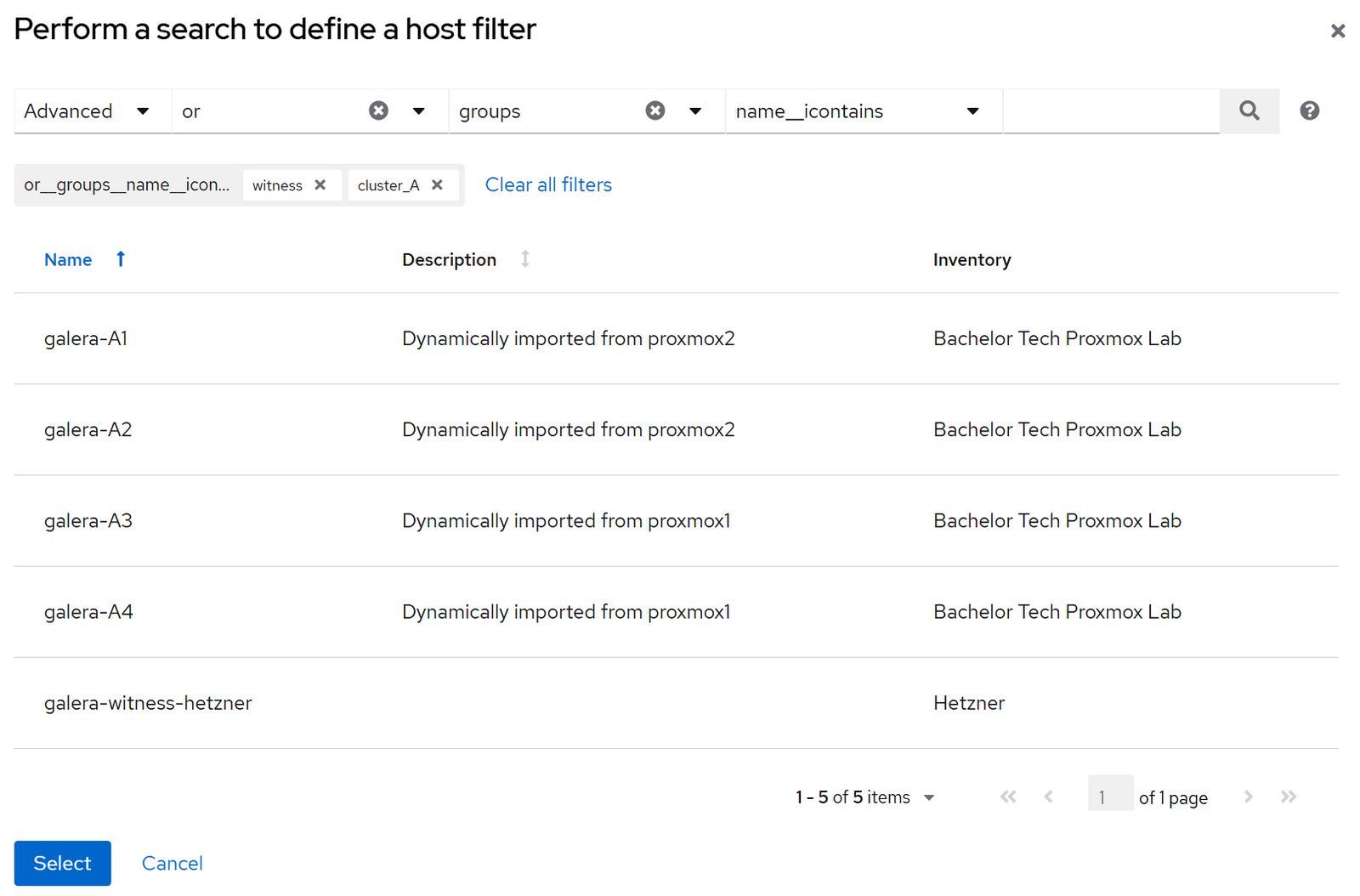
Galera Cluster-A Production. - Smart Host Filter: Essentially, we need to use the ‘Advanced’ filter with ‘or’ operator to add each group. The result should be
groups__name__icontains=witness or groups__name__icontains=cluster_A. - This creates an inventory that contains only the relevant hosts from both parent inventories.
- Create a new template for the copying and configuring of a new template.
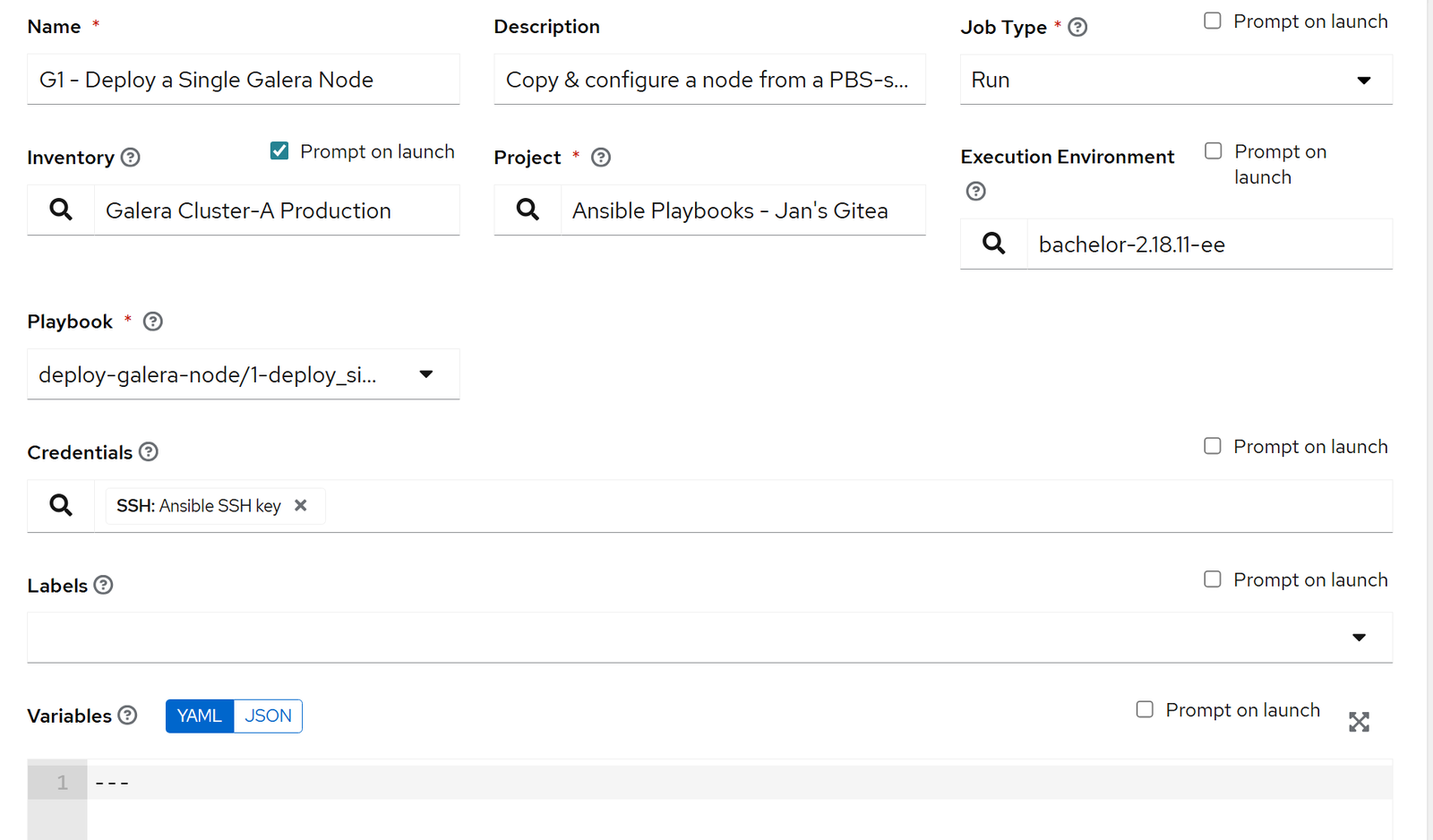
- Name:
G1 - Deploy a Single Galera Node - Description:
Copy & configure a node from a PBS-stored template - Inventory:
Galera Cluster-A Production (tick prompt on launch) - Project:
Ansible Playbooks - Jan's Gitea - EE:
bachelor-2.18.11-ee - Playbook:
deploy-galera-node/1-deploy_single_galera_node.yml - Credentials:
Ansible SSH key - Privilege Escalation: tick
- Name:
- Save it and go into the ‘Survey’ section and add variables.
- Flip the switch to enable the survey!
- All questions will be required - tick the ‘Required’ box as you add them (below).
- Q1 - Target Cluster Name
- Description: Cluster name in the config is without _ or - signs
- Answer variable name:
galera_cluster_name - Answer type: multiple choice
- Choice options: clusterA, clusterB, clusterC (enter after each)
- Q2 - Target Node Hostname
- Description: Which Galera node would you like to deploy?
- Answer variable name:
target_host - Answer type: multiple choice
- Choice options: galera-A1….galera-A10 (enter after each)
- Q3 - Galera Segment ID
- Description: 1 = Uvody, 2 = Tusarka, 3 = Hetzner, 4 = New location
- Answer variable name:
target_host - Answer type: integer
- Minimum: 1
- Maximum: 10
- Default: 2
- Q4 - Quorum Weight
- Description: Standard is 1. Increase for fallback sites.
- Answer variable name:
galera_weight - Answer type: integer
- Minimum: 1
- Maximum: 2
- Default: 1
- Q5 - Target IP
- Description: Specify the IP address of the node
- Answer variable name:
target_ip - Answer type: Multiple choice
- Choice options: 192.168.8.71 … 192.168.8.74

Test G1 deployment
- Launch the job and fill in the survey!
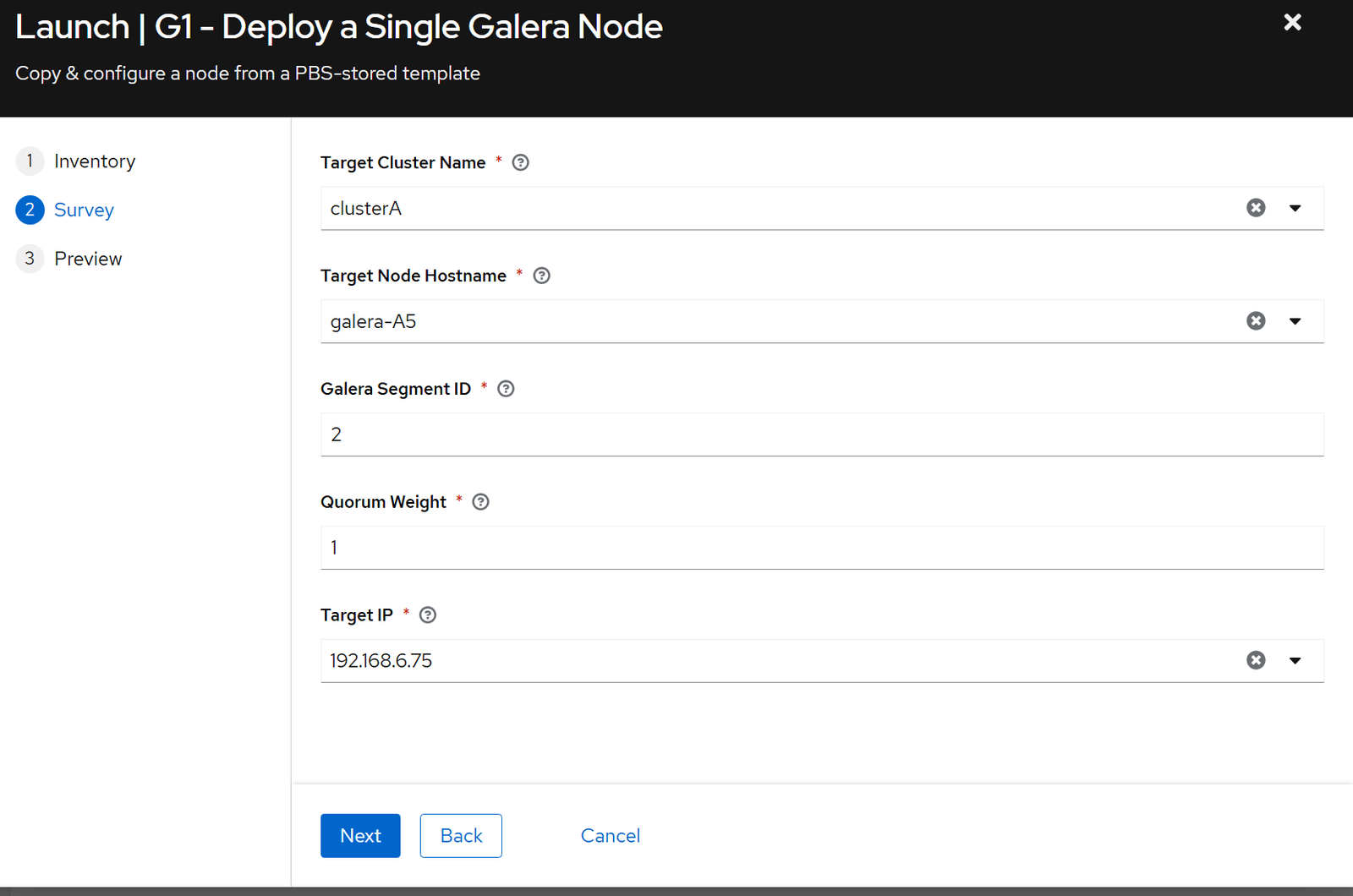
- If it goes well, then during the restoration, you will observe that a container is being restored onto the right Proxmox host:

- Ensure that the Unbound DNS override was created as well:

- Then we will need a job that modifies configuration on other nodes to update the
60-galera.cnf.
# 2-configure_one_galera_node.yml

---
- name: Configure Single Galera Node
  # Wildcard allows matching "galera-a5" even if inventory has "galera-a5.domain.com"
  hosts: "{{ target_host.split('.')[0] }}*"
  become: yes
  gather_facts: no # Do not SSH in as the LXC will not be ready straight after it is switched on

  vars:
    # Default fallbacks
    galera_segment: 2
    galera_weight: 1
    galera_sst_user: "sst_user"
    galera_cluster_name: "{{ galera_cluster_name | default('clusterA') }}"

    # ROBUST CLUSTER STRING LOGIC
    # 1. We define the candidate groups: The Galera Cluster + The Witness Group.
    #    (We accept both 'cluster_a' and 'clustera' to handle tag variations).
    # 2. We Loop through only these hosts.
    # 3. We use .get() to safely retrieve IPs, defaulting to the hostname if IP is missing.

    galera_cluster_address_string: >-
      gcomm://{% for host in (
        groups.get(galera_cluster_name | lower, [])
        + groups.get((galera_cluster_name | lower) | replace('a', '_a'), [])
        + groups.get('witness_group', [])
      ) | unique -%}

      {{ hostvars[host].get('ansible_ip', hostvars[host].get('ansible_host', host)) }}

      {%- if not loop.last -%},{%- endif -%}
      {%- endfor %}

  pre_tasks:
    - name: Wait for SSH Connection to be available
      wait_for_connection:
        delay: 5
        timeout: 300  # Wait up to 5 minutes
        connect_timeout: 5
        sleep: 5

    - name: Gather Facts (Manual)
      setup:

  tasks:
    - name: Fail if target_host is not defined
      fail:
        msg: "You must specify a target_host variable!"
      when: target_host is not defined

    - name: Stop MariaDB (to apply new config)
      systemd:
        name: mariadb
        state: stopped

    - name: "Deploy Galera Config (Segment: {{ galera_segment }}, Weight: {{ galera_weight }})"
      template:
        src: 60-galera.cnf.j2
        dest: /etc/mysql/mariadb.conf.d/60-galera.cnf
        owner: root
        group: root
        mode: '0644'
      register: config_pushed

    - name: Start MariaDB Service
      systemd:
        name: mariadb
        state: started
        enabled: yes

    - name: Check Sync Status
      command: mysql -e "SHOW STATUS LIKE 'wsrep_local_state_comment';"
      register: node_state
      changed_when: false
      failed_when: "'Synced' not in node_state.stdout"
      retries: 20
      delay: 5

    # ---------------------------------------------------------
    # STATUS CHECKS
    # ---------------------------------------------------------
    - name: Query Cluster Size and Weight
      command: mysql -e "SHOW STATUS LIKE '{{ item }}';"
      loop:
        - wsrep_cluster_size
        - wsrep_cluster_weight
      register: cluster_status
      changed_when: false

    - name: Display Cluster Status
      debug:
        msg: "{{ item.stdout_lines }}"
      loop: "{{ cluster_status.results }}"
      loop_control:
        label: "{{ item.item }}"
3rd script to configure other nodes + Galera witness
# 3-update_other_nodes_config_after_change.yml
---
- name: Update Galera Cluster Configuration (Rolling)
  hosts: "{{ galera_cluster_name }}"
  become: yes
  serial: 1

  vars:
    galera_cluster_address_string: >-
      gcomm://{% for host in (
        groups.get(galera_cluster_name | lower, [])
        + groups.get((galera_cluster_name | lower) | replace('a', '_a'), [])
        + groups.get('witness_group', [])
      ) | unique -%}

      {{ hostvars[host].get('ansible_ip', hostvars[host].get('ansible_host')) }}

    galera_segment: "{{ hostvars[inventory_hostname]['galera_segment'] | default(10) }}"

  tasks:
    # -----------------------------------------------------------
    # BLOCK: DATA NODES ONLY (Segment != 3)
    # -----------------------------------------------------------
    - name: MariaDB Configuration Tasks
      block:
        - name: Check current Cluster Address in config
          command: grep "wsrep_cluster_address" /etc/mysql/mariadb.conf.d/60-galera.cnf
          register: current_config
          changed_when: false
          ignore_errors: yes

        - name: Update Config and Restart
          block:
            - name: Stop MariaDB
              systemd:
                name: mariadb
                state: stopped

            - name: Deploy Updated Config
              template:
                src: ../templates/60-galera.cnf.j2
                dest: /etc/mysql/mariadb.conf.d/60-galera.cnf
                owner: root
                group: root
                mode: '0644'

            - name: Start MariaDB
              systemd:
                name: mariadb
                state: started

            - name: Wait for Node to Sync
              command: mysql -e "SHOW STATUS LIKE 'wsrep_local_state_comment';"
              register: node_state
              until: node_state.stdout.find("Synced") != -1
              retries: 30
              delay: 10

          # Only run restart block if the string is missing
          when: galera_cluster_address_string not in current_config.stdout

      # Only run this block on Data Nodes (Not the Witness on Site 3)
      when: galera_segment | int != 3

    # -----------------------------------------------------------
    # NEW TASKS: Final Next Step Reminder
    # -----------------------------------------------------------
    - name: Determine OPNsense Site Name
      set_fact:
        opnsense_site_name: "{{ 'Site 1 (U vody)' if galera_segment|int == 1 else 'Site 2 (Tusarka)' }}"
      when: galera_segment | int != 3

    - name: Next Steps Reminder
      debug:
        msg: "Remember to verify that you have the host {{ inventory_hostname }} added on {{ opnsense_site_name }}'s HAProxy as a Real Server and in the back-end pool to start serving traffic."
when: galera_segment | int != 3Enjoying this tutorial?
This site is a non-profit project. If it saved you some time, you can support it by getting Jan some coffee.
☕ Buy me a coffee
Comments