Deploy Gitea on Proxmox and use git to track WordPress core, plugins and themes for a HA website
May 9, 2025
Table of Contents
- Part 1: Install Gitea as an LXC from a Turnkey template
- Part 2: Configure self-hosting for Gitea
- Part 3: Set up and init your repo (first time)
- Part 3b: Set up for manual pulls
- Part 4: Clone the repo onto the other web server(s)
- Part 5: Automate a sync to other nodes with webhook
- Part 6: Test the workflow in real!
- Part 7: Further Considerations - Conclusion
- Re-configure syncthing in a nested folder on your other web server(s)
- Run a plugin update test with commits to Gitea and syncing with other nodes
Part 1: Install Gitea as an LXC from a Turnkey template
- Download the turnkey LXC template and install it
- Set up an SSH key to access Gitea.
Part 2: Configure self-hosting for Gitea
- Configure SMTP and other basic features under /etc/gitea/app.ini
- Optional: Source a local HTTPS cert for Gitea from OPNSense (ACME plugin) with HAProxy
- Security hardening of your Gitea instance
Part 3: Set up and init your repo (first time)
- Create a repo on Gitea
- On the top right side of your Gitea web interface, click on the + sign and select 'New Repository'.

- Add a name
    - Leave the remaining options at their defaults unless you have a specific preference (visibility, .gitignore template, license, etc.).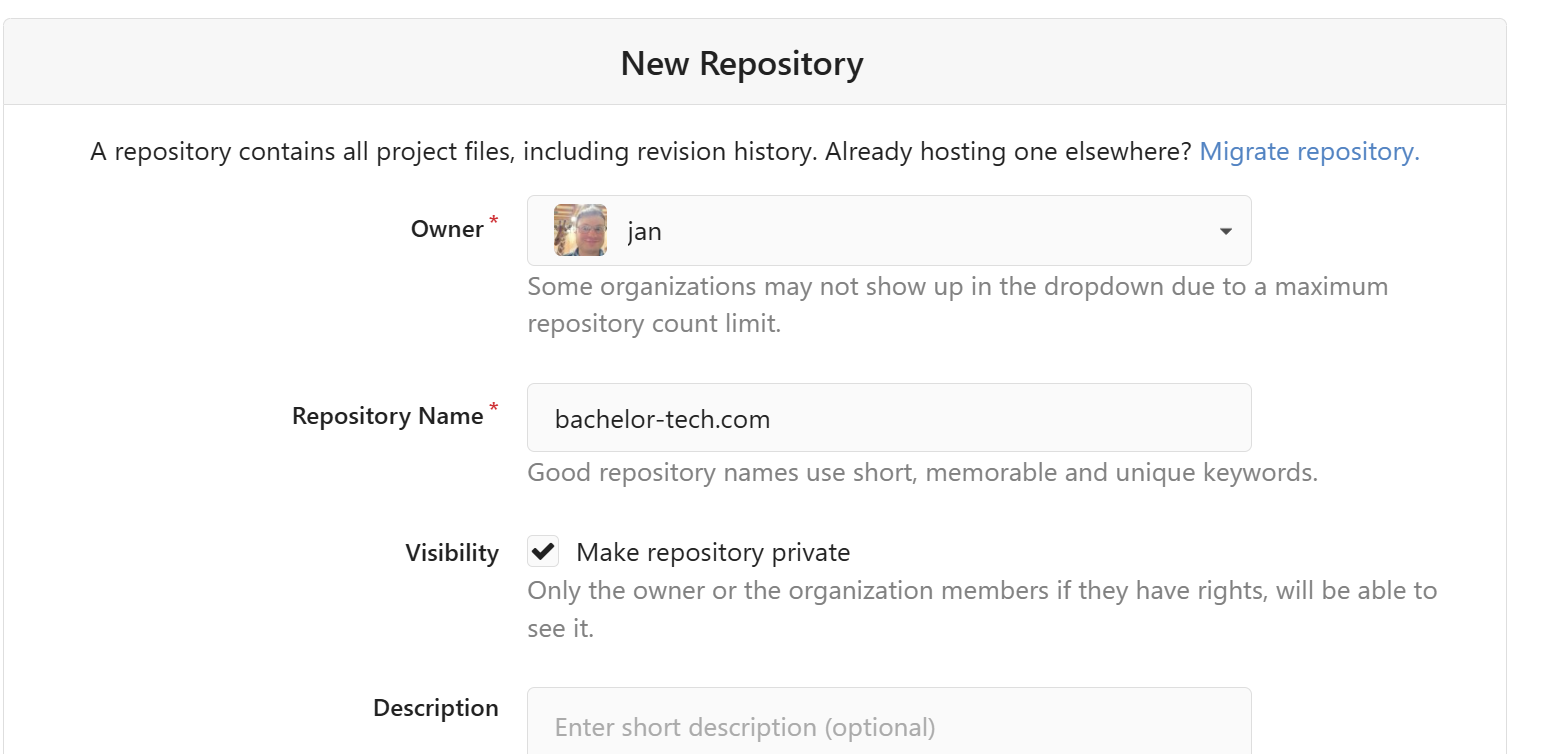
As the repo is created, you will be provided with a full URL that ends with .git. Keep that window open for later use, once we have done a local commit, we can upload it to that origin.
- Sort out account/file/folder permissions
- Typically, you will have a different user (such as www-data) running under
apacheornginxthat has access to the www files. - We will want to be able to create a local repo as a user we actually SSH in with, such as 'jan'. It is important to ensure that the user has the required permissions.
- None of this should include any downtime for the site if done correctly. It is still recommended to take a snapshot of your VM just in case.
- Typically, you will have a different user (such as www-data) running under
# If you are unsure about who owns the www files, run this in your www folder:
ls -la /var/www/html

# Then you can add a user to the right group:
sudo usermod -a -G www-data jan

# Then log out and log back in and run:
id
- The output should reveal that the user is a member of the `www-data` group (or another based on your set up):
- Change permissions on folders to 775 and on files to 664:
sudo find /path/to/your/wordpress/root -type d -exec chmod 775 {} \;
# sudo find /var/www/html/iriskayan.com/ -type d -exec chmod 775 {} \;

sudo find /path/to/your/wordpress/root -type f -exec chmod 664 {} \;
# sudo find /var/www/html/iriskayan.com/ -type f -exec chmod 664 {} \;

# Set it up for future folders
sudo find /path/to/your/wordpress/root -type d -exec chmod g+s {} \;
# sudo find /var/www/html/iriskayan.com/ -type d -exec chmod g+s {} \;- Now we can safely change the owner of the files from
www-datato our user, e.g. jan.
sudo chown -R jan:www-data /path/to/your/wordpress/
# sudo chown -R jan:www-data /var/www/html/iriskayan.com/- Install and initialize the repo:
sudo apt update && sudo apt install git
cd /var/www/your-site-directory
# cd /var/www/html/bachelor-tech.com/

# Set the default branch name as 'main' instead of 'master', as Gitea expects 'main':
git config --global init.defaultBranch main
git init- Set up folders to ignore - this applies only to WordPress sites - if you use another web engine, check out what is standard for your case:
nano .gitignore

# WordPress
wp-config.php
wp-content/uploads/
wp-content/backups/
wp-content/cache/
wp-content/upgrade/
wp-content/advanced-cache.php
wp-content/wp-cache-config.php
# Used by the Wordfence plugin
wp-content/wflogs/

# Various Logs
*.log
debug.log

# System files
.DS_Store
Thumbs.db

# Gitea webhook
gitea-pull.php- Set up your global variables:
git config --global user.name "Your Name"
git config --global user.email "[email protected]"

# git config --global user.name "Your Name"
# git config --global user.email "[email protected]"
- Make sure that plugins in your WP are not including their own .gitignore, which would limit what gets into your Gitea from the respective plugins/theme folders. This is quite a bummer if you miss it, since then if you clone the repo to another web server VM, the content will not display properly.
find wp-content/plugins -name ".gitignore"
find wp-content/themes -name ".gitignore"

# If you find some, either remove them or force add them. Examples include:
git add -f wp-content/plugins/complianz-terms-conditions/assets/vendor
git add -f wp-content/plugins/html5-audio-player/vendor
git add -f wp-content/plugins/unyson-subsolar/framework/extensions/shortcodes- Add your git repo & commit it
cd /var/www/html/website
# cd /var/www/html/bachelor-tech.com

git add .

# In case you get a warning because some plugin already uses a .git folder, then remove it:
# rm -rf wp-content/plugins/penci-shortcodes/pagespeed/vendor/sabberworm/php-css-parser/.git

# Commit it:
git commit -m "Initial commit of WordPress site"- Connect your local with your remote repository:
- On Gitea under 'Repositories', find the 'Clone your repository' section that points to your Gitea server URL with the repo ending on .git, such as https://gitea.bachelor-tech.com/jan/bachelor-tech.com.git.
git remote add origin https://gitea.bachelor-tech.com/jan/bachelor-tech.com.git
git push -u origin main- In case you get an error related to 'error: failed to push some refs to….git', it could mean that your Gitea instance defaults to the older terminology of 'master' instead of 'main'. Run the following:
git branch -m master mainPart 3b: Set up for manual pulls
- Let's say you make a change directly in Gitea or later you push a change from another server and want to pull it into your current VM.
- If we just run 'git pull' and some changes are found, the files/folders will be pulled but the permissions may not be set properly. So even for manual pulls, it is best to set up a little script and turn that into an alias that can be run on-demand.
- Yes, there is also the option of running it automatically via a webhook and we will look into that, but this method is the safest, as it allows you to inspect what is happening as it gets executed.
- Log into your VM (such as web1) and create a folder for git pulls:
mkdir /var/www/git-pulls

nano /var/www/git-pulls/pull-mywebsite.com.sh

#!/bin/bash
# A script to pull the latest changes and fix permissions afterwards.

# Exit immediately if any command fails
set -e

# --- Configuration ---
SITE_DIR="/var/www/html/your-folder"
REPO_OWNER="www-data:www-data"
# --- End Configuration ---

echo "Starting deployment for iriskayan.com..."

# Navigate to the site directory
cd "$SITE_DIR"

# Pull the latest changes
echo "Pulling latest changes from Git..."
git pull

# Enforce correct ownership and permissions
echo "Fixing permissions..."
sudo chown -R "$REPO_OWNER" .
sudo find . -type d -exec chmod 775 {} \;
sudo find . -type f -exec chmod 664 {} \;
sudo find . -type d -exec chmod g+s {} \;

echo "----------------------------------------"
echo "Deployment and permission fix complete."- Then we just need to make it executable and link it to call it from anywhere:
# Make it executable
sudo chmod +x /var/www/git-pulls/pull-mywebsite.com.sh

# Create a symlink (you will be asked to provide your sudo password
sudo ln -s /var/www/html/.local/state/pull-mywebsite.sh /usr/local/bin/pull-mywebsite
# sudo ln -s /var/www/html/.local/state/pull-iriskayan.sh /usr/local/bin/pull-iriskayan- Then you can just run it (feel free to make a small change on Gitea's side first).
pull-mywebsite
Part 4: Clone the repo onto the other web server(s)
- So far we have committed code from
web1togitea. In the following example, we haveweb2that we want to connect to download the data fromgitea(and if there is any content in that same folder location, then move it away). - You should not initialize a new repository on the second (or subsequent) server. Instead, we will clone the existing one from Gitea.
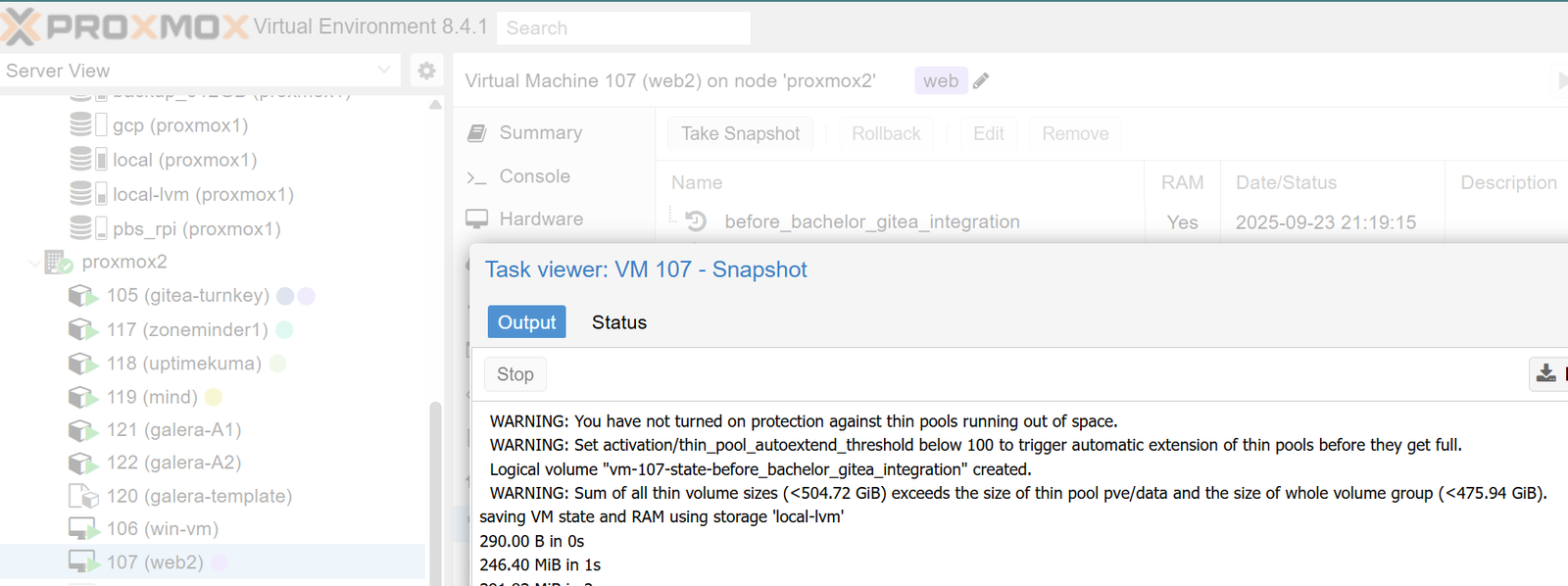
- Firstly, take a snapshot of your other web server where you will be making changes (in this case,
web2) just in case, since we will need to flush the website data out.
- If you already have your load balancer pointing to the instance, remove it (such as in the back-end setting of HAProxy), so that traffic will not be sent there till we are done.
- SSH into your other web server, we will call it web2.
- Move the local files away, such as to the
/tmppath + proceed with permission changes.

# Move  web files away on web2 (if you cloned the VM before, for example)
sudo mv /var/www/html/your-website /tmp/
mkdir /var/www/html/your-website

# Add permissions of your web server (such as for apache or nginx)
cd /var/www/html/your-website
sudo usermod -a -G www-data your_user
# sudo usermod -a -G www-data jan

# Set ownership on the empty directory first
sudo chown your_ssh_user:www-data /var/www/html/your-website
# sudo chown jan:www-data /var/www/html/my-website- Then proceed with installing git and cloning the repo into the newly created folder:
# Install git if not done already
sudo apt install git -y

# Enter the folder you created earlier and clone the repo
cd your-website

# Clone it to the same folder (hence the dot - otherwise a sub-folder is created!)
git clone https://gitea.bachelor-tech.com/your-gitea-user/my-wordpress-site.git .- Now both web servers have the exact same codebase, are tracking the same Gitea repository and have the correct permissions. That is apart from what was excluded via the
.gitignorefile! - In case you already had data in the web server that you moved to a
/tmpfolder, you will need to move it back. For example:
sudo mv /tmp/your-website/wp-config.php /var/www/html/your-website
sudo mv /tmp/your-website/wp-content/uploads /var/www/html/your-website/wp-content/.- Change file permissions
# Ensure you are in your web hosting directory:
cd /var/www/html/your-website

# Set file permissions - wait for a bit for each to complete (based on file amount)
sudo chown your_ssh_user:www-data /var/www/html/your-website
sudo find . -type d -exec chmod 775 {} \;
sudo find . -type f -exec chmod 664 {} \;
sudo find . -type d -exec chmod g+s {} \;- In case your web server has not yet served traffic for this particular website, you will need to add it. For example, on nginx, depending on your set up, you would need to update the nginx's configuration folder (such as by copying a previous website + modifying it) and then restarting the nginx service.
# Copy an existing config from another virtual
sudo cp /etc/nginx/conf.d/existing-website /etc/nginx/conf.d/new-website
# sudo cp /etc/nginx/conf.d/bachelor-tech.com.conf /etc/nginx/conf.d/learn-english.uk.conf

# Replace domain name with the new one
sudo sed -i 's/old-website.com/new-website.com/g' /etc/nginx/conf.d/existing-website
# sudo sed -i 's/bachelor-tech.com/learn-english.uk/g' /etc/nginx/conf.d/learn-english.uk.conf

# Check the config for syntax & reload it:
sudo nginx -t
sudo systemctl reload nginx- To make the website work, you may need to manually copy in the
wp-config.phpfile and sync thewp-content/uploadsfolder, such as by usingsyncthingorlsyncd. Check out my other guide for that. - Once ready, add the web server in your load balancer configuration, such as at the back-end pool in HAProxy.
Part 5: Automate a sync to other nodes with webhook
- Imagine a situation where you test an update of plugins / WP core / the theme on one web server and then you push it to Gitea. Would it not be nice if the updated files got automatically pushed into your other web servers?
- The simplest way - create a crontab that regularly pulls from Gitea. Something like this:
crontab -e
*/10 * * * * cd /var/www/html/your-site-directory && git pull origin main > /dev/null 2>&1- As you can imagine, there would be lots of empty pulls every 10 minutes (or whatever value you go for). This creates unnecessary traffic. In addition, unless you expand on it with your own script, there is no error handling or reporting when something goes wrong. If you do not have many websites and want to keep it simple, it can be a good solution for you.
- The harder but more professional way - using webhook and a PHP script. A webhook is triggered whenever your repo receives a commit in the desired branch (such as
main). That is what we will be focusing on in this section below. - WARNING: This is a long and tedious set up, only go for it if a manual method is not feasible due to having more contributors, etc.
- For the webhook to work, we need to be able to distinguish between our hosts - we cannot simply set the webhook to trigger bachelor-tech.com/gitea-pull.php, since our load balancer (such as HAProxy) will forward the traffic to either web host.
DNS & Certs
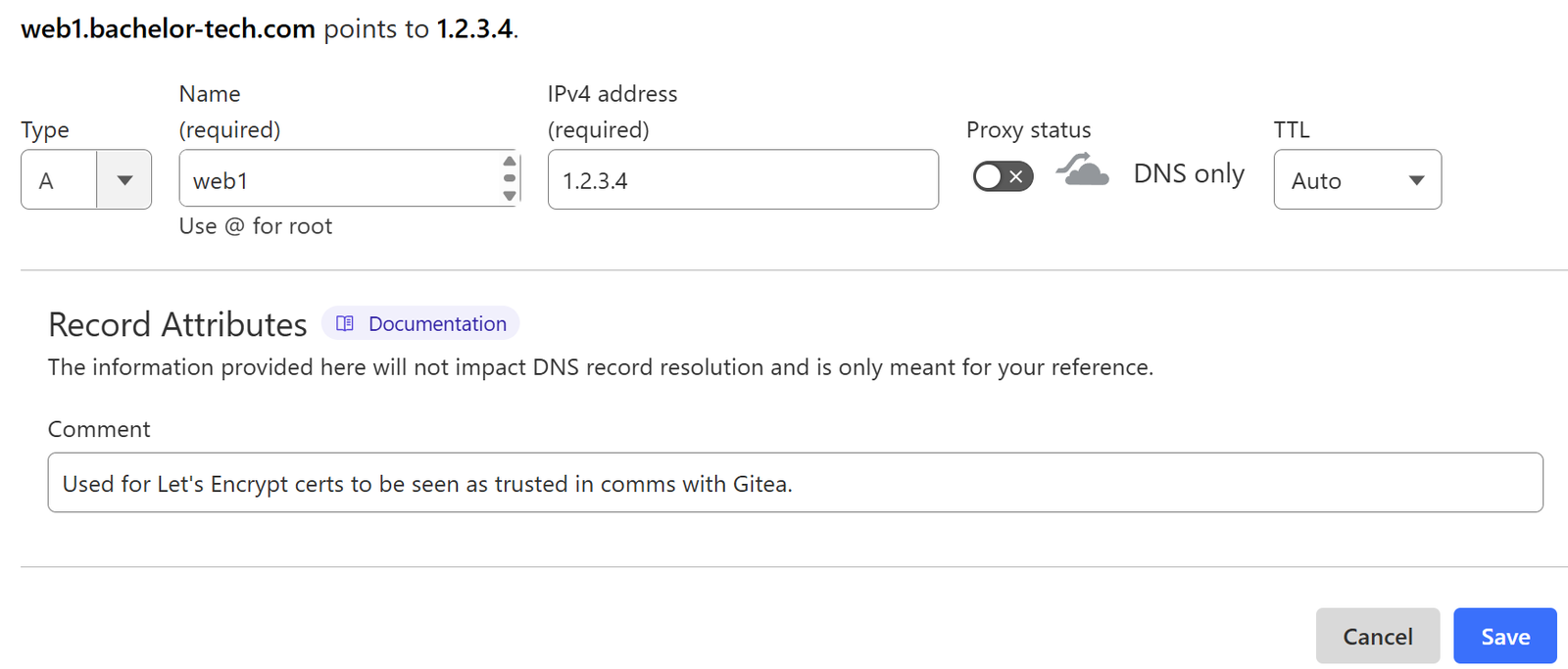
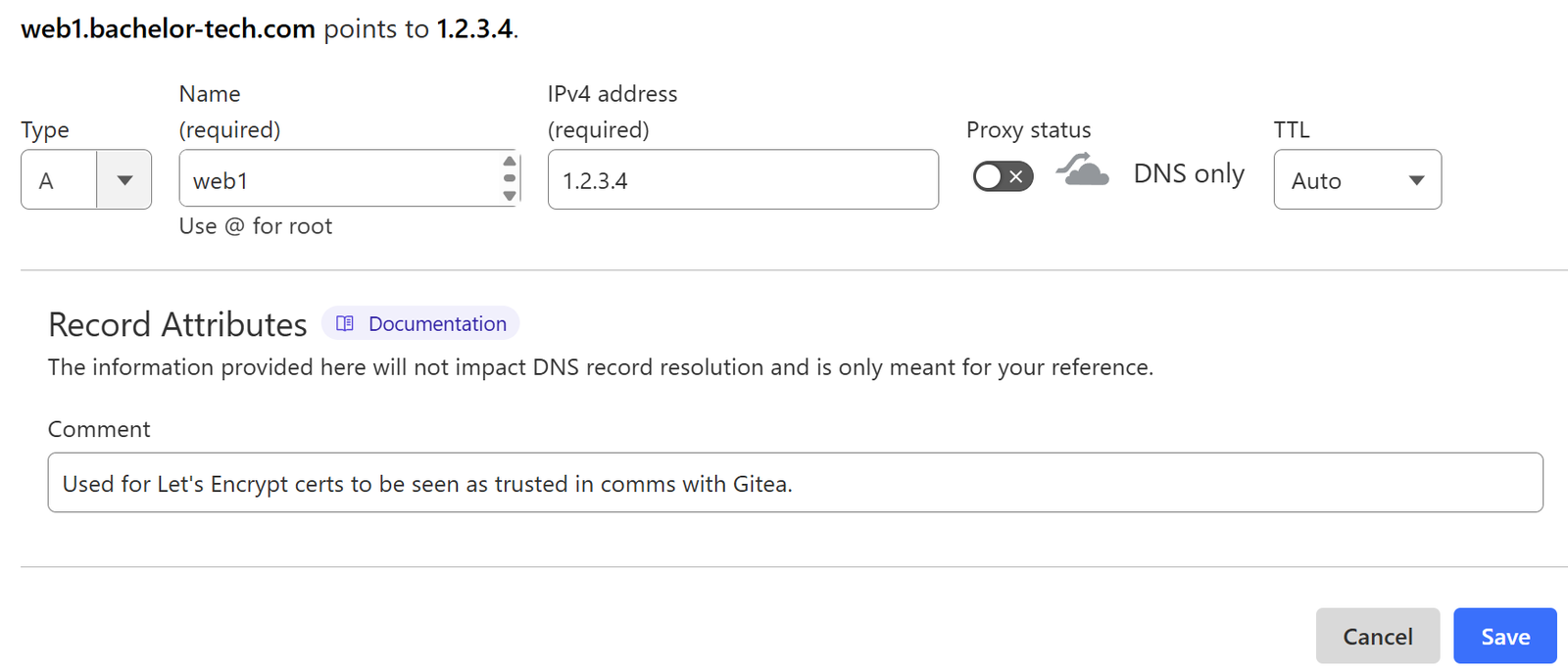
- Create DNS records for each web host VM that will be used for Let's Encrypt certificates. For example on CloudFlare:
- Find your domain → DNS → Records. Click on the '+' button to add a new one.
- Add a new A record that uses the host name (such as web1) and points to your static IP. Do not use proxying, as we need it to resolve to that IP.
- Alternatively, if you already have a dynamically updated hostname for your location, you can use a CNAME and point it to that name to keep it up to date. Again, do not proxy it.
- It is always good to use a description for why you have the record in there, such as 'Used for Let's Encrypt certs to be seen as trusted in comms with Gitea.'
- Repeat the DNS record creation step for each of your web hosts.
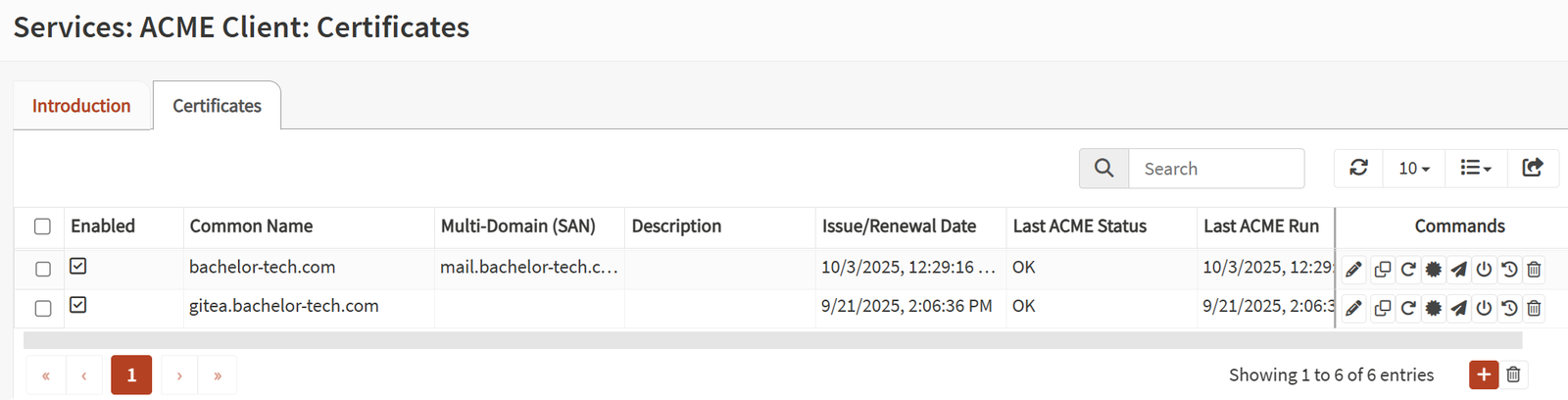
- Assuming that you use HAProxy on OPNSense and have already set up your domain on it using the ACME plugin, you can add the additional hosts to the subject alternative names (SANs). Just in case you have not had to do it before, let's go through it from the start:
- In OPNSense, go to 'Services' → 'ACME Client' → 'Accounts' and click on the '+' sign.
- Provide the top-level domain (such as bachelor-tech.com) and your email address.

- In case you do not have it done yet, set up a challenge type in the next sub-section. The DNS method is preferred. You can create your API key from CloudFlare under your profile section → 'API Tokens'. Read-only is sufficient, either for just the domain you need or for all of them, in case you will be adding more in the future.


- Now you can create the certs. While still in the ACME Client → Certificates section, click on the '+' button to create a new one (or edit your existing one to add the SANs).

Virtual IP & Internal DNS (Unbound)
- The next step is to correctly route the traffic for
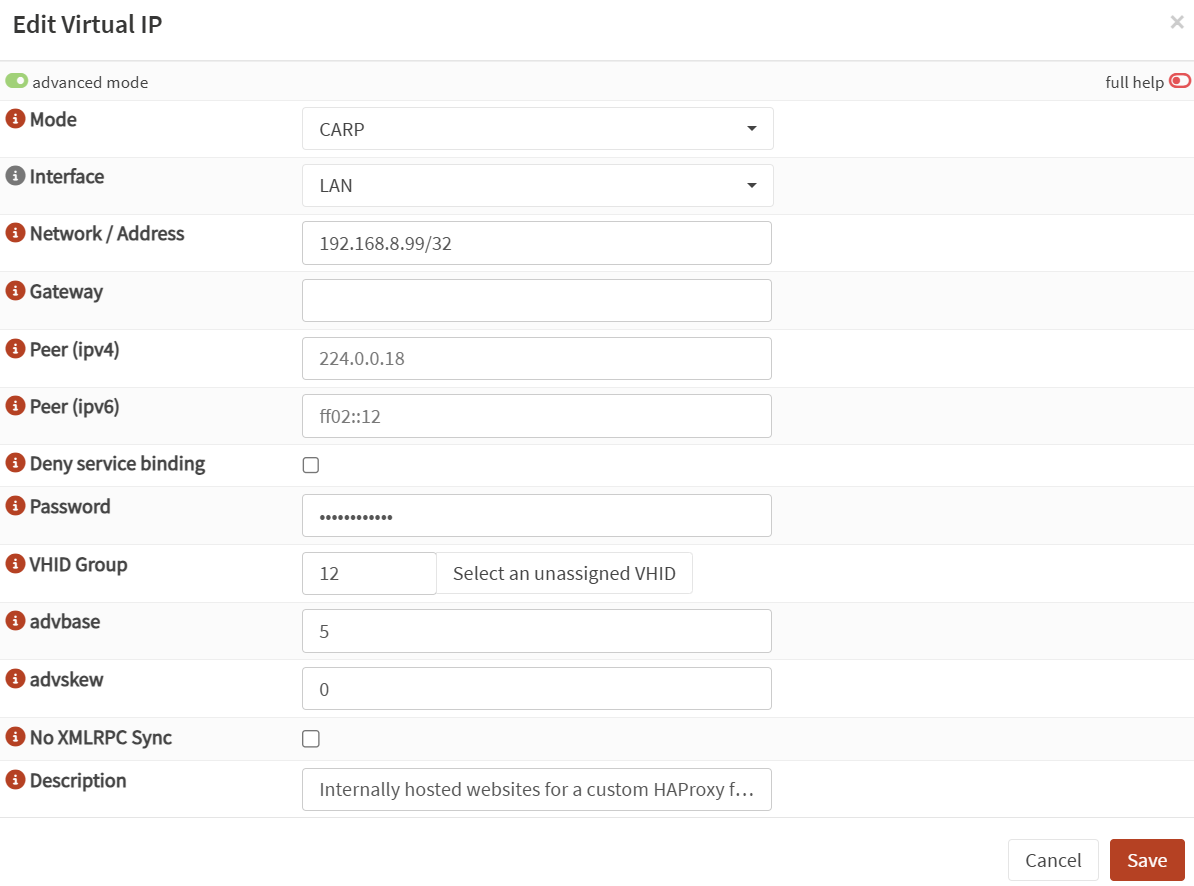
web1.yourdomain.tldto HAProxy. We do not want to interfere with the regular HTTPS traffic on the general HTTPS front-end that you use for outside traffic. It would be good to create a virtual IP interface that we can then use on HAProxy.- On OPNSense, go to Interfaces → Virtual IPs → Settings and click on the '+' button.
- Now if you are just operating on one OPNSense box, this can be an 'IP Alias' + an IP on your LAN with a /32 at the end.
- In case you have more than one OPNSense box (which makes sense for high availability set ups), you will need to choose 'CARP' as the mode, then 'LAN' as interface. Give it a password that will be shared between OPNSense instances, together with the same VHID group and advbase number. Enable the 'advanced mode' and for your primary node, set it to 0. For 'adskew', add 0 for your primary zone. On the other (backup) ones, add higher values, such as 30 and 60 (CARP is beyond the scope of this tutorial).
- The next thing on the list is to add local routing to this Virtual IP for the
web1.yourdomain.tldhost. Assuming you are already using Unbound on OPNsense (or another similar service), you will need to set it up. - On OPNSense, go to Services → Unbound → General. Make sure the service is 'on' and listening on ideally all interfaces, or at least the LAN that we need for this purpose.
- Then in the 'Override' section, add a new host:
- Host: web1 (or the hostname of your VM)
- Domain: the domain it is running on
- IP: the virtual IP
- TTL: up to you, 360 (5 minutes) is recommended

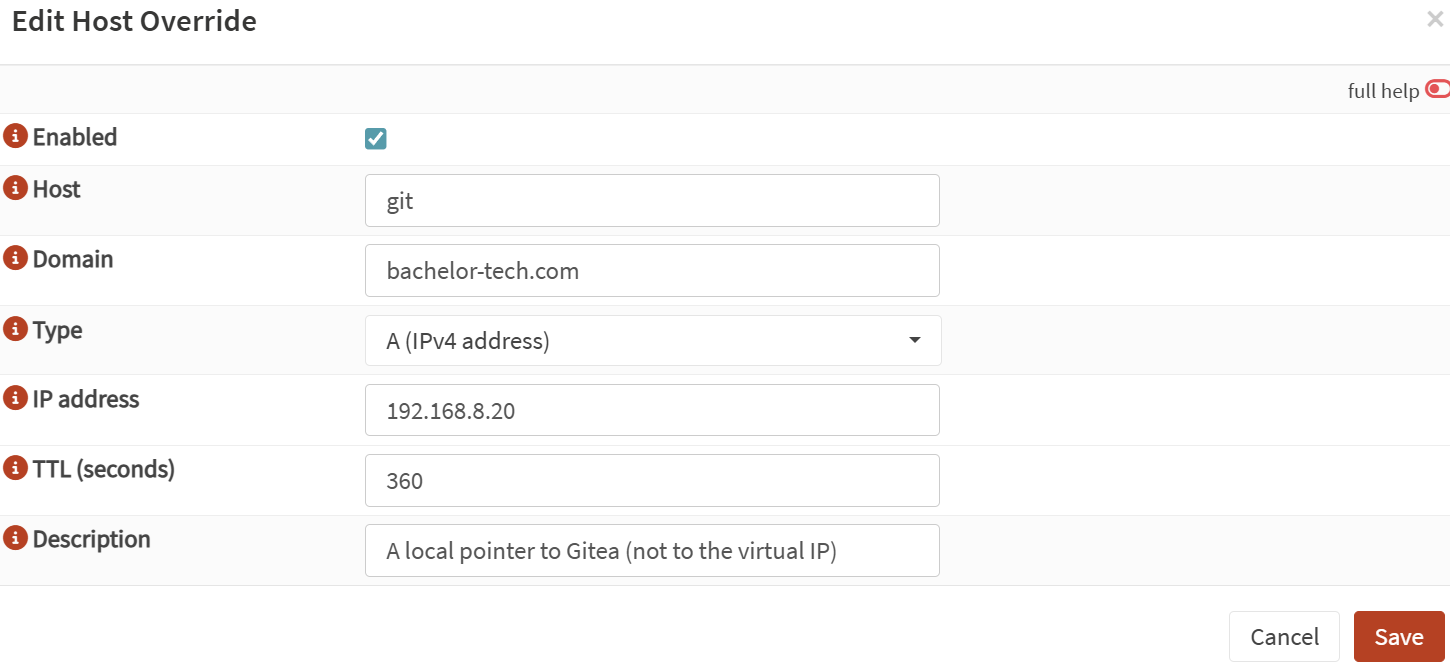
- While you are in this section, please also create a local override for the Gitea server, which will be used for fetching from origin. You can call it 'git' and it should point to the actual host's IP:
HAProxy
- Now when we have the certs and the virtual IPs defined, we can use them in HAProxy (or in another reverse proxy of your choice). Go to 'Services' → 'HAProxy' → 'Settings'. Then click on the 'Virtual Services' and open the 'Backend Pools'. Add your VM into it.
- Keep in mind that for naming, it is best to not use dots - use _ or - instead. This applies to the other sections in HAProxy that we explore below.

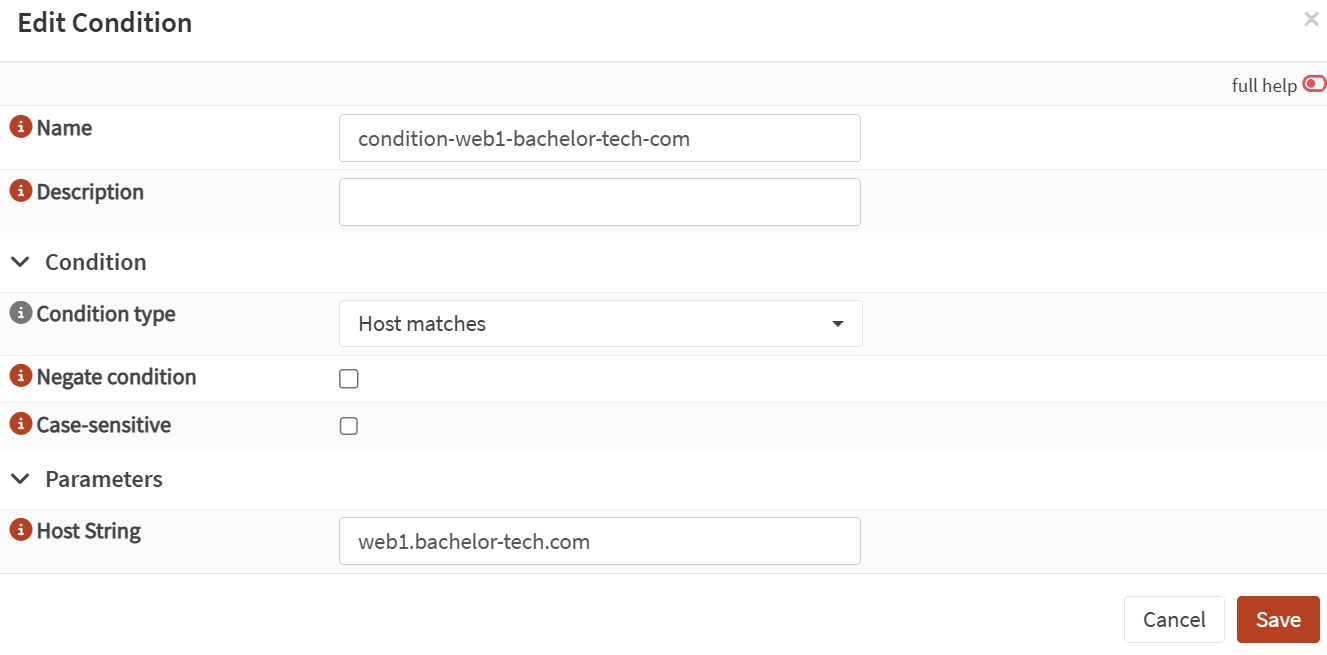
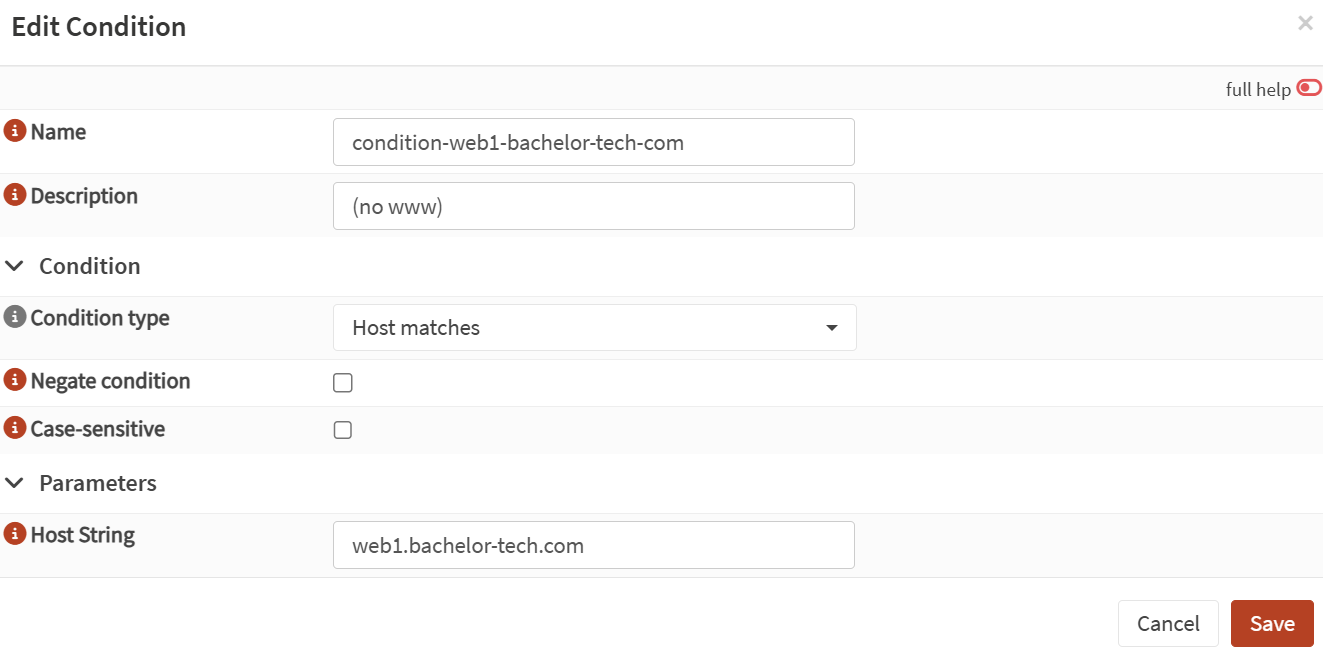
- Then go to the 'Rules & Checks' section → Conditions and create a new one:
- Condition type: Host Matches
- Host string: your subdomain + second level domain + TLD, e.g. web1.bachelor-tech.com.
-
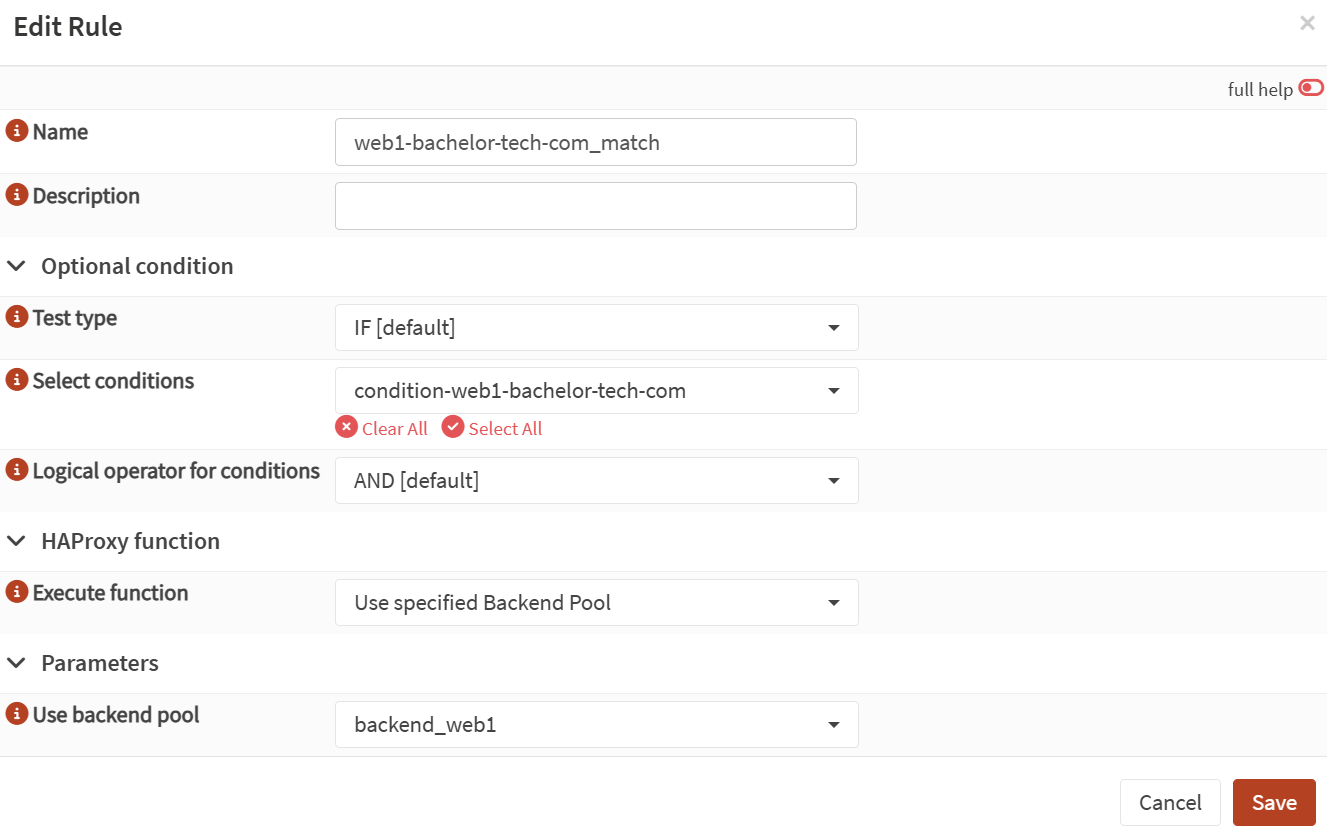
Similarly, in the 'Rules & Checks' section, go to 'Rules' and create a new rule.
-
Test type: IF
-
Select conditions: your previously created one
-
Execute function: Use specified Backend Pool
-
Use backend pool: your previously created pool, such as backend_web1
- Finally, we can get to the front-end configuration of HAProxy. In the 'Virtual Services', go to 'Public Services'.
- Make sure that the 'Listen Address' field is set to the virtual IP you set up earlier + the port 443 (HTTPS).
- Tick the box for SSL offloading.
- Certificates: add your recently created cert in the 'SSL Offloading' section.
- Scroll down to 'Rules' and add your rule into it.
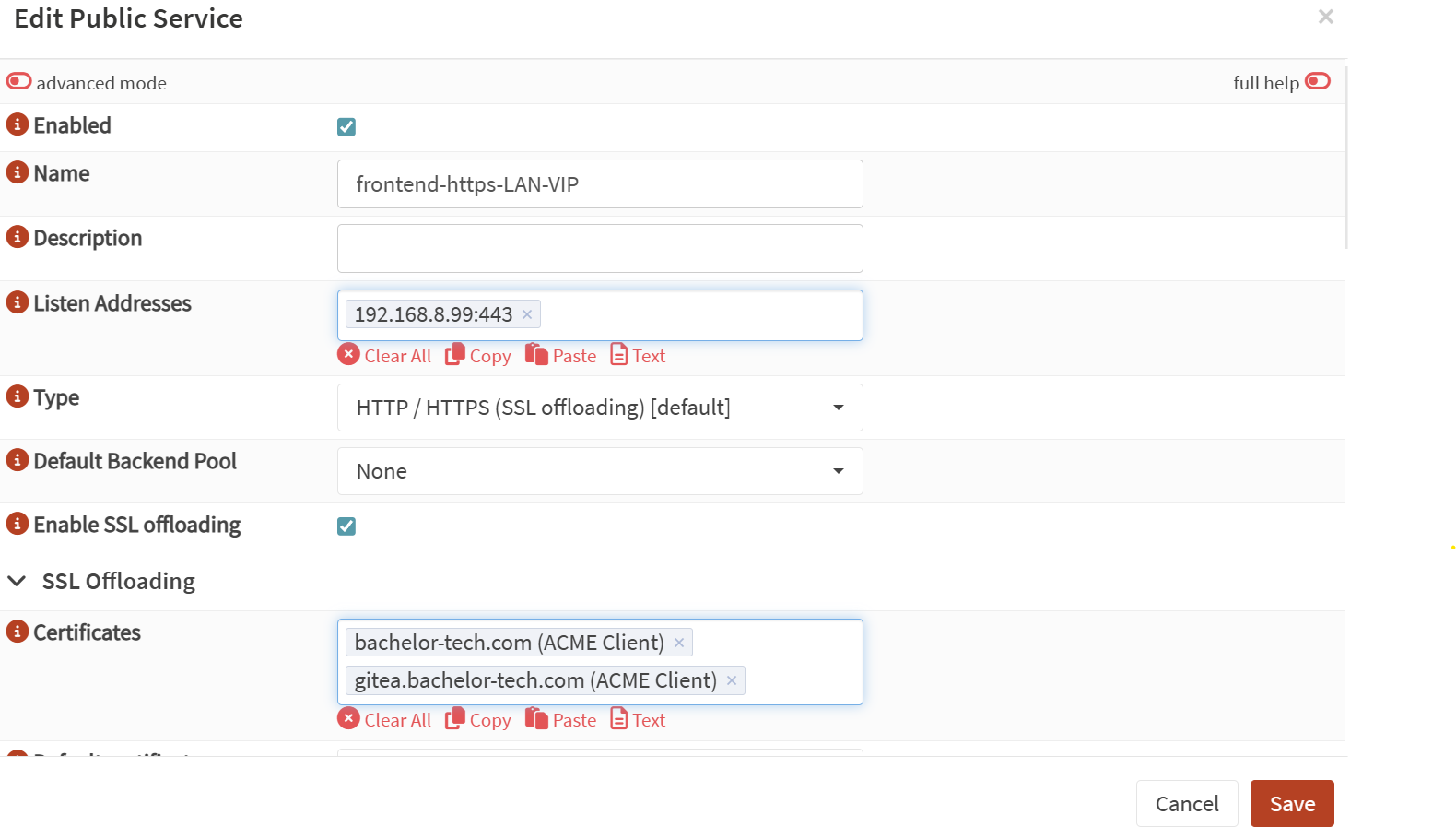
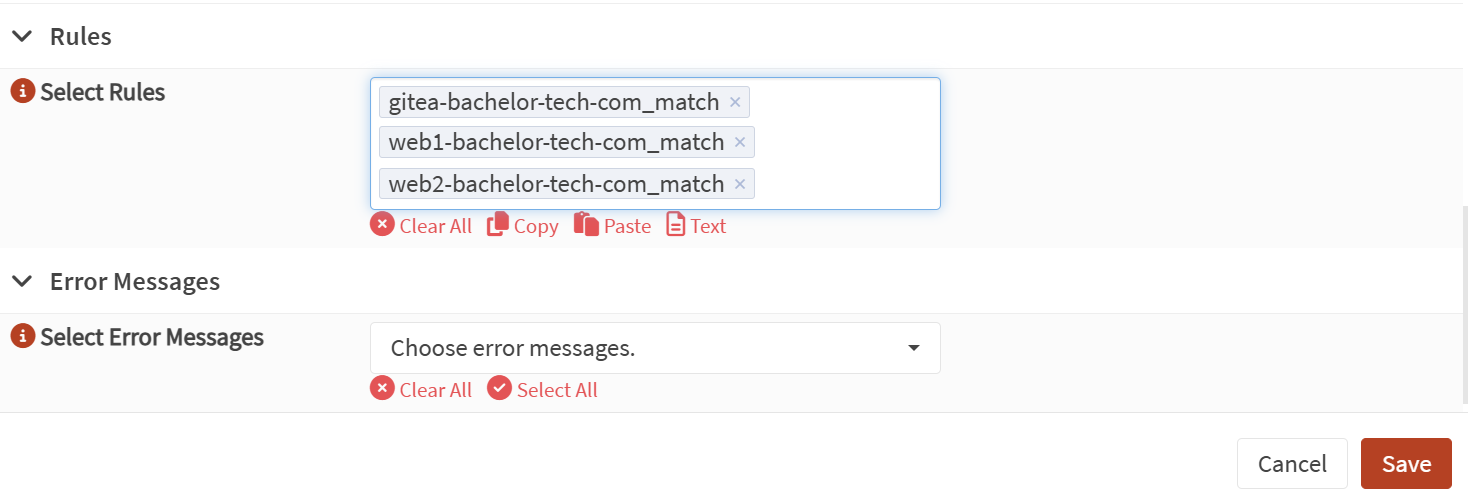
- Once done, at the bottom, click on the 'Test syntax' button and if all is good, click on the 'Apply' button. In case you encounter issues, read the error and correct it in the appropriate section. You can also post it in the comments if you get stuck.
- To make that subdomain able to reach the VM and get associated with the correct website, we will also need to make the web server aware. On nginx (and it is very similar on apache), this would be done in the respective configuration file. For example:
# On Web1 VM:
sudo nano /etc/nginx/conf.d/bachelor-tech.com.conf

# Change:
server_name bachelor-tech.com;
# to
server_name bachelor-tech.com web1.bachelor-tech.com;
# Save and exit the text editor

# Reload nginx:
sudo systemctl reload nginx
Troubleshooting
- If you want to verify the cert offloading works correctly, simply remove the rule on the public services front-end for the particular VM and then try reaching the full URL. You will still be able to inspect which cert has loaded in the browser.
- For more information about the SSL cert, you can SSH into your OPNSense and run the following command:
openssl s_client -connect 192.168.8.99:443 -servername your.domain.tld. - If you are struggling, think of the chain of events that take place - (a) local DNS resolution = Unbound, (b) Certificate processing and renewal (ACME), (c) Certificate off-loading and assignment to the physical server based on the right back-end and the defined rule (HAProxy), (d) hitting the actual web server (e.g. nginx).
- If you have not set up HAProxy before to reach your website, remember to add the required firewall rules to pass HTTPS traffic from WAN to 'This Firewall'. For the purpose of reaching your web server on the LAN later, however, it is not necessary.
Webhook & web server script
- Now we can finally create that webhook in Gitea.
- Go to your repository in Gitea.
- Click on 'Settings' → 'Webhooks'. You are therefore creating the webhook within that repo, not as a global one.
- Click on the 'Add Webhook' button and choose 'Gitea'.
- For Target URL, enter the URL to your script on the server (e.g.,
https://web1.bachelor-tech.com/gitea-pull.php). - HTTP Method:
POST - Trigger On: Select 'Push Events'.
- Branch filter:
main - Secret: Create some long password that will also be used in the script as a
$secretvariable in a PHP script in the next step. This provides basic security on the endpoint. - Click on the 'Add Webhook'.
- On each web server VM, let's create a pull script that we can trigger when an update is pushed to gitea for the desired repo.
# Create the file with a user that the web server has access to or change ownership afterwards.
nano /var/html/www/your-website-folder/gitea-pull.php

<?php

// VARIABLE DEFINITIONS
// Secret Key (must match the one in Gitea)
$secret = 'your-long-random-webhook-secret'; // Make sure this matches your Gitea secret
// Repo path
$repo_path = '/var/www/html/bachelor-tech.com';
// Log file
$log_file = '/var/log/gitea-deploy.log'; // Make sure this file is writable by www-data
// Define SSH key location
$ssh_key_path = '/var/www/.ssh/id_ed25519'; // Ensure that www-data can reach it

// REST OF THE SCRIPT
$date_today = date('[Y-m-d H:i:s]');
file_put_contents($log_file, '-----------------\nPull initiated on ' . gethostname() . ' on ' . $date_today . '\n', FILE_APPEND);

// Signature Verification
$hub_signature = '';
if (isset($_SERVER['HTTP_X_HUB_SIGNATURE_256'])) {
    $hub_signature = $_SERVER['HTTP_X_HUB_SIGNATURE_256'];
} else {
    http_response_code(400); die('Security Error: GitHub-compatible signature header not found.');
}
$parts = explode('=', $hub_signature, 2);
if (count($parts) !== 2) {
    http_response_code(400); die('Security Error: Invalid signature format.');
}
list($algo, $hash) = $parts;
$payload = file_get_contents('php://input');
$payload_hash = hash_hmac($algo, $payload, $secret);
if (!hash_equals($hash, $payload_hash)) {
    http_response_code(403); die('Security Error: Signature verification failed.');
}

// Construct the SSH command
$git_ssh_command = "ssh -i {$ssh_key_path} -o IdentitiesOnly=yes -o StrictHostKeyChecking=no";

// The command to be executed
$command = "cd {$repo_path} && GIT_SSH_COMMAND='{$git_ssh_command}' git pull origin main 2>&1";

// Execute the command
$output = shell_exec($command);

// Log the output
$log_entry = date('[Y-m-d H:i:s]') . " --- \n" . $output . "\n";
file_put_contents($log_file, $log_entry, FILE_APPEND);

// Respond to Gitea
http_response_code(200);
echo "Deployment successful. See log for details.\n";
echo $output . '\n';

?>- Prepare the log file:
# Log file creation and file permissions
sudo touch /var/log/gitea-deploy.log
sudo chown www-data:www-data /var/log/gitea-deploy.log

# Change ownership of the script to www-data, so that it a
sudo chown www-data:www-data gitea-pull.php

# Add the repo into exceptions to accept data from other autors (such as www-data when you do updates).
sudo -u www-data git config --global --add safe.directory /var/www/html/bachelor-tech.com- If you were to open the URL directly in your browser, you will receive an error (also recorded in the error.log on the web server). This is because it is expecting a payload (from Gitea) that it does not find when accessed directly.
- To allow Gitea to access the hostname on the LAN, we need to add it to the allow list.
# Log into Gitea.
sudo nano /etc/gitea/app.ini

# Add a line about webhook and add any relevant subnet (perhaps only one is needed):
[webhook]
ALLOWED_HOST_LIST = 192.168.1.0/24,192.168.2.0/24

# Save an exit and restart gitea:
sudo systemctl restart gitea- Another requirement for the webhook to work is that the web server and Gitea can communicate over password-less SSH. SSH into your web server (such as
web1) and create a key. Log in as a user that has permissions to access the hosted files.
# Create a key
ssh-keygen -t ed25519 -C "webhook-gitea@web1"

# Accept the default path for now.
# Do not create a passphrase (press enter twice).

# Create a folder and set permissions to be reachable by www-data (or your PHP-FPM user):
sudo mkdir /var/www/.ssh
sudo mv /home/$USER/.ssh/id_ed25519 /var/www/.ssh
sudo chown www-data:www-data /var/www/.ssh

# Print out the public side of the key:
cat /home/$USER/.ssh/id_ed25519.pub- Make sure to have your repo on git:// rather than https://
cd /var/www/html/your-website

# Use the git.yourdomain.tld alias that we created earilier in Unbound.
git remote set-url origin [email protected]:user/repo.git

# git remote set-url origin [email protected]:jan/learn-english.uk.git
# git remote set-url origin [email protected]:jan/bachelor-tech.com.git

# Perform the first fetch manually to confirm the key trust
git fetch origin- In case you are not getting connected and it is just hanging, then most likely, the handshake is not even happening, meaning there is a network issue. You can CTRL+C (or Command+C) and run
ssh -v [email protected]instead. Ensure the hostname resolves to the correct local IP of Gitea, not the virtual IP on OPNSense. - Open Gitea's web UI, find your repository and go to Settings → Deploy Keys. Add a new key.
- Title: Give it a name like
web1_deploy_key. - Key: Paste the public key you copied from the server.
- Tick "Write Access". During our test later, we will want to push code from our VM server to the repo.
- Click Add Key.
- Title: Give it a name like
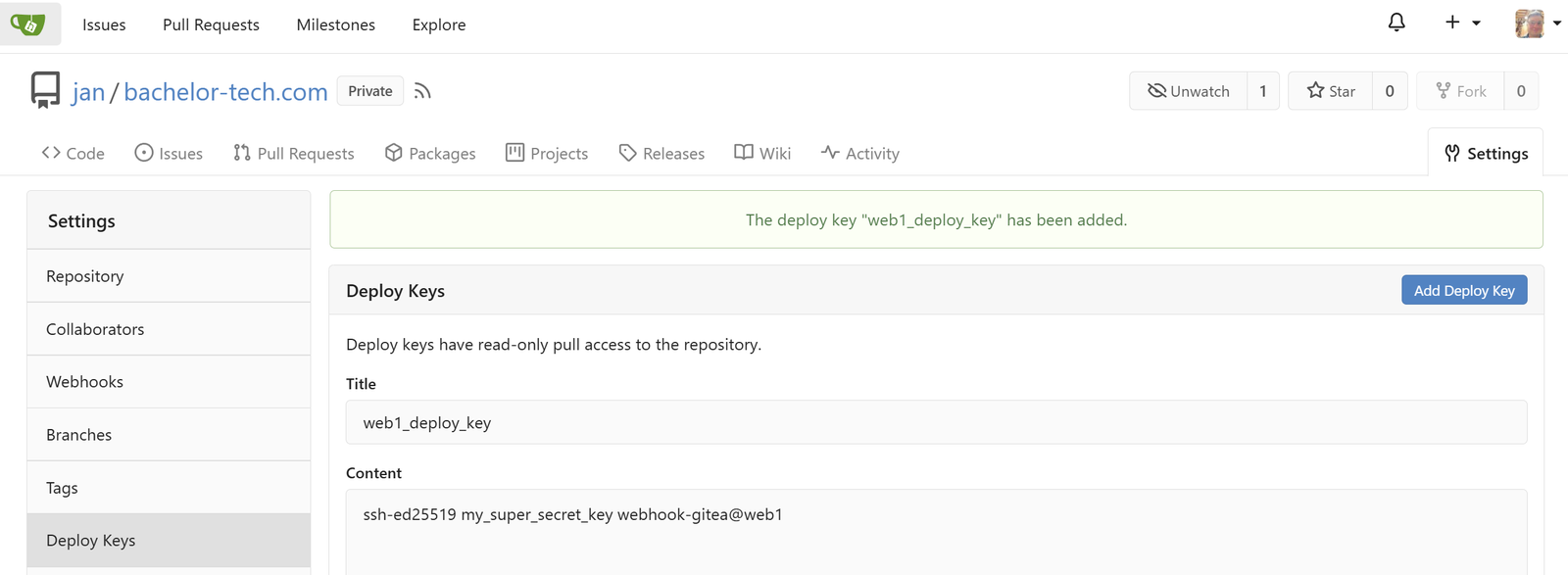
- Ensure you have added a key for each of your web server VMs.

- Finally, let's run a test from Gitea's web GUI. Locate the desired repository → Webhooks → find your webhook. Scroll down and click on a green button called 'Test Delivery'.
- If you encounter Error 0 related to '
webhook can only call allowed HTTP servers', it means the web server is not properly allow listed in Gitea's config or you forgot to restart the gitea service after you added it. - In case you get Error 500, it means that gitea successfully sent the webhook, HAProxy correctly routed the request to your web server and that our
gitea-pull.phpscript started to run, but then it crashed for some reason. Most often, this is because there is no password-less login available. Create an SSH key and add it into Gitea.
- If you encounter Error 0 related to '
Part 6: Test the workflow in real!
- Currently we have it nicely set up in theory and it would be great to see how it actually performs in practice. Let's test it on the bachelor-tech.com WordPress site!
- Firstly, we want to know which web VM we will be working with. One way of isolating a VM is to remove the others from the back-end pool in the load balancer - in our case, HAProxy. So if I want to perform the WP core / plugins updates on web1, then I will remove web2 and any other VM from the equation - on OPNSense, find the back-end pool under Services → HAProxy.
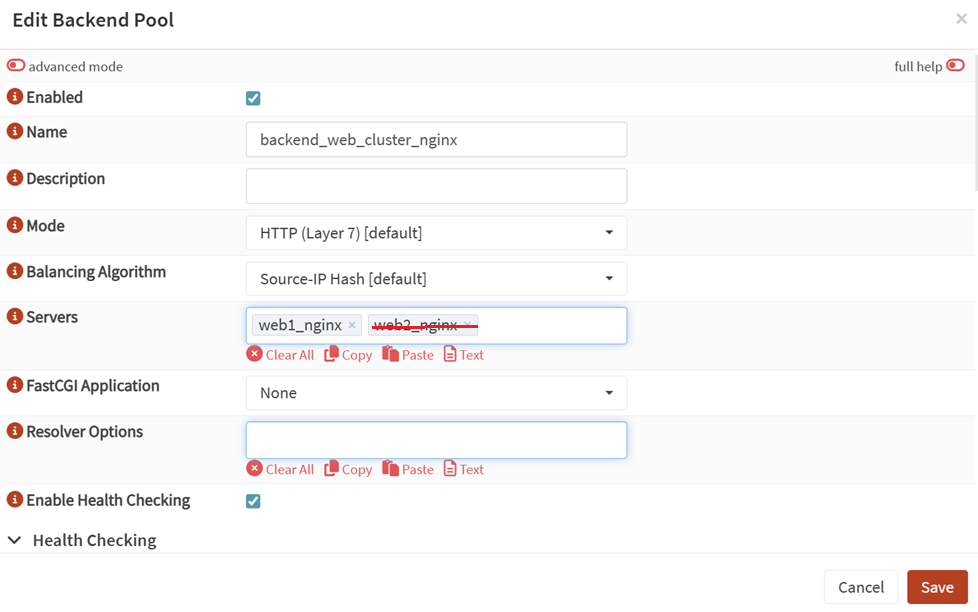
- Now if you access your website, you will know that only one VM is serving the traffic.
- Take a snapshot of both your web VMs.
- If you (like most others) use your database servers for multiple DBs, then a snapshot of the entire VM / container would not be a good idea, as a snapshot restore would revert data from other DBs as well. Instead, use a tool like
mysqldumpto export the specific database.- Log into your DB server (such as via SSH). If you are on a cluster, then any of the nodes will do.
- Identify your DB name (such as from the wp-config.php file if it is a WP site). If you struggle but can log into the DB engine, then find all the DB names from there:
mysql -u root -p
SHOW DATABASES;

# If you need to find out what users have access to the DB (not necessarily to which database):
SELECT grantee, group_concat(privilege_type) from information_schema.user_privileges group by grantee;

# Then you can enquire for a specific user
SHOW GRANTS FOR 'user'@'localhost';

# My case:
# SHOW GRANTS FOR 'bachelor_tech_com_wp_user'@'192.168.%';
- Run the following command to export the DB (if you are on a DB cluster such as MariaDB's Galera, then run it from any of the members):# SPECIFIC DB export: Use root or another user with the required privileges
mariadb-dump --user=root -p --lock-tables --extended-insert --databases your_database_name > /var/backups/your_database_name.sql
# ALL DBs export (into one file, though).
mariadb-dump --user=root -p --lock-tables --extended-insert --all-databases > /var/backups/dbs_alldatabases.sql
# My case for each
mariadb-dump --user=root -p --lock-tables --extended-insert --databases bachelor_tech_com_db > /var/backups/bachelor_tech_com_db.sql
mariadb-dump --user=root -p --lock-tables --extended-insert --databases learn_english_db > /var/backups/learn_english_db.sql
- Now you can perform all the updates you need! Usually the fastest way is to connect via SSH and perform the following steps using
wp-cli- if you do not have it, see the install steps. Then proceed as follows:
# Go into the webhosting folder to update
cd /var/www/html/your-website

# Firstly update the CLI, if needed
wp cli check-update

# Check WP version
wp core version

# Update WP core
wp core update

# Update all plugins
wp plugin update --all

# Update themes
wp theme update -all
- Once you are happy with the state of things, let's push the changes to Gitea!
git add .

# NOTE: If you get an error related to a php file in wp-content/wflogs,
# then it means that that folder was not listed in .gitignore before the data were
# committed. So make sure the path is added into .gitignore if not done already and
# then run the following:
# Confirm it was there before
# git ls-files | grep "wp-content/wflogs"
# Flush it away
# git rm --cached -r wp-content/wflogs/

git commit -m "Updated the theme, plugins and WP core to 6.8.3."

# In case you get an error related to 'web1_deploy_key is not authorized to write to',
# the perms need to be fixed.

git push origin main- Assuming you had a webhook set up for web2, it should trigger a 'git pull' in there as per our script we set up earlier.

- One way of verifying it is by connecting to web2 and checking if the data has been updating, such as by going to the folder and running
wp core versionor checking if a plugin version is up to date.- Alternatively, on your load balancer, you can switch to the other VM and browse the website.
If the automatic pull did not work..
- Issue 1: If you do not see any updates, then even if the webhook script exited with 200 (successful), then git pull likely failed anyway. The 200 is actually a confirmation that the script was executed successfully, yet the output of it is another issue. If you encounter this issue, connect via SSH and do the following:
cd /var/www/html/your-website
git status- If you see errors related to 'Changes not staged for commit' or 'Untracked files' and you just want to overwrite it, then run the following:
# This tells Git to discard all local changes and reset the files to a specific state.
git reset --hard origin/main

# Remove untracked files recursively as a dry run
git clean -n -d

# Once you are comfortable with it, clean it
git clean -f -d-
Warning: This will flush away files that are not in Gitea, such as your
wp-config.phpfile as well as anything in thewp-content/uploadsfolder! -
Now you can either run
git pullmanually or make another little change onweb1and watch the magic. -
Issue 2: If the
git statuscommand does not show any differences even though you know there are some on Gitea, then most likely, the SSH key is not reachable for the user running the command. Make sure it is accessible, especially to whoever is running the PHP FPM module, which is typicallywww-data. That is why it is good to have it under/var/www/.sshrather than your own home directory. -
Issue 3: The .log file reveals the following error: "fatal: detected dubious ownership in repository at '/var/www/your-path'.
- This is because we are trying to push code from a non-valid user on Gitea. We can override it by the following command:
- Run
sudo -u www-data git config --global --add safe.directory /var/www/html/your-website - You will need to run this on all your web server VMs.
- Then try changing something small, committing it and pushing it again.
Part 7: Further Considerations - Conclusion
- We have skipped some files and folders from being uploaded to Gitea. Specifically, these are:
- The
wp-config.phpfile - it is sensitive and should be kept in a more password-sensitive space such as a secure note in Bitwarden or another password manager. - The
wp-content/uploadsfolder - this one changes frequently and we want a more dynamic service to sync it in real time between nodes. Check out my guide on Syncthing to handle this one.
- The
Re-configure syncthing in a nested folder on your other web server(s)
- Just in case you previously configured the
/wp-content/uploadsfolder to be synced in some other way (such as via lsyncd or syncthing), you will need to reconfigure it. In this case, we will check how to go about it with syncthing. - Let's assume you had it syncing and now it is broken - web1 has the files and web2 does not. If this is your situation, please head to THIS LINK to remedy the situation.
Run a plugin update test with commits to Gitea and syncing with other nodes
- At this point we have at least two web server nodes that are synced in terms of the plugin, theme and WordPress core versions.
Enjoying this tutorial?
This site is a non-profit project. If it saved you some time, you can support it by getting Jan some coffee.
☕ Buy me a coffee
Comments