Backup Notion DB to Gitea using Python
August 10, 2026
Table of Contents
Introduction
Do you use Notion a lot and are you worried about how they back up your data or what would happen if you accidentally lose it (or someone deletes it)?
Worry no further! In this tutorial, we will cover how you can automate backing up your data onto your own self-hosted infrastructure using a Python script. We will use Gitea due to its versioning capabilities (although you can use other source version control tools, self-hosted or not). So strap your seat belts and let’s dive in!
Pre-requisites
Here are the tools and requirements to make this effort happen:
- Notion (API token)
- Gitea (or similar source version control software) with an empty repo per Notion resource you want to back up.
- Optional: Anthropic API key (for more customized image naming)
- Discord webhook (optional but recommended)
- A runtime environment to run a Python script (such as a simple Fedora / Debian / Ubuntu VM or container).
Originally, I was working on creating an n8n workflow that would handle it, but as of late January 2026, due to an n8n Sandbox Escape vulnerability (CVE-2026-25049) that scored 10.0/10.0, n8n devs tightened the screws and running scripts for this purpose became impossible. What an opportunity to do some coding and get one’s hands dirty!
1. Import the Script
You can git clone the script from a Github repo. It is written in pure Python with no external dependencies. The following internal libraries are used:
The Script Explained
When the script runs, it follows the following pipeline: load configuration → query Notion → convert to markdown → commit to Git → notify. More precisely:
- On startup, the script reads the
.envfile to learn which Notion databases to back up, where to push them and which optional features (AI naming, Discord) are enabled. It also loadssync-state.json, a small local file that tracks the last sync time for every page - this is how incremental sync works. - For each configured database, the script queries the Notion API to get all pages, then compares each page's
last_edited_timeagainst what's stored in the sync state. Only pages that have changed since the last run get processed, which keeps daily runs fast.- For each changed page, the script fetches every block (paragraphs, headings, images, code blocks, tables - 30+ types) and converts them into clean markdown (this is because docs fetched from Notion API arrive in JSON). Images are downloaded, their actual format is detected from the raw bytes (because Notion's URLs often have misleading extensions), and they're base64-encoded for the Git API. Attachments like PDFs and JSON files go through the same process.
- Before committing, the script flushes any existing files in that page's
assets/andattachments/directories in the Git repo. This prevents orphaned files from piling up when images are added, removed, or renamed between syncs. - The converted markdown, images, and attachments are then committed to the Gitea repository via its API - one file at a time, each as its own commit. After each page is successfully synced, the script saves the sync state immediately, so if the process is interrupted (network failure, Ctrl+C, server restart), it picks up where it left off on the next run.
- Once all databases are processed, the script sends a summary to Discord (if configured) showing how many pages were synced, how many files were committed, and any errors that occurred - along with the hostname of the machine that ran it.
- The script exits with code
0on success or1if any errors occurred, making it easy to monitor via cron or any process supervisor.
Libraries used (for geeks)
In case you would like to know how is each imported library used:
| Library | How it's used in the script |
|---|---|
json |
Parsing API responses from Notion and Gitea (or other Git solution), reading/writing the sync-state.json file, and building request bodies for all API calls |
base64 |
Encoding downloaded images and attachments into base64 strings, which is how the Gitea API expects file content to be submitted |
ssl |
Creating a custom SSL context that accepts self-signed certificates, needed for internal Gitea/Forgejo instances without public CA certs |
re |
Cleaning and transforming strings - used in slugify() to strip special characters from page titles, and in URL extension detection |
os |
Forced process exit via os._exit(130) in the SIGINT handler, ensuring immediate termination even during blocked network I/O |
sys |
Accessing command-line arguments (sys.argv), exiting with appropriate codes (sys.exit(0) for success, 1 for errors, 130 for interrupt), and writing to stderr |
time |
Rate limiting: time.sleep(0.34) between Notion API calls (~3 req/sec) and time.sleep(0.15) between Gitea API calls to avoid overloading either service |
logging |
Structured log output with timestamps and severity levels (INFO, WARNING, ERROR), used throughout for progress tracking and error reporting |
signal |
Registering a handler for SIGINT (Ctrl+C) that forces immediate exit, bypassing Python's default behaviour of waiting for blocked I/O to complete |
socket |
socket.gethostname() retrieves the machine's hostname, included in Discord notifications so you know which server ran the backup |
urllib.request |
All HTTP communication - Notion API queries, Gitea file commits, image/attachment downloads, Discord webhook posts, and AI naming requests |
urllib.error |
Catching and handling HTTP errors (HTTPError for status codes like 403/404) and connection failures (URLError) with descriptive error messages |
urllib.parse |
URL-encoding file paths segment by segment to handle spaces and special characters in filenames (e.g. Notion to Gitea Backup.json), and extracting file extensions from URLs |
datetime |
Generating ISO timestamps for markdown front matter and commit messages, comparing page edit times against last sync times for incremental updates |
pathlib.Path |
Resolving the script's directory to locate .env and sync-state.json relative to the script rather than the working directory |
zoneinfo |
Converts the Discord notification timestamp from UTC to the user's configured timezone (e.g. Europe/Prague). Standard library from Python 3.9+ (gracefully falls back to UTC on older versions). |
Now that the theory is behind us, let's set up the individual variables.
2. Create API tokens
We will need to prepare variables. Here is a list of all the variables we will need to fill in (thank you for the summary, Claude):
| Variable | Required | Description |
|---|---|---|
NOTION_TOKEN |
Yes | Your Notion integration token |
GIT_BASE_URL |
Yes | Gitea API URL (e.g. https://gitea.example.com/api/v1) |
GIT_TOKEN |
Yes | Gitea API token with repo scope |
GIT_OWNER |
Yes | Gitea username or org that owns the repos |
AI_NAMING_ENABLED |
No | 0 to disable, 1 to enable AI image naming |
AI_API_URL |
No | Specify the full URL of the LLM (can be self-hosted as well), such as https://api.anthropic.com/v1/messages . |
AI_API_KEY |
No | Provide the API token for access to that LLM. |
AI_MODEL |
No | Specify the name of the language model, such as claude-haiku-4-5-20251001 |
DISCORD_LEVEL |
No | 0 = never, 1 = errors only, 2 = always |
DB1_NOTION_ID |
Yes | Notion database ID (32-char hex) |
DB1_GIT_REPO |
Yes | Target Gitea repository name |
DB1_LABEL |
Yes | Human-readable label for logs and Discord |
Timezone |
Yes | Provide your time zone, such as Europe/Prague or America/New_York . |
- Copy over the .env.example file into .env and start filling it in using the steps below:
cp .env.example .env
nano .env
Create Notion Integration
- Go to https://www.notion.so/my-integrations
- Click on the ‘+ New integration’ button
- Name it (e.g. ‘Gitea Backup’)
- Type: Internal
- Select your workspace and click on the ‘Create’ button.
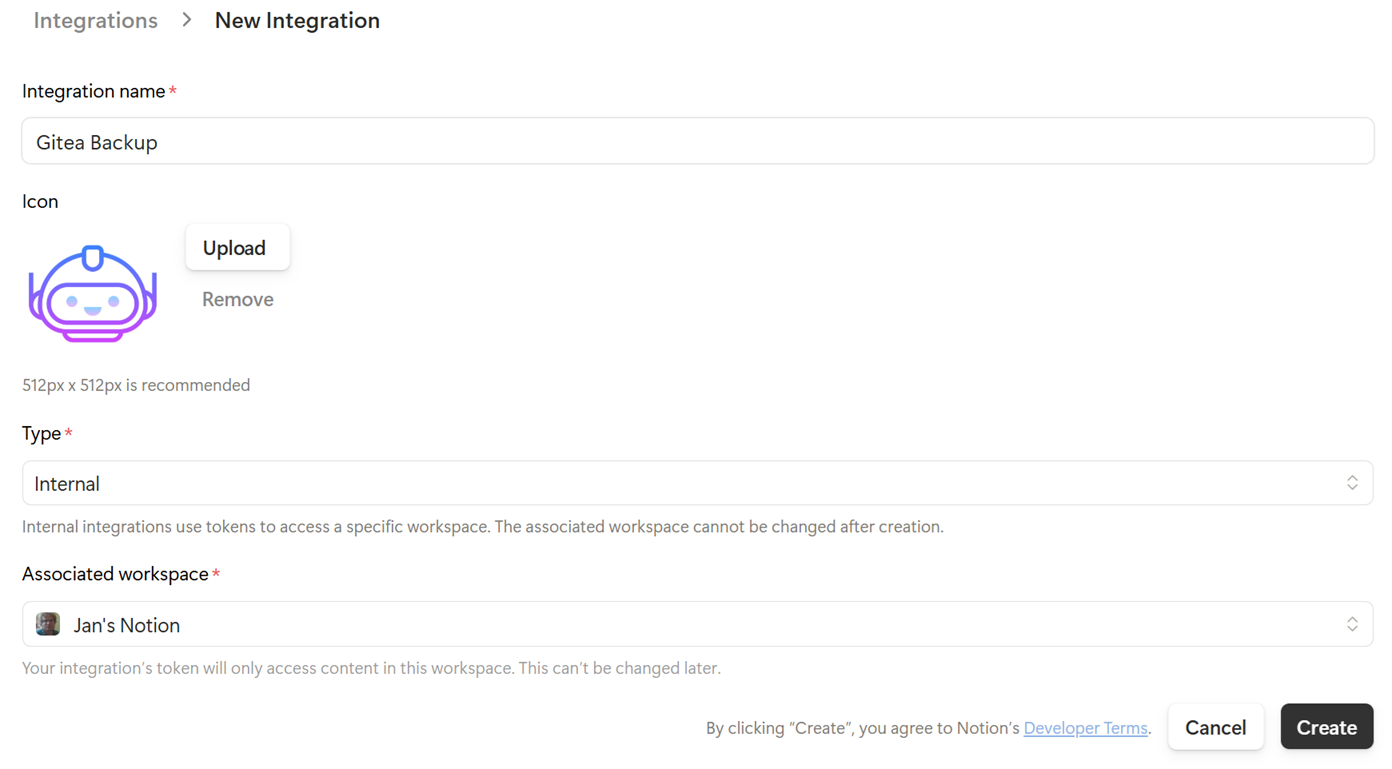
- A popup will appear - click on the ‘Configure Integration settings’ button.
- Copy the Internal Integration Secret (starts with
ntn_) - In the ‘Capabilities’ section, ensure Read content is enabled (no update / insert content permissions are needed)
- Copy the Internal Integration Secret (starts with
Share Notion Databases with Integration
- Open each database in Notion (such ’Important Documents to Keep’).
- Click the ⋯ menu (top right) → Connections → select your integration.
- Confirm it.

Get Notion Database IDs
- From each database page URL:
https://www.notion.so/yourworkspace/abc123def456...?v=...
                                    ^^^^^^^^^^^^^^^
                                  This is the database ID
Format it with dashes: abc123de-f456-... (or use as-is, the API accepts both).
- Alternatively, if you are on the free subscription within just one Workspace, you can find the DB name divided by a question mark:
https://www.notion.so/abc123def456...?v=...
                       ^^^^^^^^^^^^
                    This is the database ID
Create Discord Webhook (Optional)
- In your Discord server → channel settings → Integrations → Webhooks
- Create webhook, copy the URL

Create Gitea Repos & Token
- In Gitea, create one empty repo for each Notion resource (ensure the
mainbranch exists - if not, you can create it with a readme file). Making it ‘private’ should be an obvious setting. In my case, I created a couple:notion-important-docsnotion-it-webdev-kb
- Generate a Gitea API token (it is good to have a dedicate one for this purpose):
- Settings → Applications → Generate New Token
- Permissions needed: Expand on the
Alldropdown and findrepository- chooseRead and Write.
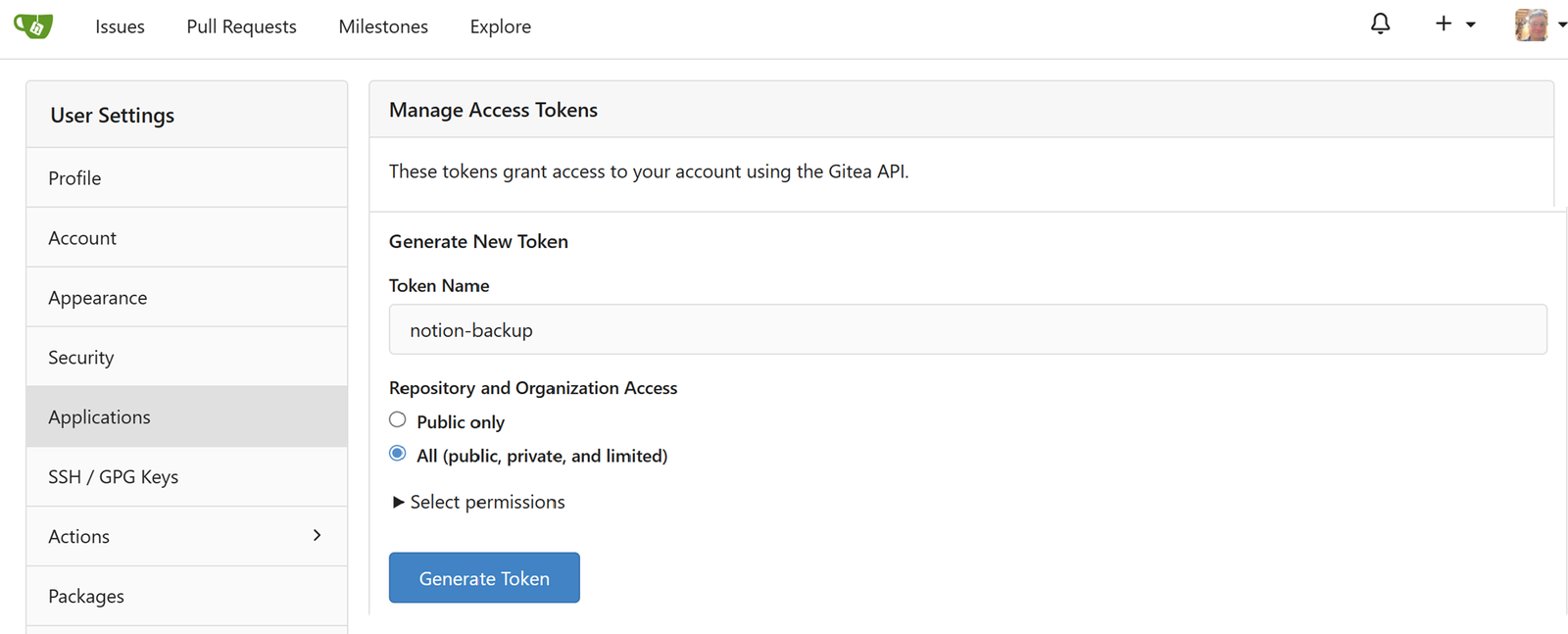
- Enter the Gitea server URL into the
.envfile including the names of the repos (without the .git extension) and then add the token as well (all of these variables are pre-created).
Create an Anthropic token
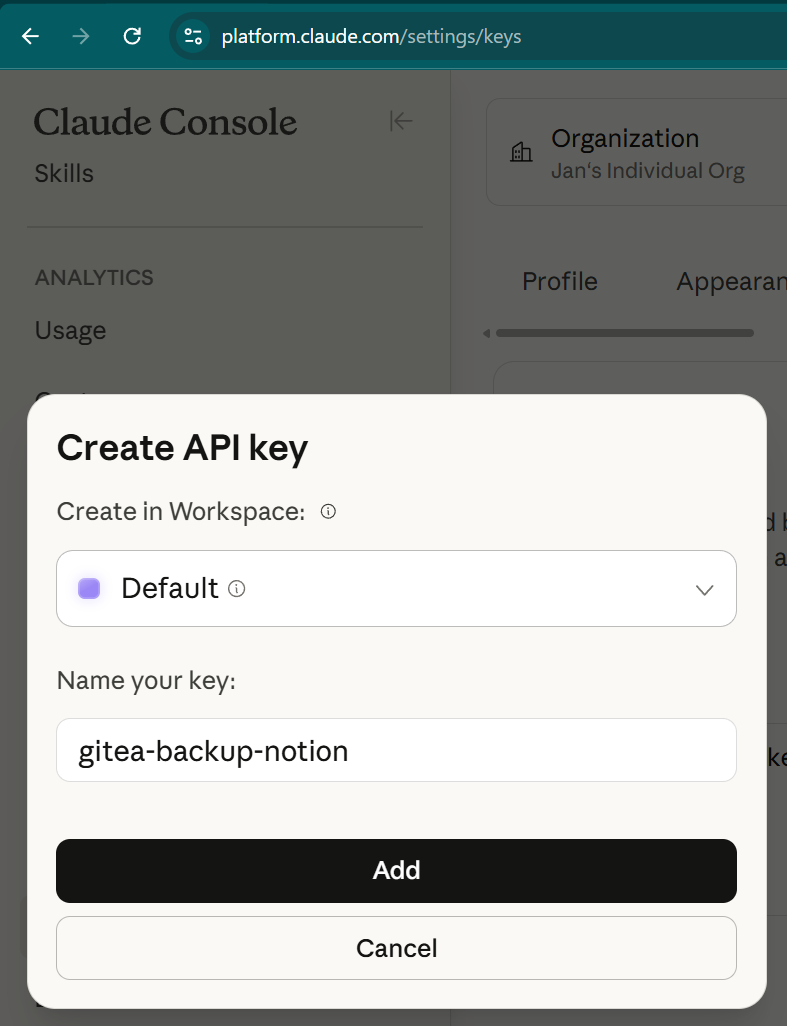
- Go to https://platform.claude.com/settings/keys and click on the ‘+ Create Key’ button.
- Fill in a memorable name and click on the ‘Add’ button to generate a new token (ideally, save it in your favorite password manager like Vaultwarden).
Having more databases to back up?
Just add db3_notionDatabaseId, db3_giteaRepo, db3_label fields in the .env file. The script auto-detects up to 100 databases.
3. Behavioral Notes
It is good to have realistic expectations as part of this script (inc. caveats related to the Notion API), namely:
- Image re-download on page edit: Any edit to a page triggers re-download of all its images. Notion's API doesn't expose block-level change tracking, and signed image URLs change on every API call, making URL-based diffing impossible. This is wasteful but unavoidable without a local block-hash cache.
- AI naming circuit breaker: If Haiku fails 5 times consecutively within a page, the script switches to fallback naming (
{number}-{chapter}.{ext}) for the rest of that page to avoid burning API credits on a persistent error. - Incremental sync: Only pages modified since last successful run are processed. The timestamp is stored in the
sync-state.jsonfile. - Rate limiting: Built-in 340ms delay between Notion API calls (~3/sec) and 150ms between Gitea commits.
- Image expiry: Notion's signed S3 URLs expire within ~1 hour. Images are downloaded during the same run and renamed to avoid the default
image1.ext,image2.extpattern. - Error handling: Individual page failures do not stop the script’s execution. Errors are collected and reported in the Discord summary.
Conversion of blocks (JSON → .MD)
The exported files from Notion come in JSON and need to be converted back to Markdown. Here are the supported Notion Block Types:
| Block Type | Markdown Output |
|---|---|
| Paragraph | Plain text |
| Heading 1/2/3 | ## / ### / #### (shifted down one level) |
| Bulleted list | - item |
| Numbered list | 1. item |
| To-do | - [x] / - [ ] |
| Code | Fenced code blocks with language |
| Image | Downloaded to assets/, linked in md |
| File / PDF | Downloaded to attachments/, linked in md |
| Table | Markdown table |
| Quote | > blockquote |
| Callout | Blockquote with emoji |
| Toggle | <details><summary> |
| Divider | --- |
| Bookmark | Link with 🔗 |
| Embed / Video | Link |
| Column layout | Flattened to sequential content |
| Equation | $$expression$$ |
| Synced block | Content rendered inline |
AI Naming Workflow
Due to the generic image naming convention, I employed Haiku in recognizing what each image displays and name it accordingly, together with the chapter name + previous paragraph.
- The script sends Haiku the image itself (base64 via vision) plus two pieces of context: the current heading and the preceding paragraph text. Haiku returns a short descriptive slug, which gets assembled into the final filename:
{sequential_number}-{chapter-slug}-{haiku-description}.{ext}- An example set from one of my previous tutorials:
1-deploy-n8n-docker-n8n-web-registration-page.png
2-connect-n8n-with-claude-anthropic-api-dashboard.png
3-connect-n8n-with-claude-credential-form.png
4-connect-n8n-with-discord-webhook-settings.png
Three safety nets built in:
- Circuit breaker: if Haiku fails 5 times in a row on a page, it stops trying and falls back to
{number}-{chapter-slug}.{ext}for remaining images. Avoids burning credits on a persistent API issue. - Response validation: if Haiku returns garbage (too short, too long, empty), it falls back gracefully.
- No API key = no problem: if you leave the Anthropic key blank, it silently uses the chapter-based fallback for everything
Cost estimate: Haiku vision is roughly $0.001-0.002 per image. Your first full sync (~1000-1500 images across all articles) would cost maybe $1-3. Weekly incremental runs would be pennies.
4. Testing & Troubleshooting Executions
- Firstly, let’s prepare a log file so that we can track it. Then we can use logrotate (or whatever you use to maintain the length of your logs) to archive them regularly.
sudo touch /var/log/notion-gitea-backup.log
chown your_username:your_username /var/log/notion-gitea-backup.log

sudo nano /etc/logrotate.d/notion-gitea-backup- Recommended standard settings for
logrotate:
/var/log/notion-gitea-backup.log {
    weekly
    rotate 4
    compress
    missingok
    notifempty
}- Once you have copied over
.env.exampleto.envand filled it in with your keys, run a dry run on your first attempt (assuming you are using a path of/opt/notion-gitea-backup):
python3 /opt/notion-gitea-backup/notion-gitea-backup.py --dry-run- Run the script fully with a log:
python3 /opt/notion-gitea-backup/notion-gitea-backup.py 2>&1 | tee /var/log/notion-gitea-backup.log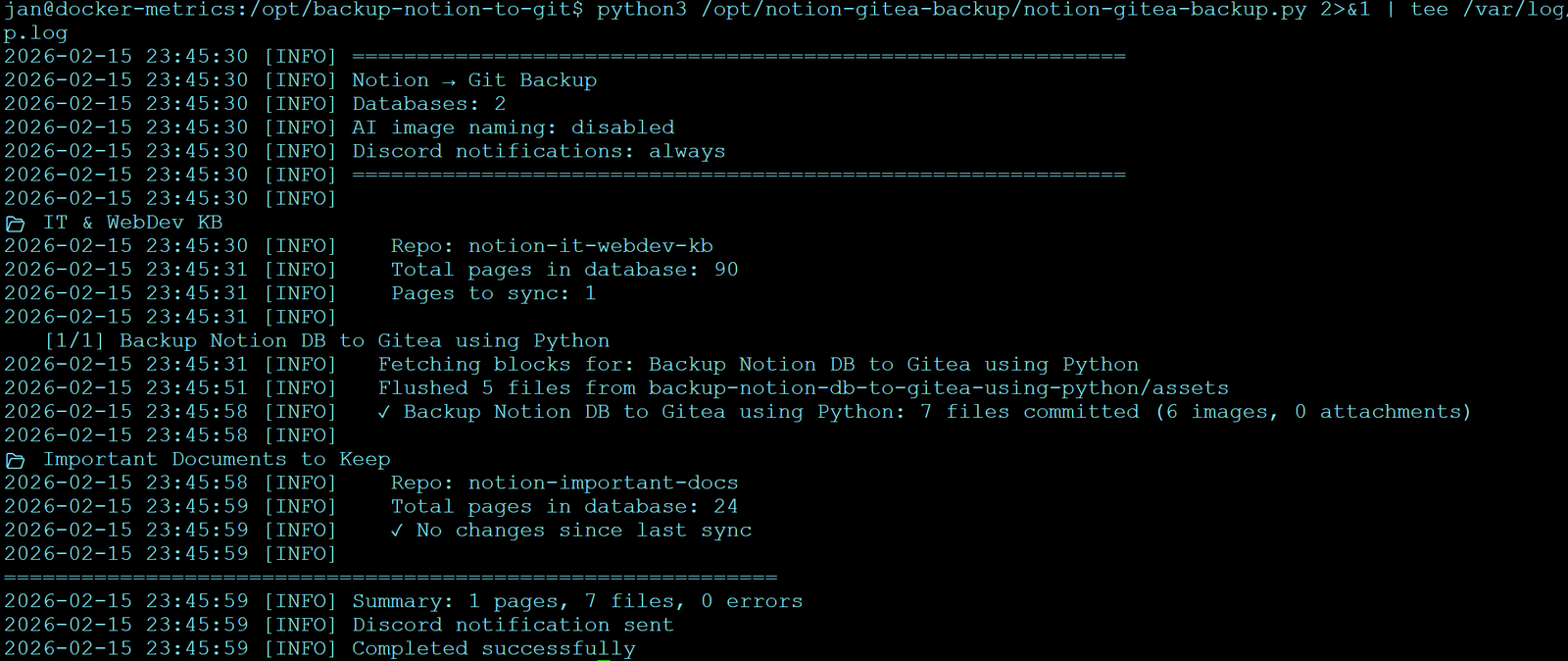
- The first run will sync ALL pages (since there's no previous timestamp).
- Check your Gitea repos and Discord for results. You can also check the log file, e.g.
vi /var/log/notion-gitea-backup.log(or use the tail command, such astail -n 50 /var/log/notion-gitea-backup.log).

Set Up a Cron Job
- Once you know it works for you, set up a cron job. On Debian/Ubuntu, this could look as follows (to run every day at 7am):
crontab -e

# Notion backup every day at 7 AM
0 7 * * * /usr/bin/python3 /opt/notion-gitea-backup/notion-gitea-backup.py >> /var/log/notion-gitea-backup.log 2>&1
Troubleshooting the Script
- "Unauthorized" from Notion API → Check your token in Config. Ensure the integration is connected to both databases (Step 2).
- "404" from Gitea API → Verify the repo names match exactly. Ensure repos are initialized (not empty).
- Images missing / broken links in markdown → Check Discord summary for download errors. Notion's temporary URLs may have expired if the workflow took too long (unlikely for 60-80 pages).
- State not persisting between runs → Ensure
sync-state.jsonis in the same directory as the script and the user running it has write permissions. - Lots of changes in your notes and you want to start afresh → run the script with the
--full-syncparameter.
I would encourage you to also take a look at the README.md file in the Github repo. Feel free to fork it and adapt it to your needs. Hopefully it helps a few people 😇
Enjoying this tutorial?
This site is a non-profit project. If it saved you some time, you can support it by getting Jan some coffee.
☕ Buy me a coffee
Comments